NPU vs GPU: What’s the Difference, and Does a Desktop PC Need an NPU?
An NPU (neural processing unit) is a low-power AI engine in some CPUs for light jobs like webcam blur. A GPU is far faster at AI but uses far more power.
Last updated: November 2026
Table of Contents
- Which one matters for you
- NPU vs GPU: the key differences
- How an NPU and a GPU work differently
- Which desktop CPUs have an NPU
- How to check if your PC has an NPU
- NPU TOPS vs GPU TOPS: why the numbers don’t compare
- What the NPU does on a Windows desktop
- Windows Studio Effects
- Copilot+ PC features
- Everything else needs app support
- What your graphics card does that the NPU can’t
- NPU vs CPU vs TPU
- NPU vs CPU
- NPU vs TPU
- On a laptop, the NPU earns its place
- Frequently Asked Questions
- Can an NPU run a local LLM?
- Does an NPU help in games?
- Can you add an NPU to a desktop PC?
- Do ChatGPT and the Copilot app use my NPU?
- Do RTX graphics cards have an NPU?
Maybe you spotted a graph called NPU in Task Manager. Maybe a store label says “AI PC” or “Copilot+ PC”, Microsoft’s name for PCs whose NPU reaches 40 TOPS, the bar for its extra Windows AI features. Either way, you want to know what this chip does next to the graphics card (the GPU, or graphics processing unit), and whether it’s worth paying for.
Both run AI math, but they’re built for opposite jobs. The NPU is small and frugal: it runs a modest AI model nonstop on very little power. The GPU is big and power-hungry: it handles large models quickly, like a local chatbot or an image generator. TOPS, the number both are sold on, means trillions of operations per second.
The first table tells you what matters for your PC. To see whether you have an NPU at all, jump to how to check.
Which one matters for you
| If you… | What matters |
|---|---|
| Game on a desktop with a graphics card | The graphics card. Games and DLSS (NVIDIA’s AI upscaling) run on the card, not on the NPU. |
| Are buying one family PC for video calls, photos and some gaming | A prebuilt with an entry-level graphics card such as an RTX 5060 and at least 16 GB of RAM. No NPU needed: Teams and Zoom blur backgrounds themselves. |
| Were told you need an NPU to be “future-proof” | Ask if it’s a Copilot+ PC: Windows’ headline AI features need a 40 TOPS NPU. If you don’t need them, a PC without an NPU won’t hold you back. |
| Want Recall, Click to Do or translated Live Captions on a desktop | A Copilot+ desktop with a Ryzen AI 400 chip, at least 16 GB of RAM and a 256 GB SSD (which CPUs). |
| Want to run a local LLM (large language model) chatbot or an image generator | The graphics card with the most VRAM (the card’s own memory) you can afford (details). |
| Want local AI in a small case | A low-profile graphics card that fits, chosen by VRAM. |
NPU vs GPU: the key differences
| NPU | GPU | |
|---|---|---|
| What it is | An AI block inside the processor. Intel calls it AI Boost, AMD calls it Ryzen AI. | Your graphics card, or the graphics built into your CPU |
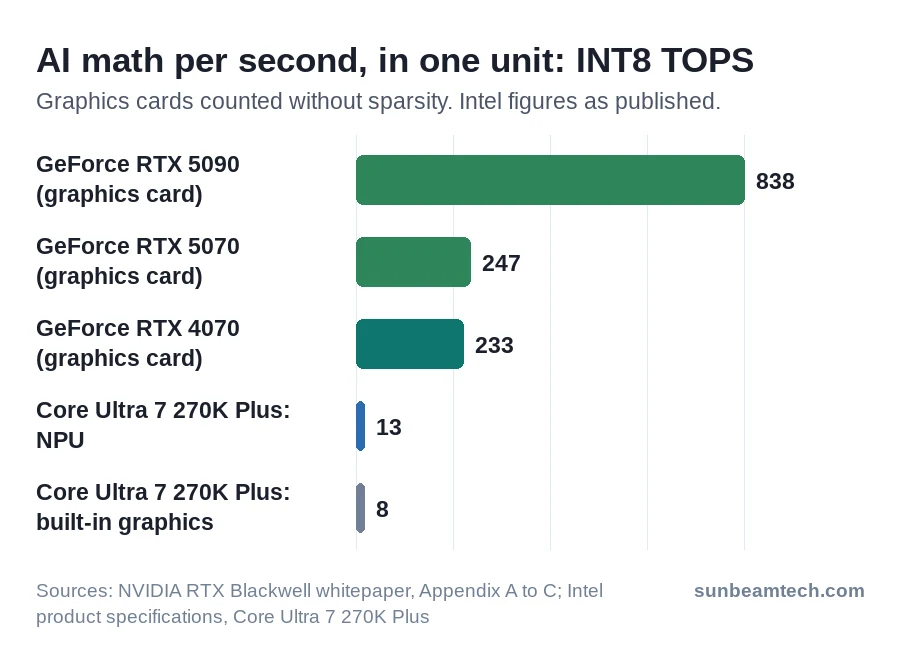
| AI speed | 13 to 50 TOPS on today’s desktop CPUs | About 233 TOPS on an RTX 4070, 838 on an RTX 5090, counted the same way (see below) |
| Power | Part of the CPU, so it shares the CPU’s power budget | 145 W on an RTX 5060, more on bigger cards |
| Memory | Shares your system RAM | Its own VRAM: 8 GB on an RTX 5060, 32 GB on an RTX 5090 |
| Best at | Small models running nonstop, such as webcam effects and Copilot+ features | Big models in bursts: local chatbots, image generation, AI video effects, DLSS |
| Software | Windows features, plus apps built for it | Local AI apps such as LM Studio, Ollama and ComfyUI |
| Upgrade | Comes with the CPU: to get one, you change the processor | Swap the card, if your case and power supply allow it |
How an NPU and a GPU work differently
Both chips do the same core math for AI: they multiply large grids of numbers and add up the results. What differs is what’s built around that math.
A GPU has thousands of cores made for graphics, plus dedicated AI units (NVIDIA calls them tensor cores), all fed by its own fast VRAM. That lets it run almost any AI model quickly, at high power. An NPU is a block of specialized multiply-and-add units with fast memory on the chip itself, built to repeat short calculations on as little energy as possible. It saves power, but it only runs AI models that software has prepared for it.
Which desktop CPUs have an NPU
Desktop chips only started getting NPUs in 2024, and plenty of current CPUs still don’t have one. Here’s where things stand in November 2026:
| CPU | NPU rating | Enough for Copilot+? |
|---|---|---|
| Intel Core Ultra 200S: Core Ultra 5 245K, Core Ultra 7 265K, Core Ultra 9 285K and the rest of the series | 13 TOPS | No |
| Intel Core Ultra 200S Plus (March 2026), such as the Core Ultra 7 270K Plus | 13 TOPS | No |
| AMD Ryzen 7 8700G and Ryzen 5 8600G | 16 TOPS | No |
| AMD Ryzen AI 400: Ryzen AI 7 450G, Ryzen AI 5 440G and 435G | Up to 50 TOPS | Yes, in a complete Copilot+ PC |
| Chips without an NPU, such as the Core i7-14700K, Ryzen 7 9800X3D and Ryzen 5 8500G | None | No |
Intel’s desktop chips, including the March 2026 refresh, stop at 13 TOPS, well short of the 40 TOPS Copilot+ needs. So an Intel desktop can carry an “AI PC” sticker without being a Copilot+ PC: “AI PC” is Intel’s looser label for chips with an NPU, Copilot+ is Microsoft’s stricter one.
AMD’s Ryzen AI 400 chips are the first desktop processors built for Copilot+ PCs. AMD sells them to PC makers such as HP and Lenovo, so you’ll find them inside complete desktops rather than as a boxed CPU on the shelf.
How to check if your PC has an NPU
On Windows 11:
- Press Ctrl+Shift+Esc to open Task Manager.
- Click Performance in the menu on the left.
- Look at the list of graphs (CPU, Memory, Disk, Ethernet or Wi-Fi, GPU). If there’s an entry called NPU (on AMD it can read NPU 0), your PC has one. Click it: the name at the top right is the NPU, for example Intel AI Boost. The CPU entry in the same list shows your processor model.
No NPU entry? Right-click Start, choose Device Manager and look for a category called Neural processors. Expand it to see the device, such as Intel(R) AI Boost.
If your CPU is in the table above but neither place shows an NPU, check the driver first. On Intel, the NPU driver comes from your motherboard’s support page or Intel’s download center. On AMD, it’s the NPU driver AMD publishes for Ryzen AI. Install it, restart, and look in Task Manager again.
NPU TOPS vs GPU TOPS: why the numbers don’t compare
Every AI chip is sold on TOPS, and every maker counts it a little differently. Three things to know before you compare two numbers:
- Number format. A chip gets through more rough calculations per second than precise ones, so the same card scores a bigger TOPS figure in a smaller number format. NVIDIA’s “AI TOPS” for the RTX 50 series use FP4 (4-bit numbers) plus sparsity, a feature that skips part of the math and counts it double. Counted that way, the RTX 5090 reaches 3,352 TOPS. Its whitepaper figure for 8-bit integer (INT8) math without sparsity is 838. Intel’s NPU ratings are INT8 figures.
- Peak, not typical. AMD defines TOPS as the maximum under optimal conditions. Real results vary with the AI model, the software and the rest of the system.
- Whole chip or just the NPU. The Core Ultra 7 270K Plus is rated at 36 TOPS overall: 13 from the NPU, 8 from the built-in graphics, and the remaining 15 from the CPU cores. Copilot+ only counts the NPU.
So compare NPUs with NPUs and graphics cards with graphics cards. Counted the same way, a mid-range RTX 4070 or RTX 5070 lands at 233 to 247 TOPS, roughly 18 to 19 times the NPU in Intel’s desktop chips. An RTX 5090 is about 64 times. The NPU’s case is efficiency, not speed.
How many NPU TOPS do you need? 40 or more if you want Copilot+ features. Below that, the number matters less than whether your software uses the NPU at all.
What the NPU does on a Windows desktop
Windows uses the NPU for two groups of features. Anything else depends on the app.
Windows Studio Effects
These are camera and microphone effects for video calls, and they need an NPU. On an NPU under 40 TOPS you get Background effects (blur), standard Eye contact, Automatic framing and Voice focus; Copilot+ PCs get extra effects on top.
On a desktop, the catch is the camera. Studio Effects started out working only with a device’s built-in webcam, and in September 2025 Microsoft began rolling out support for external USB webcams on supported Copilot+ PCs. Intel lists Studio Effects support for desktop chips such as the 265K and 285K, but with a 13 or 16 TOPS NPU and a USB webcam, check before you count on it: open Settings > Bluetooth & devices > Cameras and pick your camera. If a Windows Studio Effects section shows up, switch on what you want. If it doesn’t, your setup isn’t covered.
You don’t need an NPU for a blurred background anyway. Teams and Zoom have their own Blur option, and NVIDIA Broadcast does blur, eye contact and auto framing on GeForce RTX 2060 and newer cards.
All of these effects are computer vision: software that finds your face and the background in every frame of live video. It’s the same kind of image recognition companies commission from computer vision development services to spot defects on a production line, scaled down to one face and one webcam. One small model running nonstop is exactly the job NPUs were built for.
Copilot+ PC features
Recall lets you find something you saw on screen by describing it. Click to Do offers actions for text and images on your screen. Live Captions can translate speech from more than 40 languages into English captions. These, plus the improved Windows search and the AI tools in Paint and Photos, only run on a Copilot+ PC. That takes an NPU rated 40 TOPS or more, 16 GB of DDR5 or LPDDR5 RAM and a 256 GB SSD. A 13 or 16 TOPS desktop NPU doesn’t qualify, and a graphics card can’t make up the difference: the requirement is on the NPU.
Everything else needs app support
Beyond Windows itself, an app only uses the NPU if its developer built that in, for example through Windows ML or Intel’s OpenVINO. Apps that don’t run on your CPU or graphics card instead, and the NPU graph in Task Manager stays flat. So on a desktop that isn’t a Copilot+ PC, the NPU often has little to do today.
What your graphics card does that the NPU can’t
Everything heavy. LM Studio, Ollama, ComfyUI and ChatRTX use RTX cards for local AI: local LLM chatbots that run offline, image generation and the like. The AI effects in DaVinci Resolve and Premiere Pro run on the card too, and so does DLSS in games, on the card’s tensor cores.
For local AI, look at VRAM first. To see yours, open Task Manager, click Performance and select your graphics card (GPU 1 if the CPU’s own graphics shows as GPU 0): the Dedicated GPU memory line is your VRAM. For reference, NVIDIA’s RTX 5060 has 8 GB, the 5060 Ti 8 or 16 GB, the 5070 12 GB, the 5070 Ti and 5080 16 GB, and the 5090 32 GB. For gaming the question is different; see whether 8 GB of VRAM is enough at 1080p.
The easiest start is LM Studio: its model browser marks whether each download fits on your graphics card, so pick one it shows as fitting. A model that doesn’t fit spills into system RAM and runs slower. Ollama shows this too: run ollama ps while a model is loaded, and the PROCESSOR column reads 100% GPU when it fits, or a split such as 48%/52% CPU/GPU when part of it landed in system memory.
The trade is power. The RTX 5060 is rated at 145 W and bigger cards draw more, so a card bought for AI can also mean a bigger power supply (check which power supply you have).
On a PC without a graphics card it’s the other way around, at least on Intel: the NPU is the stronger AI engine. The built-in graphics of the 265K, 285K and 270K Plus are rated at 8 TOPS, against 13 for the NPU. If you want real local AI speed, you’ll need to add a graphics card.
NPU vs CPU vs TPU
| Chip | Where it lives | Built for | Example |
|---|---|---|---|
| CPU | Every PC | Windows, apps, game logic | Ryzen 7 9800X3D |
| GPU | Graphics card, or built into the CPU | Graphics and big AI models | GeForce RTX 5070 |
| NPU | Inside newer CPUs | Small AI models on low power | Intel AI Boost |
| TPU | Google’s data centers | Running and training Google’s AI | Cloud TPU |
NPU vs CPU
Your CPU runs everything else on the PC, and it can run AI models too; it’s also where an app falls back when it can’t use anything faster. The NPU does one job, AI math, and does it far more efficiently than a CPU or GPU, which is the reason it exists. The CPU still counts in the marketing: that’s where the extra 15 TOPS in the 270K Plus’s 36 come from.
NPU vs TPU
A TPU (tensor processing unit) is Google’s own AI chip, a custom ASIC that Google uses to run services like Search and Gemini, and that you can rent as Cloud TPUs through Google Cloud. So NPU vs TPU comes down to where the work happens: a TPU in Google’s data centers, an NPU inside your own processor.
On a laptop, the NPU earns its place
Every watt a laptop spends comes out of the battery, so running video-call effects or Copilot+ features on a frugal NPU instead of the graphics chip pays off there. That’s also where Copilot+ PCs started, in 2024, and every Copilot+ laptop has an NPU rated 40 TOPS or more. Choosing a laptop for local AI is a different question: the desktop rule still applies, so look at the GPU and its VRAM first.
Back on a desktop: if yours has a graphics card and no NPU, you’re not missing anything for gaming or local AI. Planning a new build anyway? Start with how much it costs to build a gaming PC.
Frequently Asked Questions
Can an NPU run a local LLM?
Yes, with software built for it, on some chips. AMD’s Ryzen AI software can run LLMs on the NPU of Ryzen AI 300 chips, but it lists the Ryzen 7000 and 8000 series, which includes the 8700G, as GPU and CPU only. On Intel, OpenVINO GenAI can run LLMs on the Core Ultra NPU, but it’s a developer toolkit, not a chat app you install. Ollama loads models onto the graphics card or into system memory for the CPU, as its ollama ps output shows.
Does an NPU help in games?
Not on a desktop with a graphics card. Windows does have one gaming feature that uses the NPU, Automatic super resolution, which upscales games with the integrated graphics and the NPU together, but it’s made for Copilot+ PCs and gaming handhelds.
Can you add an NPU to a desktop PC?
Not for Windows’ own NPU features. Copilot+ asks for a processor with a 40+ TOPS NPU, so the route is a CPU that has one, or for Copilot+, a complete Ryzen AI 400 desktop.
Do ChatGPT and the Copilot app use my NPU?
No. Cloud chatbots such as ChatGPT run on the company’s servers, so neither your NPU nor your graphics card does the work. Local hardware only matters for AI that runs on your own PC.
Do RTX graphics cards have an NPU?
Not by that name, but they carry tensor cores, AI units inside the GPU that do the same kind of math far faster and at far higher power. Windows doesn’t count them toward Copilot+, which needs the NPU in the processor.
Want our guides higher in your Google results? Add SunbeamTech as a preferred source.


Alex Rivera writes SunbeamTech’s guides on BIOS settings, motherboard headers, cooling and PC builds. Every guide starts from the manufacturer’s documentation and the questions builders actually search for, and gets checked against AMD, Intel, NVIDIA and board-vendor sources before it goes live. Spotted a mistake? Email [email protected] and it gets fixed.