How Much Does It Cost to Build a Gaming PC in 2026? $800, $1,500 and $2,500 Builds
A DIY DDR5 build starts near $1,200 with RAM. At $800 you build on DDR4 for about $740 to $790, about $1,500 buys competent 1440p, and about $2,500 can reach 60 FPS at 4K.
Last updated: October 2026
Table of Contents
- What $800, $1,500 and $2,500 buy in October 2026
- Why a $924 parts list costs $1,182
- What $800 really buys
- $1,500: where AM5 starts to make sense
- $2,500: the 4K-capable build
- Prebuilt or build it yourself?
- Three things to get right so you don’t regret it in six months
- Set the budget before the parts list
- Before you order
You have a number in mind: $800, $1,500 or $2,500. The useful question is what that number buys this month. RAM and graphics card prices have climbed so much that the parts lists behind those round numbers no longer add up.
The lowest tracked price for a 32GB DDR5-6000 kit on Tom’s Hardware’s RAM price index is now $447. Graphics cards were priced in August about 28% above launch price on average, with the RTX 5090 left out of that figure.
Below, each budget is priced with October numbers, RAM included. Prices are in US dollars and have been moving fast, so treat every figure as a snapshot and check again on the day you buy.
What $800, $1,500 and $2,500 buy in October 2026
| Budget | The build | What it plays | The catch |
|---|---|---|---|
| $800 | AM4 with 16GB DDR4 and an Arc B570, $737 | 1080p at medium settings | No upgrade path past Ryzen 5000 |
| $1,500 | AM5 with 16GB DDR5, $1,452 to $1,513 | Good 1080p, competent 1440p | 8GB of VRAM unless you pay more |
| $2,500 | AM5, Ryzen 7 9800X3D and 32GB DDR5, $2,505 to $2,583 | 1440p ultra, 60 FPS at 4K | GPU prices swing the total |
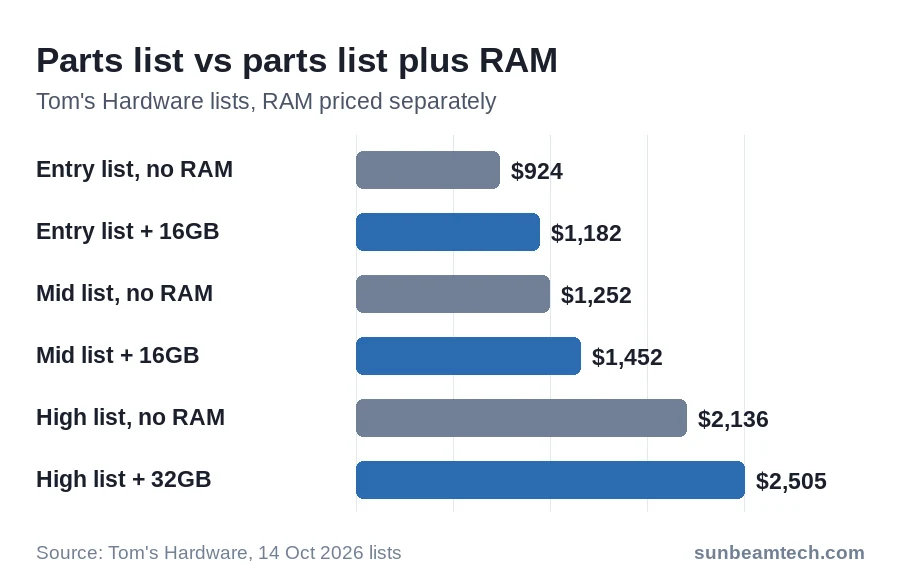
Every total here includes RAM. The parts lists behind the $1,500 and $2,500 totals leave RAM out because its price swings, which is how a $924 build ends up costing $1,182.
Why a $924 parts list costs $1,182
The cheapest build in Tom’s Hardware’s set of lists comes to $924 for everything except RAM: a Core Ultra 250K Plus, a B860 board, an RX 7600, a 512GB SSD, a case, a 650W PSU and a $25 CPU cooler. Add the 16GB DDR5-6000 kit from the same list at $258 and it’s $1,182. The cheapest 16GB DDR5-6000 kit on the price index is $279 as of 22 October, which would make it about $1,203 today.
Graphics cards moved too, and not evenly. The RX 9070 XT was priced 25% over its launch price in August, the RTX 5060 Ti 16GB 70% over. That gap matters most at $1,500, where it decides which 16GB card makes sense.
What $800 really buys
The cheapest DDR5 list above costs $1,182, so $800 is DDR4 territory. MSI’s shortage guide points value builds the same way: stay on DDR4 and spend the savings on other parts. The gap is large. 16GB of DDR4-3200 costs $106 on the price index, against $249 to $279 for 16GB of DDR5.
Here’s an $800 list priced this month. The CPU and board are Newegg prices from 23 October, the RAM is the cheapest 16GB DDR4-3200 kit on the price index, the GPU is TechSpot’s August street price, and the SSD, case and PSU are carried over from the $924 list.
| Part | Pick | Price |
|---|---|---|
| CPU | Ryzen 5 5500 (stock cooler in the box) | $99 |
| Motherboard | ASRock B550M-HDV | $70 |
| RAM | 16GB DDR4-3200 | $106 |
| GPU | Intel Arc B570 10GB | $260 |
| SSD | Patriot P300 512GB | $82 |
| Case | DIY PC ARGB-N5-BK | $60 |
| PSU | MSI MAG A650BN 650W | $60 |
| Total | $737 |
That leaves about $60 under $800. Spend it on the GPU: the Arc B580 was $310 in August, which puts the list at $787. The RX 9060 XT 8GB at $360 pushes it to $837, just over the line. The Ryzen 5 5500 ships with AMD’s Wraith Stealth cooler, so there’s no cooler line to pay for.
The cost is the platform. AMD’s AM4 compatibility list ends at the Ryzen 5000 series, while Ryzen 7000, 8000 and 9000 sit on AM5, and AM5 boards take DDR5. A CPU upgrade past Ryzen 5000 therefore means a new board and new RAM. For the board, our B450 vs B550 comparison covers the choice.
Check the VRAM on any card you swap in. Our 8GB VRAM guide lists game by game where 8GB holds at 1080p and where it doesn’t.
$1,000 sits in the awkward gap, above the DDR4 route and below the $1,182 of the cheapest DDR5 list. Put the extra into the GPU, or into 32GB of DDR4-3200, which is $199 against $106 for 16GB.
Our call: if $800 is a hard cap, build this list with the B580 and accept that the platform ends at Ryzen 5000. If you can stretch toward $1,100, read the prebuilt section before you order parts.
$1,500: where AM5 starts to make sense
The $1,252 list in the same set pairs a Ryzen 7 7600X3D ($230) with an Asus TUF B650E-E Wifi board ($165), an RTX 5060 Ti 8GB ($499), a 1TB PCIe 4.0 SSD ($149), a $69 case, a 750W PSU ($60) and a 360mm AIO cooler ($80). Add a 16GB DDR5-5200 kit at $200 and it’s $1,452. The price index’s cheapest 16GB DDR5-5200 kit is $261 as of 22 October, which would put the total near $1,513.
It’s a good 1080p machine and a competent 1440p one. A monitor comes on top, and so might a Windows license.
The $80 AIO is the easiest line to trim. The 7600X3D doesn’t come with a cooler, so you still need one, but a cheaper air cooler is the place to save. Our best budget CPU cooler guide covers air coolers and budget AIOs, with a compatibility section by CPU generation.
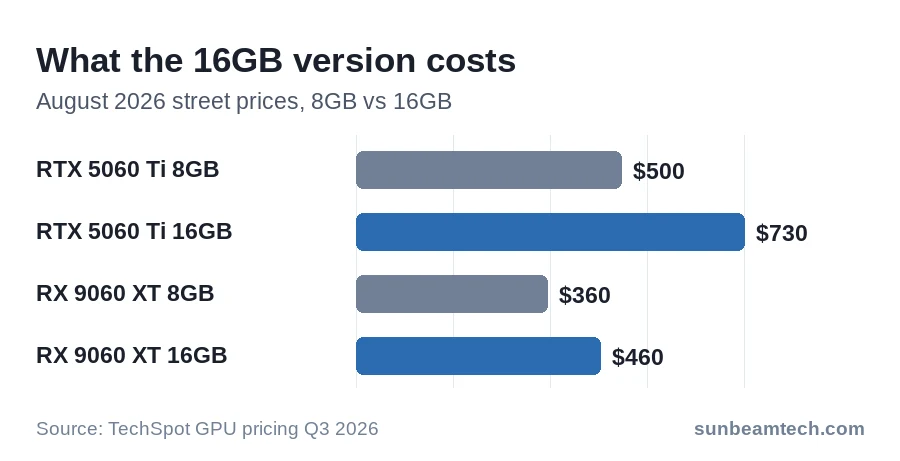
The choice that matters is the GPU’s VRAM. In the August numbers the 16GB RTX 5060 Ti was $730, $230 above the 8GB card at $500, while the 16GB RX 9060 XT was $460, only $100 above its 8GB version at $360. Prices have kept moving since, so compare the day’s listings, but of the two, the 16GB Radeon is the cheaper way past 8GB.
The catch is speed: the 9060 XT matches the 5060 Ti at 1080p but starts to fall behind at 1440p, and especially with ray tracing. If both prices hold, swapping the list’s $499 card for the $460 RX 9060 XT 16GB brings the $1,452 total to about $1,413.
Our call: take this list, swap the AIO for a good air cooler, and put what you save toward a 16GB card. At 1080p the 16GB Radeon is the better buy; if 1440p with ray tracing is the goal, the 16GB GeForce is worth the extra.
Whatever DDR5 kit you buy, its advertised speed only applies once you select its XMP or EXPO profile in the BIOS. Our guide to enabling XMP covers ASUS, MSI, ASRock and Gigabyte boards. The speed grade is a small price decision: the cheapest 32GB DDR5-6000 kit on the index is $447, below the cheapest DDR5-5600 kit at $479, so compare both.
$2,500: the 4K-capable build
The $2,136 list pairs a Ryzen 7 9800X3D ($449) with an MSI MAG B850 Tomahawk Max Wifi ($210), a Radeon RX 9070 XT ($849), a 2TB PCIe 4.0 SSD ($351), a $124 case, an 850W Corsair RM850e ($73) and a 360mm cooler ($80). With 32GB of DDR5-6400 at $369 the total is $2,505. It handles 1440p ultra settings with strong frame rates, and the card can reach 60 FPS at 4K. The price index’s cheapest 32GB DDR5 kit is $447 (DDR5-6000), $78 above that line, which would put the total near $2,583.
Watch the GPU line most closely. The 9070 XT is $849 in that list and was $750 in the August survey, but the same page warns it goes for no less than $1,100 at major retailers. At $1,100 the build lands near $2,756. Check listings before you commit. An RTX 5080 isn’t the answer at this budget either: at $1,550 in August it would take over 60% of $2,500 on its own.
Ray tracing is the weak spot on the 9070 XT, so 60 FPS at 4K is least likely in the games that lean on it hardest. Our list of the most demanding PC games names them and shows how Radeon cards fare in path tracing.
The list uses a B850 board rather than X870 or X870E. Our X870 vs X870E comparison has a section on where B850 fits.
Our call: keep the 9800X3D and the 850W PSU fixed, and let the GPU be the line that flexes with the market.
Prebuilt or build it yourself?
The cheapest prebuilt in Tom’s Hardware’s gaming PC picks, updated 5 October, is the CyberPowerPC Gamer Xtreme, tested at $1,099.99. It has a Core Ultra 5 225F, an RTX 5060, 32GB of DDR5-6400, a 2TB SSD and Windows 11. The DIY entry list above costs $1,182 with 16GB of RAM and a 512GB SSD, and no Windows. The parts differ, so it isn’t a fair race, but a prebuilt with twice the RAM and four times the storage for roughly $80 to $100 less is hard to ignore.
That squares with the same page’s remark that, at current GPU prices, a card inside a desktop can sometimes cost less than the card alone. A prebuilt’s price also pays for labor, warranty service and support. The cheapest pick on the list is $1,099.99, so it doesn’t change the $800 answer. If these numbers make a console look smarter, our PC vs console comparison weighs it up.
Three things to get right so you don’t regret it in six months
Buy the PSU for the next GPU, not only this one. Plan on 550W for an RTX 5060 and 600W for a 5060 Ti, and 650W for a 5070 and 750W for a 5070 Ti. The RX 9070 XT needs at least 750W. These are the makers’ own minimums. Nvidia measures on a specific test PC, so your system can differ.
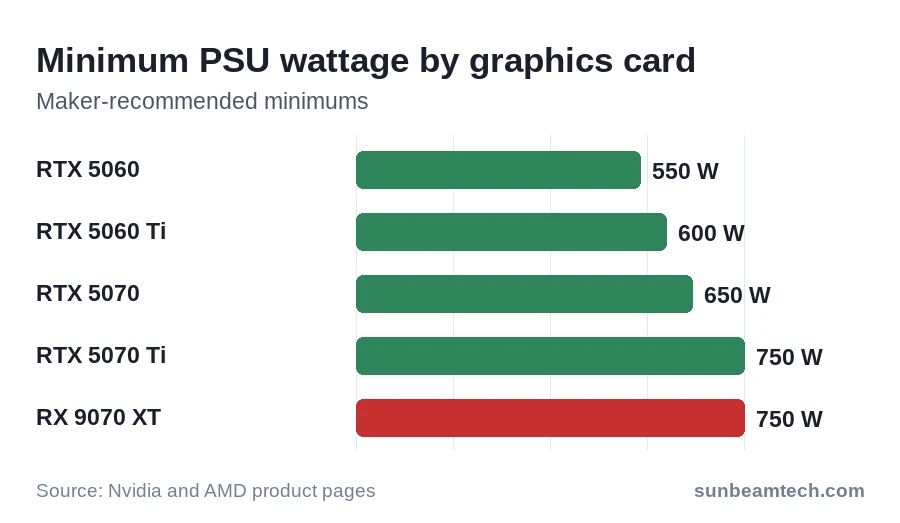
The $1,500 list above pairs a 750W unit with an RTX 5060 Ti, and the $2,500 list pairs an 850W unit with the 9070 XT. Our modular vs non-modular PSU guide helps you choose one, and how to check your power supply shows how to find out which one an existing PC has.
Pay for the RAM you need. MSI’s guide calls 16GB the baseline for 1080p light gaming and 32GB the sweet spot for mainstream AAA gaming in 2026. At today’s prices the step between them costs real money: 32GB of DDR5-6000 is $447 against $279 for 16GB. If your games run well on 16GB, buy 16GB and put the roughly $170 into a monitor, PSU, cooler or case.
Budget for what isn’t on the parts list. None of the totals above include a monitor, keyboard or mouse, and Windows isn’t in them either: a PC you build yourself may need a purchased license.
Set the budget before the parts list
Prices in this guide are moving fast. Pick the ceiling first and fit the tier to it, not the other way round. Put the monitor, Windows and peripherals inside that ceiling, and keep a cushion for the price changing between choosing parts and paying for them.
If you want to check that ceiling against your monthly numbers, an AI financial planner can show you what a $1,500 or $2,500 purchase does to the rest of your budget before you order anything. Treat its answers as information, not financial advice, and make the final call yourself.
Before you order
Price the full list again on the day you buy, starting with the GPU and the RAM, the two lines that swing these totals most. If the total lands above your ceiling, drop a tier or go DDR4 before you cut the PSU. And if a prebuilt in your range beats your list, take it seriously: building is only cheaper when the parts are. Right now, sometimes they aren’t.

Alex has been building and tweaking custom PCs for over 12 years. From budget builds to full custom water loops, he’s assembled more than 50 systems and helped hundreds of builders troubleshoot their rigs. When he’s not benchmarking the latest hardware, you’ll find him optimizing airflow setups or stress-testing overclocks.


