M.2 Screw Size Guide: Dimensions, Types and Which Screwdriver
A small fastener that secures M.2 solid-state drives to motherboard slots, available in standard and countersunk variants.
An M.2 screw is a small M2 x 3mm machine screw used to secure an M.2 SSD into its slot on a motherboard or expansion card. Without it, an installed M.2 drive sits at an upward angle and stays unseated, risking poor electrical contact, vibration damage, and inconsistent read/write performance.
Table of Contents
- M2 and M.2 Are Two Different Standards
- What Is an M.2 Screw?
- Official Size and Thread Specification
- What Does the Screw Actually Do?
- M2 Screw Dimensions: Thread, Head and Length
- Which Screwdriver Fits an M2 Screw: PH0 or PH00?
- M2 Screws in Laptops, Handhelds and 2230 Drives
- M.2 Screw Sizes and Types: Full Spec Comparison
- Standard M.2 Screw Dimensions by Use Case
- PC Screw Sizes Compared: Motherboard, Drive, Fan and PSU
- Do Motherboards Come With M.2 Screws?
- What’s Typically Included in the Box
- What If Your Motherboard Didn’t Come With the Screw?
- Screwless M.2 Retention Systems
- Where to Buy M.2 Replacement Screws
- Online Sources
- Local and Brick-and-Mortar Options
- How to Install an M.2 Drive (and Not Lose the Screw)
- Step-by-Step M.2 Installation
- Tips to Avoid Losing the M.2 Screw
- Frequently Asked Questions
- What is an M2 size screw?
- What screws do M.2 drives use?
- Do motherboards come with M.2 screws?
- What screwdriver do I need for an M2 screw?
- What are the dimensions of an M2 screw?
- Is an M2 screw the same as an M.2 screw?
- What size screws does a motherboard use?
- Can I use a regular screw instead of an M.2 screw?
- The Short Version
Lost yours during a build? You’re not alone. It’s one of the most commonly misplaced components in PC assembly, partly because it’s tiny and partly because most builders don’t realize how specific the spec is until they go hunting for a replacement at the hardware store and come back empty-handed. This guide covers the exact screw specs you need, what your motherboard should have included in the box, where to buy replacements, the exact thread and head dimensions of an M2 screw, which screwdriver fits it, and how it differs from every other screw in a PC build.

- Standard spec: M2 × 3 mm cross-recessed pan head, thread pitch 0.4 mm
- Head size: 4.0 mm across, 1.6 mm tall (DIN 7985)
- Screwdriver: PH0 for the screw that comes with a motherboard; PH1 for a standard M2 machine screw
- Included with most retail motherboards: yes, usually one per M.2 slot
- Torque: finger tight plus a quarter turn. Intel puts the ceiling at 0.67 Nm
- Do not substitute: an M3 or #6-32 screw is too big and will strip the standoff
M2 and M.2 Are Two Different Standards
Most of the confusion around this part comes from the names. M.2 is a card format. M2 is a screw thread. They are unrelated standards that happen to meet in the same slot, because the screw that holds an M.2 card down happens to be an M2 screw.
| Name | What it is | Defined by | The number that matters |
|---|---|---|---|
| M.2 (with a dot) | A form factor for internal expansion cards: SSDs, Wi-Fi cards, cellular modems | PCI-SIG, in the PCI Express M.2 specification | Card widths and lengths, such as 2280 = 22 mm wide, 80 mm long |
| M2 (no dot) | A metric screw thread size, the second-smallest common metric machine screw | The ISO metric screw thread system | 2.0 mm thread diameter, 0.4 mm pitch |
This matters when you go shopping. Search for “M.2 screw” and you get SSD mounting kits. Search for “M2 screw” and you get the metric fastener, sold in lengths from 3 to 20 mm for everything from laptop hinges to drone frames. Both searches can be right, depending on which one you actually need. If you are here for the SSD screw, that is an M2 screw 3 mm long. If you are here for the fastener spec, the next section has the full dimensions.
What Is an M.2 Screw?
Official Size and Thread Specification
The “M” in M2 stands for metric, and the number is the thread diameter in millimetres. So an M2 screw has a 2.0 mm thread diameter with a 0.4 mm pitch. The version used to mount an M.2 SSD is 3 mm long, written out as M2-0.4 × 3 mm.

Board and laptop makers write the callout the same way. Dell’s service manual for the Latitude 5420 says “Replace the single screw (M2x3) that secure the M.2 2230 solid-state drive to the M.2 2230 solid-state drive holder” (Dell), and the XPS 15 9510 manual calls for an M2x2 (Dell). What none of them publishes is the pitch: 0.4 mm is simply the standard coarse pitch for M2 under ISO 965-2 (ISO 965-2), not a figure any board maker states.
Some boards and riser cards use an M2 screw 4 mm or 5 mm long instead, usually where the standoff sits lower or the card is thicker. The thread is the same; only the length changes.
What Does the Screw Actually Do?
Mechanically, the M.2 screw locks the drive down at the correct seated angle, which is typically 5 to 7 degrees from horizontal. That pressure keeps the M-key or B+M-key connector making consistent electrical contact inside the slot. Let the drive float unseated and you introduce resistance variance, which can cause intermittent disconnects under vibration, especially in a system with multiple fans or a loud case environment.
There’s a secondary thermal function too. Many modern boards ship with rubber-backed thermal pads over the M.2 slot. The screw presses the drive flush against that pad, completing the heat-transfer path. Without it, the pad just sits there doing nothing.
Do you technically need the screw? For a quick benchtop test or a temporary desk build, no. The drive will usually post and run. But for any long-term installation inside a case, yes. That single screw matters more than most builders think.
M2 Screw Dimensions: Thread, Head and Length
The M2 screw is a standard metric fastener, so its dimensions are fixed by a published standard rather than by whoever made your motherboard. In Europe that standard is DIN 7985 for a cross-recessed pan head, which has been superseded by the international ISO 7045. For M2 the two standards give the same head diameter and differ only in how tightly the head height is toleranced.
| Dimension | M2 value | What it means in practice |
|---|---|---|
| Thread diameter | 2.0 mm nominal | The “2” in M2, measured across the outside of the thread. Tolerance class 6g puts the real major diameter between 1.886 and 1.981 mm |
| Thread pitch | 0.4 mm | The distance between two thread crests. M2 has only one standard coarse pitch, so any M2 machine screw you buy has it |
| Head diameter | 4.0 mm max, 3.7 mm min | Identical in DIN 7985 and ISO 7045. The head is twice the width of the thread, and that overhang is what actually clamps the card down |
| Head height | 1.6 mm nominal | ISO 7045 caps it at 1.60 mm; DIN 7985 allows up to 1.72 mm. Worth knowing if the screw has to fit under a low M.2 heatsink |
| Cross recess | No. 1, so a PH1 bit | This is the standard’s answer for a pan head M2 machine screw. The screw that ships with a motherboard is a different, much shallower head and takes PH0, as explained below |
| Standard lengths | 3, 4, 5, 6, 8, 10, 12, 16, 20 mm | ISO 7045 tabulates M2 up to 20 mm. Length is measured from under the head, so a 3 mm screw is a little longer overall |
| Countersunk version | Head 3.8 mm across, 1.2 mm tall (DIN 965) | The flat-head M2 used where the screw must sit flush, for example under a heatsink that rests on the drive |
Sources for the table: ISO 7045 (Table 1), ISO 965-2 thread tolerances, DIN 7985 dimension table, DIN 7985 length range. DIN 7985 and ISO 7045 describe the same screw and agree exactly on the M2 head diameter. They differ only in how tightly the head height is toleranced, and at larger sizes such as M3 and M5, where ISO heads are smaller.
Which Screwdriver Fits an M2 Screw: PH0 or PH00?
Here the fastener standard and real life disagree, and both answers are right for different screws. A catalogue M2 pan head carries cross recess No. 1, which is a PH1 bit (ISO 7045). The screw that ships taped inside a motherboard box is not that screw: it has a much shallower, wider head so it can clear an M.2 heatsink, and it takes a PH0. ASUS’s own SSD upgrade guide for the ROG Ally asks for “a size 0 Phillips head screwdriver” (ASUS), and iFixit specifies a Phillips #0 for the same screw (iFixit). Intel’s page states only that the drive type is Phillips, without a number (Intel). PH00 gets recommended on forums, but no manufacturer document we found calls for it, and it is loose enough in the recess to round the head.
Two practical notes. A magnetised driver is worth more here than a perfectly sized one, because the screw is small enough to vanish into carpet the moment it leaves the tip. And if the head is already chewed up from a bad fit, stop: a rounded 2 mm head is very hard to extract from a standoff.
M2 Screws in Laptops, Handhelds and 2230 Drives
The same M2 thread holds down the short 2230 drives used in handheld consoles and thin laptops, and it fastens plenty of other parts inside a laptop chassis. Lengths vary far more than on a desktop board, so the service manual is the only reliable source.
| Device | Screw used for the drive | Source |
|---|---|---|
| Valve Steam Deck | 3.4 mm long, Phillips. iFixit uses PH0 for the internal screws and PH1 for the back cover | iFixit |
| ASUS ROG Ally | 3.4 mm long. ASUS specifies a size 0 Phillips | ASUS |
| Dell Latitude 5420 | M2x3 for the drive, plus two M2x2.5 for the thermal pad | Dell |
| Dell XPS 15 9510 | M2x2 to fasten the drive to its bracket | Dell |
| Microsoft Surface Laptop Studio 2 | Torx-Plus 3IP, not Phillips. Tighten until snug, then a further 45 degrees | Microsoft service guide |
If your device is not listed, open its official service manual or teardown guide before ordering. On a laptop the same head size is used with several different lengths, and a screw that is 1 mm too long can press against the board underneath.
M.2 Screw Sizes and Types: Full Spec Comparison
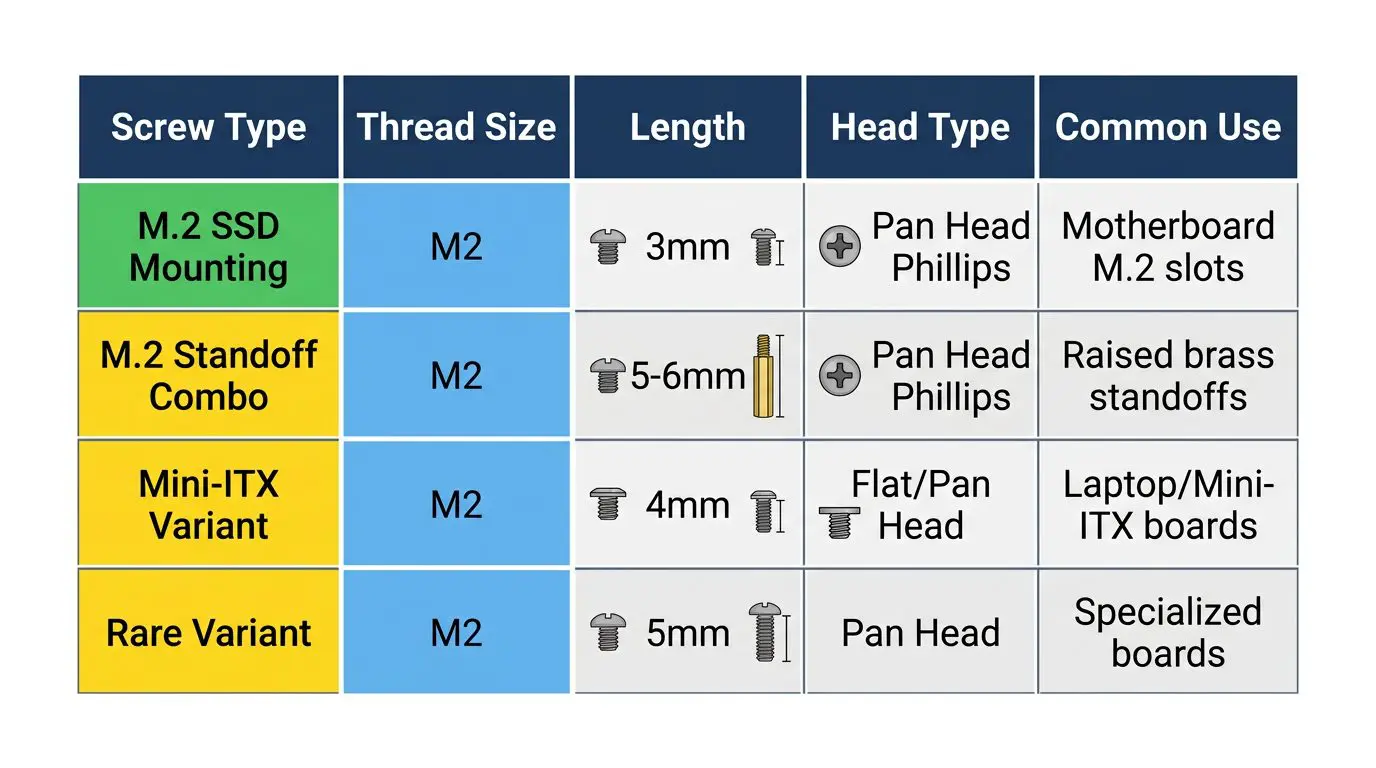
Standard M.2 Screw Dimensions by Use Case
| Screw Type | Thread Size | Length | Head Type | Common Use |
|---|---|---|---|---|
| M.2 SSD Mounting Screw | M2 | 3mm | Pan Head Phillips | Securing M.2 SSD to motherboard standoff |
| M.2 Standoff-Screw Combo | M2 | 5–6mm total | Pan Head Phillips | Boards with raised brass standoffs (one-piece unit) |
| M2 x 4mm | M2 | 4mm | Flat or Pan Head | Laptops, some Mini-ITX boards |
| M2 x 5mm | M2 | 5mm | Pan Head | Rare, server boards, some riser cards |
One thing that confuses builders on modern boards: many motherboards released by ASUS and MSI since 2022 ship with a combo standoff-screw unit. It looks like a stubby bolt with a threaded top. The bottom threads into the board, the top accepts the M.2 screw. One piece replaces what used to be a two-step process. If your board has a pre-installed brass standoff sticking up from the PCB, you just need the small M2 x 3mm screw to finish the job. If the board has a flat retention hole with no raised standoff, the screw goes directly into the PCB-mounted threaded insert.
PC Screw Sizes Compared: Motherboard, Drive, Fan and PSU
A desktop build uses four or five screw types, and mixing them up strips threads fast. The M2 screw is the smallest of them, which is why a builder who reaches into the wrong bag tends to notice only after the damage is done.
| Where it goes | Thread | Typical length | Driver | Source |
|---|---|---|---|---|
| M.2 SSD to its standoff | M2 | 3 mm (2 mm and 2.5 mm in laptops) | PH0 | Dell service manual |
| Motherboard to standoff | #6-32 UNC | 5 mm | PH2 | Fractal Design manual |
| Standoff into the case tray | #6-32 UNC | — | Hex or PH2 | Fractal Design manual |
| 3.5″ hard drive | 6-32 UNC-2B | Penetration 2.39 to 3.56 mm | PH2 | SFF-8301 |
| 2.5″ SATA SSD or drive | M3 | Penetration max 2.00 mm on a 7 mm drive | PH1 or PH2 | SFF-8201 |
| Power supply to case | #6-32 UNC-2B | — | PH2 | Intel ATX12V design guide |
| Case fan | Self-tapping, not a machine thread | About 10 to 12 mm | PH2 | Sanyo Denki |
The two that get confused with the M.2 screw most often are the motherboard standoff screw and the M3 drive screw. Both are visibly larger than an M2 screw, and neither will start in an M.2 standoff. Fan and radiator screw lengths are a topic of their own, covered in the case fan screw guide.
Do Motherboards Come With M.2 Screws?
What’s Typically Included in the Box
Yes. Nearly all retail motherboards include at least one M.2 screw, and most include one per available M.2 slot. They’re usually tucked inside a small labeled accessory pouch alongside SATA cables, the rear I/O shield, and sometimes a Wi-Fi antenna cable. Don’t throw that bag away before checking it thoroughly.
Here’s a general breakdown of what to expect by board tier:
| Motherboard Tier | Brand Examples | M.2 Screws Included | Standoffs Included | Notes |
|---|---|---|---|---|
| Budget (B650, B760) | ASRock, Gigabyte entry | 1–2 screws | Sometimes pre-installed | May only cover one slot |
| Mid-Range (B650E, Z790) | MSI MAG, ASUS Prime | 2–4 screws | Often pre-installed brass | Covers all M.2 slots |
| High-End (X670E, Z790 Apex) | ASUS ROG, Gigabyte Aorus | 4–6 screws plus spares | Pre-installed plus extras | Some use screwless retention clips |
| Workstation/HEDT | ASUS WS, MSI Creator | 4–8 screws | Multiple standoff heights | May include a full hardware kit |
What If Your Motherboard Didn’t Come With the Screw?
This happens more often than you’d expect. Open-box returns, OEM board pulls, and second-hand builds are the most common culprits. Before you order a replacement, check these spots first:
- The small accessory pouch or bag inside the motherboard box
- Small foam-tray compartments (some boards have labeled recesses pressed into the foam)
- The I/O shield packet (sometimes loose screws get taped here)
- The board itself, many manufacturers pre-thread the screw into the standoff hole on the PCB during packaging. Look before assuming it’s missing.
Not there? Then you need a replacement. They’re cheap and widely available. See the buying section below.
Screwless M.2 Retention Systems
This is where a lot of builders with newer flagship boards get confused. They open the box, find no M.2 screw for certain slots, and assume something is wrong. Nothing is wrong. They just have a screwless retention system.
The main systems in use right now:
- ASUS EZ M.2 Clip, a spring-loaded lever clip on the end of the M.2 slot. Insert the drive, press down, the clip snaps over the drive corner. No screwdriver needed. Found on boards like the ROG Strix Z790-E and ROG Maximus Z790 Hero.
- MSI M.2 Shield Frozr Clip System, MSI’s heatsink cover for M.2 slots integrates a push-pin retention mechanism. The heatsink holds down the drive when locked. Used on the MEG Z790 ACE and MAG Z790 Tomahawk.
- Gigabyte M.2 EZ-Latch, similar concept to ASUS; a rotating clip at the end of the slot secures the drive without tools. Present on the Z790 Aorus Master and Aorus Elite AX.
These systems are a genuine quality-of-life improvement, especially when you’re swapping drives in a cramped case. ASUS has published documentation on the EZ M.2 Clip mechanism on their product support pages. Note that even boards with screwless primary slots sometimes include a legacy screw for a secondary slot that uses traditional retention. Check your manual.
Where to Buy M.2 Replacement Screws
Online Sources
Online is your best bet for getting the exact spec. When searching, use the term “M2-0.4 x 3mm Phillips pan head machine screw” rather than just “M.2 screw”, that gets you the right results faster.
- Amazon, search for M2 x 3mm Phillips pan head machine screws. Brands like Hilitchi, Uxcell, and TPOHH sell kits of 50 to 100 for $5 to $10. Useful to have a kit sitting in your parts drawer permanently.
- eBay, good for small quantities. You can find listings for 5 to 10 screws if you don’t want a full kit.
- McMaster-Carr, if you want to get technical about material and tolerance, McMaster-Carr carries M2 screws in stainless steel and alloy steel in multiple lengths. Overkill for most builders, but good to know.
Local and Brick-and-Mortar Options
Harder. Not impossible.
- Home Depot / Lowe’s, carry M2 metric screws in the specialty fastener aisle, but typically stock 4mm or 6mm lengths, not 3mm. An M2 x 4mm might work with a taller standoff but it’s not ideal. Test-fit before trusting it.
- Micro Center, your best brick-and-mortar option if one is nearby. The cable and accessories section near checkout often carries PC screw kits that include M2 variants.
- Best Buy, hit or miss. Don’t count on it.
- Walmart, limited in-store selection. The Bolt Dropper brand M2 stainless sets are available online through Walmart’s site for around $7.99 to $9.99, which is a reasonable option if you have store pickup available.
- Fastenal / Ace Hardware (metric section), the most reliable local source for the exact M2 x 3mm spec. Fastenal especially caters to industrial fastener needs and will have metric sizes that Home Depot doesn’t stock.
How to Install an M.2 Drive (and Not Lose the Screw)
Step-by-Step M.2 Installation
- Identify your M.2 slot and standoff position. Check your motherboard manual for supported form factors. The 2280 (80mm length) position is the most common. The standoff hole will be clearly labeled.
- Confirm the standoff is in place. If it’s a separate brass standoff, thread it into the correct hole by hand before touching the drive. Some boards ship with it pre-installed at the 2280 position.
- Insert the M.2 drive at a 30-degree angle. Align the notch in the connector with the key in the slot, then slide the gold contacts fully into the slot. Don’t force it.
- Press the drive down gently until it’s level. It should sit parallel to the board surface and align over the standoff hole.
- Insert the M2 × 3 mm screw using a PH0 screwdriver. Finger tight first, then a quarter turn. That’s it. Stop there.
- Do not overtighten. Intel’s support page on SSD mounting hardware says “Do not exceed torque of 0.67 Newton-meter (Nm) to prevent enclosure thread damage”, and notes that the limit comes from the board’s screw base rather than from the drive (Intel). In practice that is barely snug. Overtightening cracks PCBs and strips standoff threads.
Tips to Avoid Losing the M.2 Screw
These are small enough to disappear into carpet forever. Literally.

- Work over a magnetic parts tray. They’re $5 at any auto parts store and will save you at some point during every build.
- Use a magnetised PH0 screwdriver. It holds the screw on the tip so you can guide it into the standoff without using a second hand.
- Pre-thread the screw into the standoff before inserting the drive. Then unthread it just enough to accept the drive, press down, and tighten. Easier to control than trying to start the screw one-handed while holding the drive down.
- Store your spare M.2 screws in a labeled zip-lock bag taped to the inside of your case. Future-you will be grateful.
- Buy a kit of 50. They’re $6 on Amazon. One kit lasts years of building.
Frequently Asked Questions
What is an M2 size screw?
An M2 screw has a 2mm thread diameter with a 0.4mm thread pitch, making it the smallest screw you’ll typically encounter in a desktop PC build. The “M” designation comes from the ISO metric fastener system, where the number directly indicates the thread diameter in millimeters. In PC building, the M2 x 3mm variant is the standard used to mount M.2 SSDs to motherboard standoffs. Don’t confuse it with the M.2 form factor name, they’re named differently for different reasons.
What screws do M.2 drives use?
M.2 drives use M2 x 3mm Phillips pan head machine screws, with a thread pitch of M2-0.4. That’s the full spec you need when ordering replacements. Some boards with taller-than-standard standoffs may use M2 x 4mm or M2 x 5mm variants, but 3mm is correct for the overwhelming majority of desktop motherboards. When in doubt, check your motherboard manual’s accessories section, it will list the exact screw spec.
Do motherboards come with M.2 screws?
Yes, most retail motherboards include one M.2 screw per available M.2 slot. They’re typically in the accessory pouch alongside SATA cables and the I/O shield. High-end boards from 2022 onward increasingly use screwless clip retention systems like ASUS EZ M.2 Clip, MSI Shield Frozr, or Gigabyte EZ-Latch, so some slots on premium boards won’t need a screw at all. If you bought a used or open-box board and the screw is missing, replacements are cheap and easy to find online.
What screwdriver do I need for an M2 screw?
Use a PH0 Phillips for the screw that came with your motherboard, and a magnetised one if you have it. That is what ASUS specifies for the same screw in its own SSD upgrade guide, and what iFixit uses. A plain M2 machine screw bought from a fastener supplier is a different head shape and takes a PH1. PH00 is a common forum recommendation but is not specified by any manufacturer, and it is small enough in the recess to strip the head.
What are the dimensions of an M2 screw?
An M2 screw has a 2.0 mm thread diameter and a 0.4 mm thread pitch. On a DIN 7985 cross-recessed pan head, the head is 4.0 mm across and 1.6 mm tall. Lengths run from 3 to 20 mm; the M.2 SSD screw is the 3 mm one. Length is measured from under the head, so a 3 mm screw is longer than 3 mm overall.
Is an M2 screw the same as an M.2 screw?
In practice yes, but the names come from different standards. M.2 with a dot is the card format defined by PCI-SIG. M2 without a dot is a metric thread size. The screw that holds an M.2 card down is an M2 screw 3 mm long, which is why the two names get used for the same part. A shop that sells “M2 screws” is selling the metric fastener in every length, so check that you are buying the 3 mm one.
What size screws does a motherboard use?
An ATX motherboard is held down with #6-32 UNC screws, the coarse American thread, and those screws go into #6-32 standoffs. Fractal Design’s own case manual lists them as “Mounting Screw (6-32)” alongside the M3 screws used for drives and the separate power supply screws (Fractal Design). Worth knowing: the ATX specification itself only defines where the holes go and how much clearance the board needs. The #6-32 thread is a convention that case makers document, not something the standard mandates. A 2.5″ SATA SSD uses M3 instead, per the SFF-8201 form factor standard (SFF-8201), and an M.2 drive uses the much smaller M2.
Can I use a regular screw instead of an M.2 screw?
No. Standard hardware store screws like #6-32 UNC or even M3 metric screws will not fit an M.2 standoff. The standoff requires an M2-threaded fastener specifically. Attempting to force a larger screw will strip the standoff threads permanently, and a stripped standoff on a motherboard is a serious and expensive problem. Stick with M2 x 3mm. They cost less than a dollar each in bulk.
The Short Version
The M.2 screw spec is M2 × 3 mm, cross-recessed pan head, 0.4 mm pitch, with a head 4.0 mm across. Your retail motherboard almost certainly included one per M.2 slot in the accessory bag. If it’s missing, buy a kit of 50 from Amazon for around $6 and never worry about it again. Install with a PH0, finger tight plus a quarter turn, and stop before you think you should stop. If your newer high-end board has no screw at all for certain slots, look for a clip or lever mechanism, screwless retention systems are now standard on flagship boards and they work well.

Alex has been building and tweaking custom PCs for over 12 years. From budget builds to full custom water loops, he’s assembled more than 50 systems and helped hundreds of builders troubleshoot their rigs. When he’s not benchmarking the latest hardware, you’ll find him optimizing airflow setups or stress-testing overclocks.


