How Much Gold Is in a Computer? CPU, RAM and Motherboard, Part by Part
How much gold sits in your RAM, motherboard, CPU and laptop, measured per part, plus what that gold is worth at the current price and why scrap buyers pay far less.
PC hardware guides cover the components, connectors, and headers that make up a modern desktop build — motherboards, GPUs, RAM, storage, power supplies, cooling parts, and the dozens of small connectors that decide whether your PC boots cleanly or not at all. The category exists because hardware decisions are rarely about specs alone. A spec sheet tells you what a part can do; a hardware guide tells you whether it fits your build, whether the header on your motherboard matches the connector on your fan, and whether the upgrade is worth the money compared to what you already own. Articles here combine manufacturer documentation with hands-on verification: comparison tables built from official spec sheets, pinout diagrams that match the actual boards, and recommendations grounded in real builds. Whether you’re trying to identify a mystery connector, compare two GPUs, figure out which M.2 screw your motherboard came with, or sort out a BIOS setting, cooling decision, or post-build problem, this is where those answers live.

How much gold sits in your RAM, motherboard, CPU and laptop, measured per part, plus what that gold is worth at the current price and why scrap buyers pay far less.
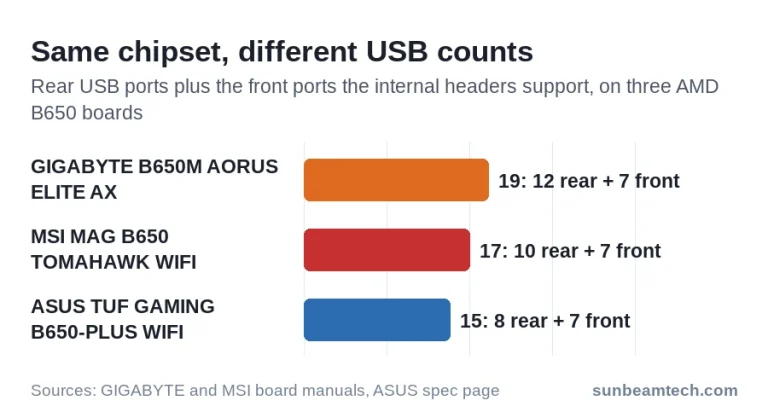
Find your exact board model, read its spec page without counting ports twice, and work out how many front ports its USB headers can run.
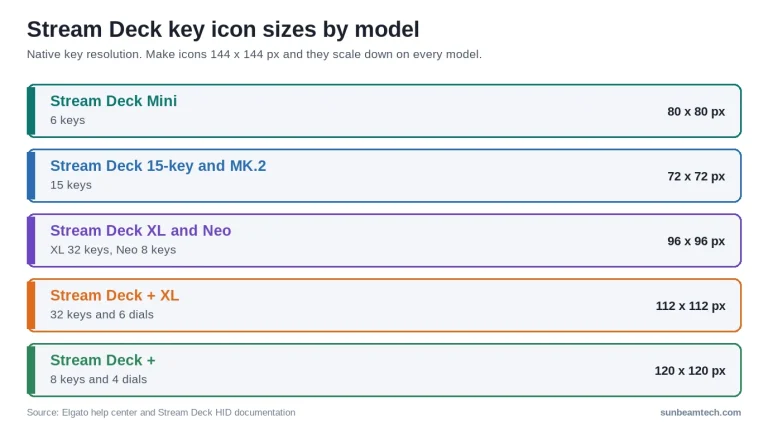
The exact key resolution of every Stream Deck model, three ways to change a key icon, where to get good icons and how to make your own, plus fixes for blank keys and question marks.
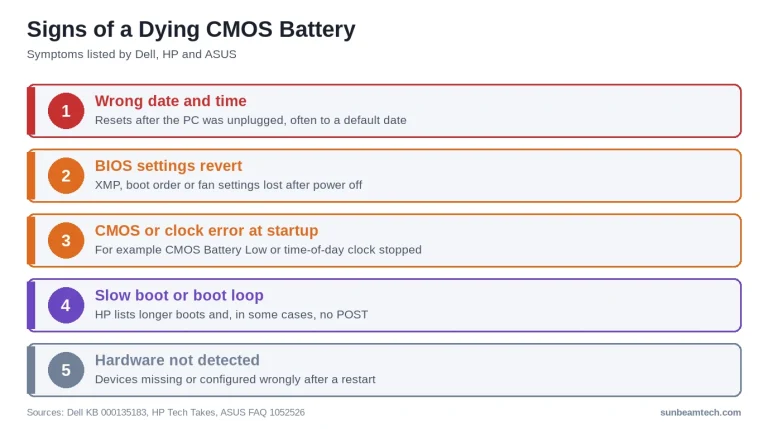
What the CMOS battery does, the signs it’s running out, which coin cell to buy, and how to replace it on desktops, compact boards and laptops.
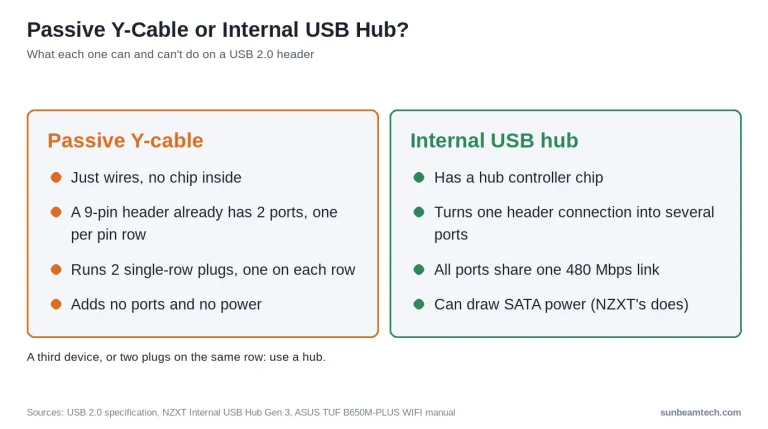
A USB header splitter turns one motherboard header into more sockets. A plain Y-cable just doubles the wires; only one with a hub chip adds working data ports. Last updated: October 2026 Quick Answer: What Is a USB Header Splitter? A USB header splitter plugs into one of your motherboard’s internal USB headers (either a…

A vertical GPU mount for PCIe 5.0 is a bracket-and-riser-cable system that rotates a graphics card 90°, requiring a Gen 5-certified cable to maintain full 32 GT/s per-lane bandwidth. Last updated: August 2026 Quick Answer: What Do You Need for a Vertical GPU Mount With PCIe 5.0? You need a riser cable explicitly certified for…
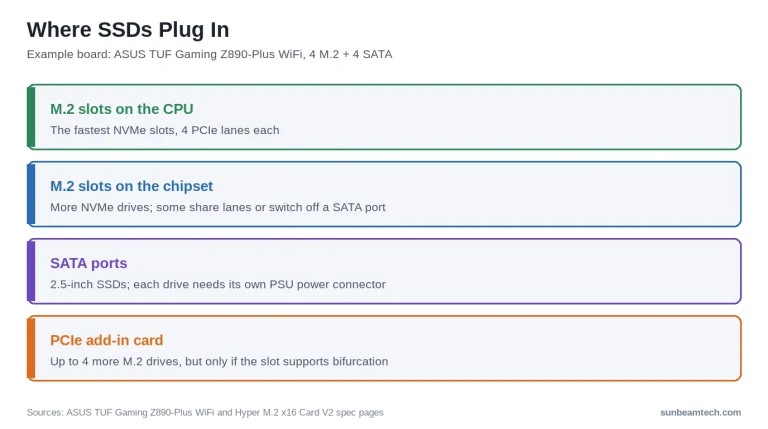
A PC can have between 1 and 10+ SSDs simultaneously, limited by the number of M.2 slots, SATA ports, available PCIe lanes, and PSU connectors on your specific motherboard. Last updated: October 2026 Quick Answer: How Many SSDs Can a PC Have? Most desktop PCs support 6 to 10 SSDs at once, combining M.2 slots…

A motherboard fan header is a 3-pin or 4-pin connector on a motherboard that delivers 12V power and speed-control signals to PC cooling fans while receiving RPM feedback. Last updated: July 2026 Quick Answer: What Is a Motherboard Fan Header? A fan header on a motherboard is a small cluster of pins that powers cooling…

B550 is AMD’s mid-range AM4 chipset with PCIe 4.0 support, more USB 3.2 Gen 2 ports, and stronger VRMs than the older B450 chipset. Last updated: July 2026 Quick Answer: B450 vs B550, Which Should You Pick? For most Ryzen 5000 builds in 2026, B550 is the better buy. It adds PCIe 4.0 for your…

GTX stands for Giga Texel Shader Extreme, Nvidia’s branding for high-performance consumer GeForce graphics cards sold from 2005 through 2019. Last updated: July 2026 Quick Answer: What Does GTX Stand For? In the context of Nvidia graphics cards, GTX stands for Giga Texel Shader Extreme. It was the label Nvidia used to mark its enthusiast-tier…
Independent PC hardware guides written by builders, for builders. No sponsored rankings, no affiliate bias — just straightforward advice to help you make better decisions about your next build.