Stream Deck Icons: Sizes per Model, Where to Get Them and How to Make Your Own
Stream Deck icons are square images (PNG, JPEG, GIF, BMP or WEBP). Elgato recommends 144 × 144 px, and anything from 72 × 72 px up works on every model.
Last updated: October 2026
Table of Contents
- Stream Deck icon size for every model
- Why 144 px when no key is 144 px?
- The info bar and touch strip are a different job
- How to change a Stream Deck key icon
- Actions with an on and off state
- Where to get Stream Deck icons
- Elgato Marketplace icon packs
- App icons for launcher keys
- Open-source packs on GitHub
- How to make your own Stream Deck icons
- Elgato Key Creator
- Any image editor
- Animated icons
- Match your deck to your build
- Where Stream Deck icons are stored
- Stream Deck icons not showing? Fixes
- Keys are blank or show the Elgato logo
- Keys show a question mark
- Icons look blurry or don’t fill the key
- Frequently Asked Questions
- What size should Stream Deck icons be?
- Can I use GIFs on a Stream Deck?
- Where can I get free Stream Deck icons?
- How do I make my own Stream Deck icons?
- Where are Stream Deck icons saved?
- Why does my Stream Deck key show a question mark?
- Do the same icons work on a Stream Deck XL and a Mini?
- Still stuck? What to tell Elgato support
A Stream Deck is only as readable as the icons on its keys. Get the size wrong and they look soft or squashed. Use the default blue icons everywhere and you end up hunting for the right key in the middle of a match or a stream.
This guide covers the exact key resolution of every Stream Deck model, the three ways to change an icon, where to get good icons (free and paid), how to make your own, and what to check when icons won’t show up. Every number comes from Elgato’s own help center and hardware documentation.
- 🟢 Make every icon 144 × 144 px (1:1). One file then looks sharp on every model.
- 🟢 Supported formats: PNG, JPEG, GIF, BMP, WEBP and animated WEBP.
- 🟡 72 × 72 px is the minimum. Smaller images look soft.
- 🟡 Non-square images keep their proportions, so they won’t fill the whole key.
- 🔴 A question mark on a key means a missing plugin, not a broken icon.
Stream Deck icon size for every model
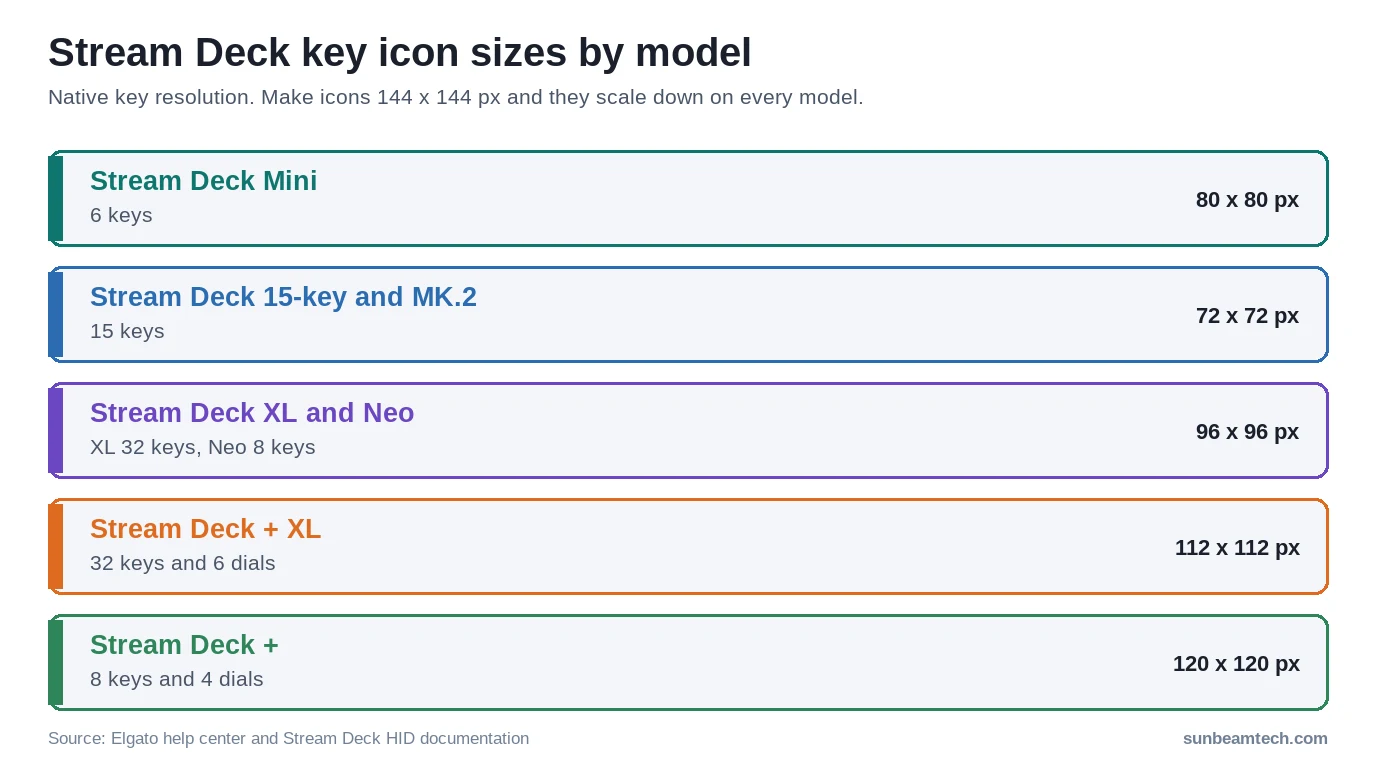
Elgato’s icon guide gives one simple rule: make icons 144 × 144 pixels with a 1:1 ratio. Larger images are scaled down automatically, and images that aren’t square are resized to fit the key with their original aspect ratio unchanged. The help center sets the floor at 72 × 72 pixels.
Under the hood, the keys on each model have their own native resolution. Elgato publishes these numbers in its Stream Deck HID documentation, and they explain why 144 px is the safe choice: no model has keys larger than 120 px, so a 144 px icon is always scaled down, never up.
| Model | Keys | Native key resolution | Other screen areas |
|---|---|---|---|
| Stream Deck Mini | 6 | 80 × 80 px | None |
| Stream Deck (15-key) and MK.2 | 15 | 72 × 72 px | None |
| Stream Deck XL | 32 | 96 × 96 px | None |
| Stream Deck Neo | 8 | 96 × 96 px | Info bar 248 × 58 px, two touch points 96 × 16 px |
| Stream Deck + | 8 + 4 dials | 120 × 120 px | Touch strip 800 × 100 px |
| Stream Deck + XL | 32 + 6 dials | 112 × 112 px | Touch strip 1200 × 100 px |
Key counts come from Elgato’s device comparison. The Stream Deck Pedal has no LCD keys, so custom icons only show up in the app there. Stream Deck Mobile runs on your phone or tablet, so its keys follow your screen rather than a fixed panel.
Why 144 px when no key is 144 px?
Two reasons. First, the Stream Deck app preview and high-DPI monitors benefit from the extra detail. Elgato’s own plugin guidelines ask for key icons at 72 × 72 px plus a 144 × 144 px high-DPI version, and recommend the larger size when only one file can be supplied. Second, scaling down keeps edges crisp. Scaling a 72 px icon up to the 120 px keys on a Stream Deck + makes it blurry. Not a disaster, but you’ll see it.
If you own more than one model, one set of 144 px icons covers all of them. That’s handy if you run an XL on your main PC and a Mini on a second setup.
The info bar and touch strip are a different job
The Neo’s info bar and the touch strip on the Stream Deck + and + XL are not keys. Their wide formats (for example 800 × 100 px on the Stream Deck +) are filled by the app, plugins and layouts, not by the key icon you pick. Don’t try to stretch a square icon across them.
How to change a Stream Deck key icon
Elgato’s key icon guide describes the same flow on Windows and macOS:
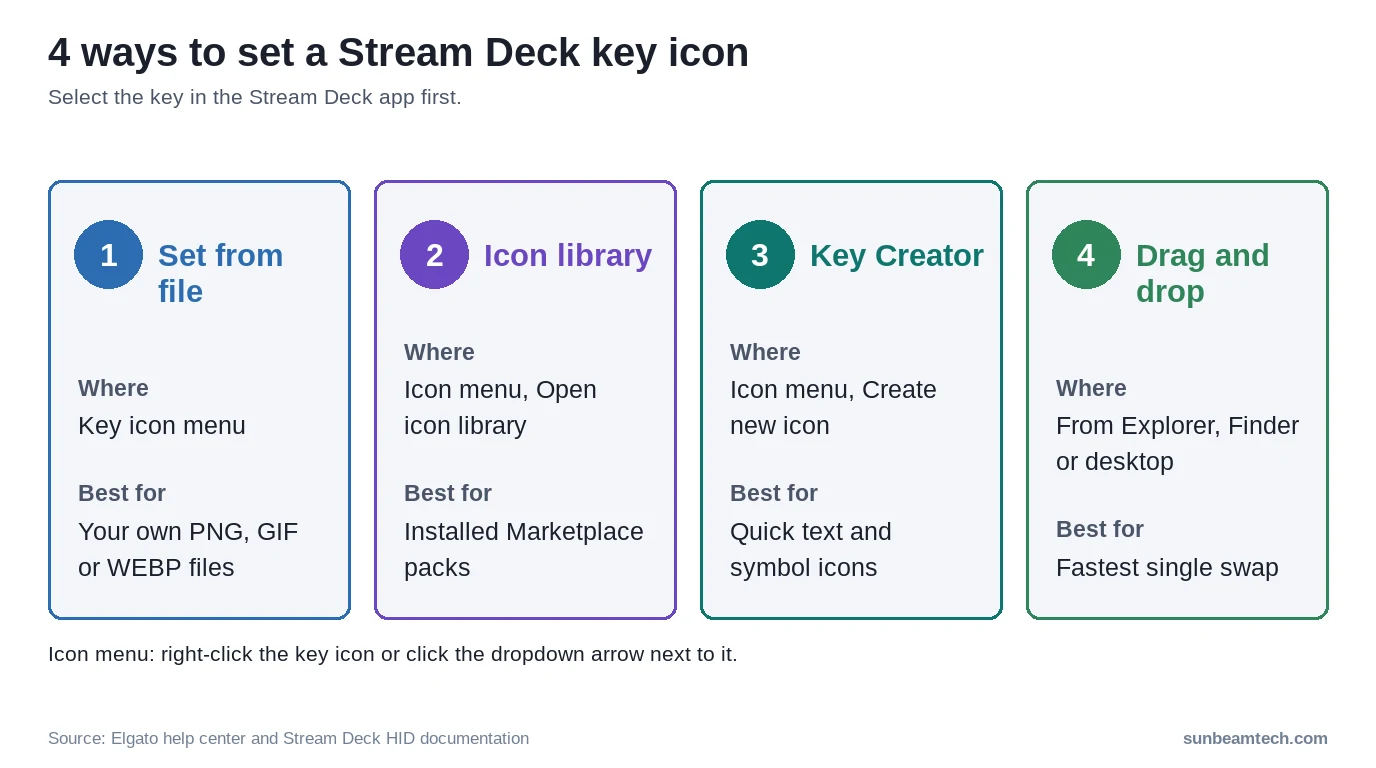
- Open the Stream Deck app and select the key you want to change.
- In the settings area, right-click the icon on the left or click the small dropdown arrow next to it.
- Pick one of three options: Set from file (browse to an image), Create new icon (opens Elgato Key Creator in your browser) or Open Stream Deck icon library (shows icons from the packs you’ve installed).
- Or skip the menu and drag an image from File Explorer, Finder or your desktop straight onto the selected key.
While the icon library is open you can click other keys and keep assigning icons without closing the window. Saves a lot of clicking when you’re doing a whole profile.
Actions with an on and off state
Some actions, like a mute toggle, have two states. When you set an icon for the on state, the app automatically generates a slightly dimmed version for the off state. If you want a clearly different look (a crossed-out microphone for muted, for example), select the off state and set a second icon the same way.
Where to get Stream Deck icons
Elgato Marketplace icon packs
The official route is Elgato Marketplace. According to Elgato’s icon pack guide, you need Stream Deck software 6.4 or newer and a free Marketplace account. Click the Marketplace icon at the top of the app, choose Stream Deck and then Icons, and use the Free filter if you don’t want to pay. Free packs install with Get; paid ones go through checkout first. Then click Open in Stream Deck and the pack appears in your icon library.
Marketplace packs are the easiest option because they install straight into the app. The catch is consistency: if you mix five packs from five makers, your deck looks like it. Elgato’s own advice is to keep color palettes, art styles and icon proportions similar.
App icons for launcher keys
A lot of keys simply open a program: Discord, Spotify, OBS, Steam, your browser. Icon packs rarely cover every app you use, and screenshotting a logo from the taskbar gives you a tiny, fuzzy image. A ready-made app icon library is faster. Icons8, for example, offers thousands of app logos in many styles, lets you recolor an icon before downloading so it matches the rest of your profile, and exports to PNG among other formats.
Two practical tips. Download the largest PNG available to you and aim for 144 px; anything from 72 px up still works, but bigger looks better on the higher-resolution keys. And pick a single style (flat, outlined or filled) for all launcher keys so they read as one set.
Licensing matters as soon as you share your work. Icons8’s free license asks you to link to icons8.com wherever you use their assets, or to buy a license instead. Brand logos also stay the property of those brands. Using them on your own deck is the normal use case, but if you plan to publish a profile or icon pack, Elgato requires that you own the rights to every image in it.
Open-source packs on GitHub
Plenty of makers publish free packs on GitHub, often under the MIT license. Many are also listed on Marketplace, which is the easier install. If you download one manually, check the license file and whether the pack ships as an installer file (double-click and the Stream Deck app imports it) or as loose PNG files you assign one by one.
How to make your own Stream Deck icons
Elgato Key Creator
Key Creator is Elgato’s free, browser-based icon editor. You can open it straight from the key’s icon menu with Create new icon. It’s built for simple icons: a background color, a symbol and some text. Elgato says your creations aren’t stored online; you save them to your own drive. Keep a folder for them so you can reuse them after a reinstall.
Any image editor
For more control, use whatever editor you like (Photoshop, GIMP, Affinity, Figma). A few rules that keep icons readable:
- Canvas: 144 × 144 px, square.
- Margin: leave a little breathing room around the artwork. One popular open-source pack frames 126 px artwork inside the 144 px canvas.
- Contrast: the keys are small and you’ll glance at them from an angle. Bold shapes on a solid background beat fine detail.
- Text: the Stream Deck app can put a title on top of any icon. If you bake text into the image as well, the two can overlap, so pick one.
- File format: PNG for static icons. Use GIF or animated WEBP only when the animation adds something.
Animated icons
Stream Deck supports GIF and animated WEBP on keys, and in the icon library a small GIF symbol marks animated icons (hover to preview them). Keep animations subtle. A whole grid of moving keys is hard to read, and Elgato’s own plugin guidelines point out that keys aren’t meant for high-frame-rate video.
Match your deck to your build
If your PC has a theme, carry it onto the deck. Pick icon colors that match your RGB lighting setup, or go monochrome for a white gaming setup or a blacked-out stealth build. White line icons on a dark background suit most themes and stay readable.
Where Stream Deck icons are stored
The simplest way to find your installed packs is through the app: select a key, open the icon menu and choose Open Stream Deck icon library. On Windows, makers of open-source packs such as the Bootstrap Icons pack tell users to place pack folders in %appdata%ElgatoStreamDeckIconPacks. Older Elgato developer documentation lists a different path, so folder locations can change between software versions. Prefer the app or an installer file over copying folders by hand.
Back up your setup through the app’s profile export rather than copying icon folders. A profile carries the key layout and its icons together, which is what you actually want back after a fresh Windows install.
Stream Deck icons not showing? Fixes
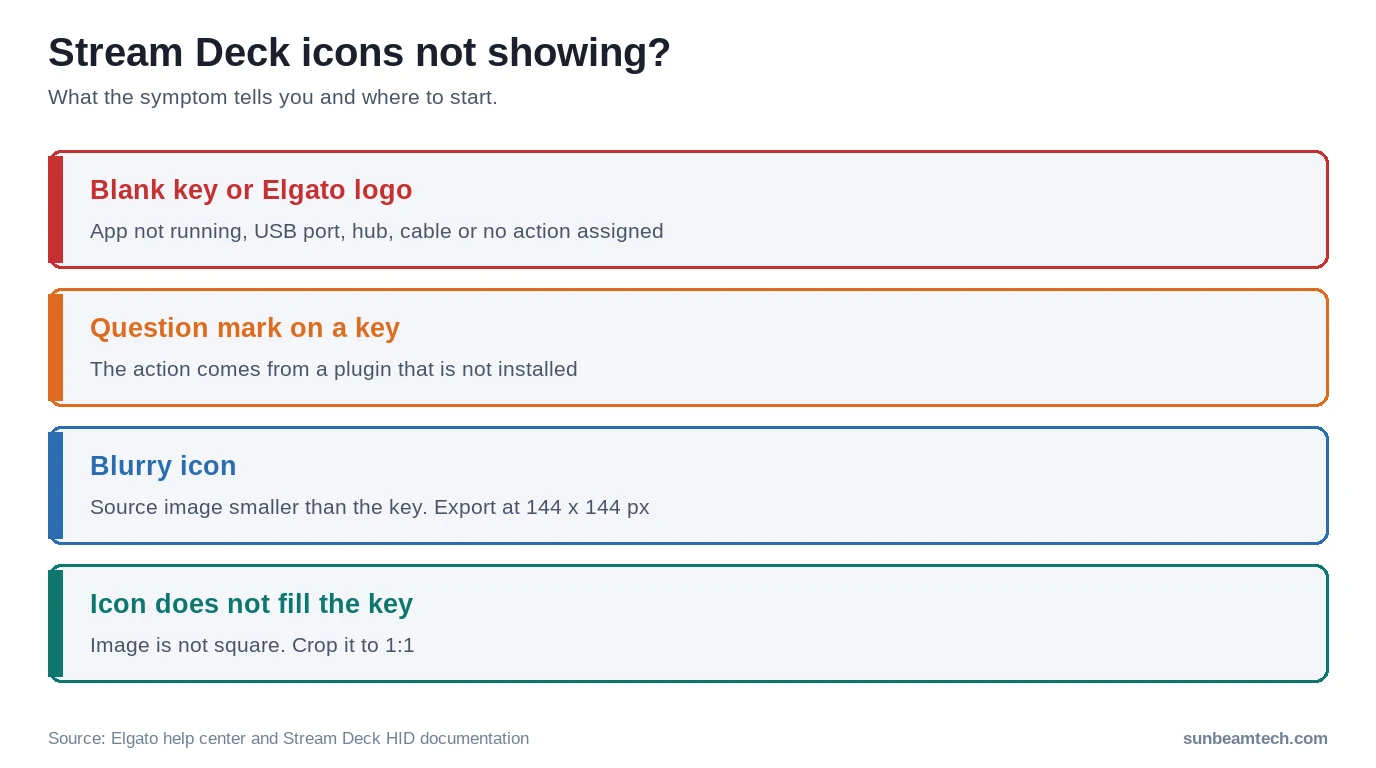
Keys are blank or show the Elgato logo
Elgato’s troubleshooting article for blank keys lists these checks, in this order:
- Make sure the Stream Deck app is installed and running. The keys get their images from the app.
- Try a different USB port.
- Connect the Stream Deck directly to the PC. An overloaded or unpowered USB hub can cause problems.
- Try a different USB cable.
- Check that the key actually has an action. Keys without an action stay blank.
- If you use Citrix Workspace, version 2302 is known to cause blank keys. Install the latest version.
For the port checks: a front-panel port depends on the case cable reaching the right header on your motherboard, so if the front ports are flaky, test a rear port first. Our guide to USB headers on a motherboard explains how those front ports are wired. If you’re short on ports, a USB header splitter is a cleaner fix than a cheap unpowered hub. Elgato’s HID documentation describes the Stream Deck devices as USB 2.0 devices, so you don’t need a fast port. The differences between USB 2.0 and 3.0 matter for drives, not for a Stream Deck.
Keys show a question mark
A question mark means the key’s action comes from a plugin that’s missing. Per Elgato’s article on question mark keys, this usually happens when you move a profile to another computer that doesn’t have the same plugins. Fix it by installing the plugin: press the key, click the key and choose Check Now, or click the question mark at the top of the app to install all missing plugins at once. Your custom icon wasn’t lost; it comes back once the plugin is there.
Icons look blurry or don’t fill the key
Blurry usually means the source image is too small for your model’s keys. Re-export it at 144 × 144 px. An icon that leaves empty bars at the sides or top isn’t square; the app keeps its proportions instead of stretching it. Crop it to 1:1.
Frequently Asked Questions
What size should Stream Deck icons be?
Make them 144 × 144 pixels with a 1:1 ratio, as Elgato recommends. The minimum is 72 × 72 pixels. Because no Stream Deck key is larger than 120 × 120 pixels, a 144 px icon is always scaled down and stays sharp on every model.
Can I use GIFs on a Stream Deck?
Yes. Stream Deck keys accept GIF and animated WEBP files as well as PNG, JPEG, BMP and static WEBP. Assign them the same way as a normal icon, through Set from file or by dragging the file onto the key.
Where can I get free Stream Deck icons?
Elgato Marketplace has a Free filter for icon packs that install straight into the app. Icon libraries such as Icons8 cover individual app logos, and GitHub hosts many open-source packs. Check the license before you share a profile that uses them.
How do I make my own Stream Deck icons?
Use Elgato Key Creator in your browser for quick icons, or any image editor with a 144 × 144 pixel canvas. Save the result as PNG, then assign it with Set from file or drag it onto the key.
Where are Stream Deck icons saved?
Open the icon library from a key’s icon menu to see installed packs. On Windows, pack makers point to %appdata%ElgatoStreamDeckIconPacks, but locations have changed between software versions, so use the app or an installer file rather than copying folders by hand.
Why does my Stream Deck key show a question mark?
The action on that key comes from a plugin that isn’t installed. This often happens after moving a profile to a new PC. Install the missing plugin from Marketplace or use the question mark button at the top of the app to install all missing plugins.
Do the same icons work on a Stream Deck XL and a Mini?
Yes. The XL has 96 px keys and the Mini 80 px keys, and the app scales your icons to fit. Make them 144 px and one set works on both.
Still stuck? What to tell Elgato support
If icons still won’t show after the checks above, contact Elgato support with the details they’ll ask for anyway: your Stream Deck model, the Stream Deck software version, your operating system, whether the keys are blank, show the Elgato logo or show a question mark, and whether the device is plugged in directly or through a hub. Mention which ports and cables you already tried. That usually skips the first round of back-and-forth.

Alex has been building and tweaking custom PCs for over 12 years. From budget builds to full custom water loops, he’s assembled more than 50 systems and helped hundreds of builders troubleshoot their rigs. When he’s not benchmarking the latest hardware, you’ll find him optimizing airflow setups or stress-testing overclocks.