Is 8GB VRAM Enough for 1080p Gaming in 2026?
At 1080p, 8GB of VRAM handles the majority of modern games in 2026 at high settings, but path-traced and texture-heavy titles can exceed this limit, causing stutters.
Last updated: October 2026
Table of Contents
- Quick Answer: Is 8GB VRAM Enough for 1080p Gaming?
- What Is VRAM and Why Does It Matter for Gaming?
- VRAM vs. System RAM: A Quick Clarification
- How Much VRAM Do Games Actually Use at 1080p in 2026?
- 8GB at 1080p: Game-by-Game Results
- What VRAM Spillover Actually Looks Like in Practice
- Is 8GB VRAM Enough for 1080p Gaming: The Honest Answer
- The “Yes” Case: Where 8GB Holds Up Perfectly
- The “Not Quite” Case: Where 8GB Can Struggle
- 8GB VRAM and Ray Tracing at 1080p: A Special Case
- Why Ray Tracing Inflates VRAM Usage
- Practical RT Settings That Actually Work on 8GB at 1080p
- Which 8GB GPUs Are We Actually Talking About?
- 8GB GPUs for 1080p: Memory Specs and Launch Prices
- The RTX 4060’s Controversial 128-bit Bus: Does It Matter at 1080p?
- Future-Proofing: Will 8GB VRAM Still Be Enough in 2027 and Beyond?
- The Upscaling Factor Changes the Equation
- The Timeline Estimate
- Should You Buy an 8GB GPU in 2026? Our Recommendation
- Buy 8GB If…
- Skip 8GB If…
- FAQ: Is 8GB VRAM Enough for 1080p?
- Is 8GB VRAM enough for 1080p gaming in 2026?
- How much VRAM do I need for 1080p gaming?
- Is 8GB of VRAM enough for 1080p ray tracing?
- Is 8GB VRAM enough for 1080p gaming on a laptop GPU?
- Is 12GB or 16GB VRAM worth it over 8GB for 1080p gaming?
- Final Thoughts
Quick Answer: Is 8GB VRAM Enough for 1080p Gaming?
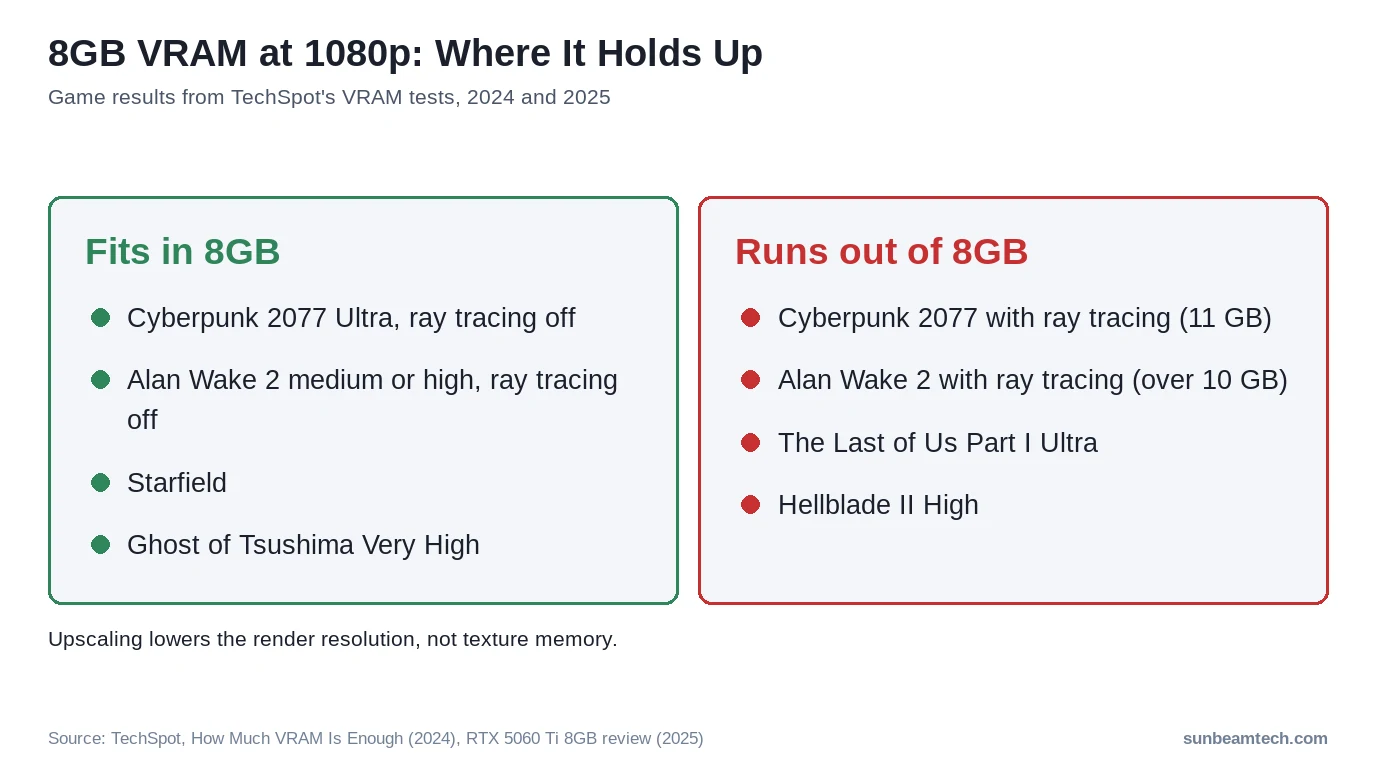
Yes, for most gamers in 2026, as long as you’re willing to touch the settings menu. Esports titles and plenty of AAA games fit in 8GB at 1080p on medium or high presets. The exceptions are ray tracing in heavy games and a handful of recent ports on their high or ultra presets: TechSpot measured Cyberpunk 2077 with ray tracing at 11GB at 1080p and Alan Wake 2 with ray tracing at over 10GB. For standard rasterization at 1080p, 8GB is a practical setup. Just don’t count on DLSS 4 or FSR 4 to fix a VRAM shortfall, because upscaling doesn’t shrink your textures.
A common rule of thumb among PC building communities is that 8GB VRAM is sufficient for 1080p gaming unless you plan to maximize every graphics setting and run heavy texture mod packs simultaneously. The general guidance is that 4 to 6GB handles 1080p adequately on a powerful enough GPU, while 6 to 8GB is the practical recommendation for high settings at 1080p and becomes the minimum for 1440p.
A large share of active Steam users are still running 8GB GPUs, and over half of all PC gamers still play at 1080p, according to the Steam Hardware Survey. (Valve confirmed in early 2026 that some VRAM figures in the survey had been misreported, so an exact 8GB-adoption percentage isn’t reliable right now, though 8GB remains extremely common. The 1080p majority figure is unaffected.) That’s not a niche group. That’s the actual majority. The online discourse skews toward enthusiast 4K builds, but this article is for the rest of us. We’ll cover rasterization, ray tracing, upscaling, and a realistic future-proofing timeline, not just a flat yes or no. Whether is 8gb of vram enough for 1080p is a question you’re asking before a GPU purchase or while watching your current card stutter in a new release, the answer has real nuance worth understanding.
8GB VRAM at 1080p: Quick Reference
- 🟢 Esports and online titles (Valorant, CS2, Apex): Light on VRAM. CS2’s minimum spec asks for a 1GB card. No issues.
- 🟢 Many AAA games on medium or high (Cyberpunk RT Off, Alan Wake 2, Starfield, Ghost of Tsushima): Fit in 8GB in TechSpot’s measurements. Comfortable.
- 🟡 Recent ports on high or ultra presets (The Last of Us Part I Ultra, Hellblade II High, Spider-Man 2 High): Run out of 8GB. Drop to a lower preset.
- 🔴 Ray tracing in heavy titles (Cyberpunk 2077, Alan Wake 2): 10 to 11GB measured at 1080p. Exceeds 8GB.
- 🟡 DLSS 4 / FSR 4 upscaling: Lowers the render resolution, not texture memory. Frame generation adds VRAM on top.
What Is VRAM and Why Does It Matter for Gaming?
VRAM is your GPU’s dedicated on-card memory. It stores everything the GPU needs immediate access to while rendering a frame: textures, shadow maps, geometry buffers, frame data, and in ray-traced scenes, acceleration structures called BVH trees. Think of it as the GPU’s workspace. The bigger the workspace, the more data it can keep close at hand without reaching elsewhere.
VRAM vs. System RAM: A Quick Clarification
System RAM is not a substitute. When a game exceeds your VRAM budget, the GPU offloads data to system RAM via the PCIe bus. That transfer path is dramatically slower than on-card VRAM bandwidth. In TechSpot’s RTX 5060 Ti test, The Last of Us Part II at 1080p Very High gave the 16GB card 320 percent better 1 percent lows than the 8GB version of the same GPU, so your lows tank hard even if average FPS looks acceptable. Micro-stuttering is the classic symptom. The game feels broken even though the frame counter says 60.
At 1080p, the base render target itself is small. The raw framebuffer at 1920×1080 in 32-bit color takes roughly 8MB. That’s nothing. The real VRAM consumption comes from texture pools, which scale with quality settings, and from rendering features like ray tracing, which load additional data structures. This is why resolution alone doesn’t tell the whole story. A 1080p Ultra texture load can rival what some games use at 1440p medium.
How Much VRAM Do Games Actually Use at 1080p in 2026?
This is the section that actually matters. Forum threads and opinion pieces tell you 8GB is fine or 8GB is dead. Neither helps you decide whether your specific games will run. Here’s what testers actually found at 1080p. The figures come from TechSpot’s VRAM investigation (July 2024, measured on an RTX 4090 so nothing ran out) and its RTX 5060 Ti 8GB vs 16GB review (April 2025).
8GB at 1080p: Game-by-Game Results
| Game | Settings (1080p) | Result on 8GB | Source |
|---|---|---|---|
| Cyberpunk 2077: Phantom Liberty | Ultra, RT off | ✅ Fits, no memory issues | TechSpot 2024 |
| Cyberpunk 2077: Phantom Liberty | Ray tracing on | ❌ 11GB (12GB with frame generation) | TechSpot 2024 |
| Alan Wake 2 | Medium or High | ✅ 8GB suffices | TechSpot 2024 |
| Alan Wake 2 | Ray tracing on | ❌ Over 10GB | TechSpot 2024 |
| The Last of Us Part I | Ultra | ❌ More than 8GB | TechSpot 2024 |
| Hogwarts Legacy | High, no RT | ⚠️ The ceiling for 8GB cards | TechSpot 2024 |
| Ghost of Tsushima | Very High | ✅ Plays fine on 8GB | TechSpot 2024 |
| Senua’s Saga: Hellblade II | High | ❌ More than 8GB | TechSpot 2024 |
| The Last of Us Part II | Very High | ❌ 16GB card: 320% better 1% lows | TechSpot 2025 |
| Spider-Man 2 | High | ❌ 16GB card: 35% faster, 58% better 1% lows | TechSpot 2025 |
| Indiana Jones and the Great Circle | Above Medium | ❌ 8GB card crashed to desktop | TechSpot 2025 |
| Horizon Forbidden West | Very High | ⚠️ Playable, frame pacing issues | TechSpot 2025 |
The pattern is clear. Rasterized games on medium or high presets mostly fit in 8GB at 1080p. Ray tracing and the high or ultra presets of recent ports are what push past it. In TechSpot’s testing, dropping to the Medium preset was what cleaned up frame pacing on the 8GB card.
What VRAM Spillover Actually Looks Like in Practice
Spillover isn’t a cliff. It’s a slide into misery. When your 8GB card runs out of on-board VRAM, it usually doesn’t crash (Indiana Jones and the Great Circle is the exception: TechSpot’s 8GB card crashed to desktop above Medium). It starts offloading texture data to system RAM via the PCIe bus. That bus is far slower than on-card GDDR6. The result shows up in frame time graphs as irregular spikes. In TechSpot’s Spider-Man 2 test at 1080p High, the 16GB RTX 5060 Ti had 58 percent better 1 percent lows than the 8GB card. Those lows are what you feel, and TechSpot notes the hit gets worse on PCIe 4.0 boards and drastically worse on PCIe 3.0.
Alan Wake 2 is a good example. TechSpot found 8GB enough at 1080p on the medium and high presets, while turning on ray tracing pushed it past 10GB. That’s spillover territory. The fix is simple: drop one setting tier. You lose little visual quality. You gain stability. This kind of per-game tuning is the practical reality of 8GB in 2026, and for titles that qualify as the most graphically demanding PC games, it’s a strategy worth understanding before you hit a stutter wall mid-session.
Is 8GB VRAM Enough for 1080p Gaming: The Honest Answer
Short version: yes, with a category of exceptions you should know upfront.
The “Yes” Case: Where 8GB Holds Up Perfectly
Esports titles don’t come close to pushing 8GB. Valorant, CS2, and Apex Legends are light: CS2’s minimum spec on Steam asks for a 1GB card, and Apex recommends a GTX 970. You could run these on a 6GB card without issue. Older AAA titles from 2020 and earlier are similarly comfortable. Even Cyberpunk 2077 runs its Ultra preset at 1080p on 8GB without memory issues when ray tracing is off, per TechSpot. GTA 6 on PC is a different question, and we look at it in what to build for GTA 6 on PC.
The other factor people bring up is upscaling. With DLSS Quality, the GPU renders internally at 720p (NVIDIA’s scaling ratio for Quality is 1.5x) and scales up to 1080p. That shrinks the frame buffers, not your textures: NVIDIA tells developers to bias texture sampling to the output resolution, and DLSS itself allocates roughly 60 to 120MB at 1080p. Frame generation goes the other way. TechSpot measured Cyberpunk 2077 with ray tracing at 11GB at 1080p and 12GB once frame generation was on. Upscaling helps your frame rate far more than your VRAM budget.
The “Not Quite” Case: Where 8GB Can Struggle
Ray tracing in heavy games. Full stop. TechSpot measured Alan Wake 2 with ray tracing at over 10GB and Cyberpunk 2077 with ray tracing at 11GB at 1080p. These aren’t edge cases or bad drivers. They’re VRAM-hungry rendering modes that belong on 12GB and 16GB cards. The other group is recent ports on their high or ultra presets: The Last of Us Part I on Ultra and Hellblade II on High both go past 8GB at 1080p.
Heavy texture mods are another real-world culprit. If you’re running a 4K texture pack on Skyrim or Fallout 4, you’re pushing VRAM use well beyond what vanilla settings show. The game might list 5GB usage in the menu, but with high-res mod packs loaded, you can saturate 8GB quickly.
If you stream, test your heaviest game with OBS running before you go live. A game that’s already at the edge, like Hogwarts Legacy on High, has no room to spare. The is 8gb vram enough for 1080p gaming question in 2025 and into 2026 really comes down to which games you play, not just which resolution you target.
8GB VRAM and Ray Tracing at 1080p: A Special Case
Ray tracing deserves its own section because it changes the VRAM math significantly, and the online conversation rarely distinguishes between RT tiers. Low RT and full path tracing are completely different animals.
Why Ray Tracing Inflates VRAM Usage
RT requires loading BVH (Bounding Volume Hierarchy) data structures into VRAM. These are the acceleration structures the GPU uses to calculate how light rays intersect with scene geometry. Turning RT on can add gigabytes compared to the same scene in rasterization. Not a rounding error. TechSpot measured Cyberpunk 2077 at 11GB with ray tracing at 1080p, while its Ultra rasterized preset fits in 8GB. Path tracing, which traces every light ray through the entire scene rather than using hybrid rasterization/RT techniques, is even more extreme.
Practical RT Settings That Actually Work on 8GB at 1080p
Low RT presets or a single RT effect, if anything. RT shadows or reflections on their own can fit in some games, but the cost varies a lot per title, so check the in-game VRAM meter if your game has one and back off at the first sign of stutter. You still get better shadows or reflections without blowing your VRAM budget. Decent deal.
Full RT (Overdrive, Path Tracing)? Not on 8GB. Upscaling won’t rescue it either: DLSS Quality drops the internal render resolution to 720p, but your textures stay, and frame generation adds memory on top. In TechSpot’s RTX 5060 Ti test, Cyberpunk 2077 at 1440p with DLSS Quality and RT Medium still gave the 16GB card 73 percent better 1 percent lows. At 1080p, RT Medium plus DLSS Quality is worth a try on 8GB. Treat it as a per-game experiment, not a given.
NVIDIA’s own DLSS 4 announcement says the new frame generation model “uses 30% less VRAM” than the old one, which tells you frame generation needs VRAM to begin with. You can review the Nvidia DLSS developer documentation for specifics on how render resolution scales with quality mode settings.
Which 8GB GPUs Are We Actually Talking About?
Not all 8GB GPUs are the same. The “8GB VRAM” label gets applied to cards with wildly different memory bus widths, bandwidths, and rasterization performance. That matters for gaming at 1080p because a bandwidth-constrained card will hit frame rate ceilings before VRAM becomes the problem in some scenarios.
8GB GPUs for 1080p: Memory Specs and Launch Prices
| GPU | Memory and Bus | Memory Bandwidth | Launch Price |
|---|---|---|---|
| RTX 5060 | 8GB GDDR7, 128-bit | 448 GB/s | $299 (May 2025) |
| RTX 5060 Ti 8GB | 8GB GDDR7, 128-bit | 448 GB/s | $379 (April 2025) |
| RX 9060 XT 8GB | 8GB GDDR6, 128-bit | 320 GB/s | $299 (announced May 2025) |
| RTX 4060 | 8GB GDDR6, 128-bit | 272 GB/s | $299 (June 2023) |
| RX 7600 | 8GB GDDR6, 128-bit | 288 GB/s | $269 (May 2023) |
| RTX 3060 Ti | 8GB GDDR6, 256-bit | 448 GB/s | $399 (Dec 2020, EOL) |
Watch the two 2025 cards that come in 8GB and 16GB versions: the RTX 5060 Ti and the RX 9060 XT. Same GPU, same name, double the memory. NVIDIA launched the 16GB 5060 Ti at $429 against $379 for the 8GB, and AMD set the 9060 XT 16GB at $349 against $299. Check the memory size on the box, not just the model name.
The RTX 4060’s Controversial 128-bit Bus: Does It Matter at 1080p?
It comes up constantly. The RTX 4060 has a 128-bit bus, half the width of the 3060 Ti. That gives it 272 GB/s of bandwidth versus the 3060 Ti’s 448 GB/s. On paper, alarming. In practice at 1080p, it’s a real but modest gap.
Bandwidth becomes a bottleneck when you’re pushing large amounts of data across the bus rapidly, which happens at higher resolutions and framerates. At 1080p, the render targets are smaller, and Ada Lovelace’s larger L2 cache is meant to compensate for the narrower bus. It only partly works: in TechSpot’s 15-game launch review, the RTX 3060 Ti was still 12 percent faster than the RTX 4060 at 1080p. Not great for the marketing story. The RTX 5060 keeps the 128-bit bus but switches to GDDR7, which lifts bandwidth to 448 GB/s on NVIDIA’s spec sheet. The 128-bit bus matters a lot more if you ever move to 1440p.
You can verify the RTX 4060 specifications including memory configuration on Nvidia’s official RTX 4060 product page. The RX 7600 specifications are similarly available through AMD’s RX 7600 product page, and the newer cards on the RTX 5060 family page and AMD’s RX 9060 XT 8GB page.
Future-Proofing: Will 8GB VRAM Still Be Enough in 2027 and Beyond?
This is where “is 8gb vram enough for 1080p in 2025” questions become “will it still be fine in two years.” Here’s the timeline as specifically as we can give it.
The Upscaling Factor Changes the Equation
DLSS 4, FSR 4, and XeSS 2 are not minor features anymore. They’re core to how modern games manage performance. When you enable DLSS Quality at 1080p output, the GPU renders internally at 720p. That lowers the memory needed for render targets, but textures are still sampled for the output resolution, and frame generation adds memory rather than saving it. So upscaling buys you frame rate, not a bigger VRAM budget.
This matters because game developers are increasingly designing around upscaling being enabled. It’s not a compromise to use DLSS or FSR anymore. It’s the intended experience. It helps an 8GB card’s frame rate keep up. It doesn’t stop texture budgets from growing.
The Timeline Estimate
- 2026: 8GB handles most games at 1080p on medium to high settings. Ray tracing and the high or ultra presets of recent ports are the exceptions. ✅ Solid with tuning.
- 2027: As more Unreal Engine 5 titles with Nanite and Lumen arrive, expect more of them to need a lower preset on 8GB. Still usable with tuning.
- 2028: The next console generation (PS6 era) is likely to shift the baseline memory target upward for multi-platform titles. 8GB begins to feel genuinely constrained on new releases at launch settings.
The bottom line on future-proofing: 8GB gets you comfortably through 2026. It gets you through 2027 with occasional setting compromises. If you’re buying a GPU today expecting a three-year minimum lifespan without touching settings, budget for 12GB. If you’re replacing a failing card on a tight budget or know you’ll upgrade in 2028, 8GB at 1080p remains a rational choice right now.
If you notice your GPU running at full load more frequently in demanding titles, it’s also worth understanding when that’s a normal, expected behavior. Knowing whether 100 percent GPU usage is bad or simply the card doing its job helps you separate a real bottleneck from a non-issue.
Should You Buy an 8GB GPU in 2026? Our Recommendation
Buy 8GB If…
- Budget ceiling: $250 to $320 and you’re gaming exclusively at 1080p.
- Game library: Skews toward esports, AA games, indie titles, or older AAA catalog.
- Upgrade plan: You expect to replace the GPU within two to three years.
- Upscaling support: Your primary games support DLSS or FSR, so you can keep frame rates up as the card ages.
- Current situation: Replacing a dying card immediately and 12GB options are out of reach right now.
Skip 8GB If…
- Resolution plans: You’re moving to 1440p within the next 12 months. 8GB will feel tight immediately.
- Game preferences: You play or want to play path-traced titles at full settings.
- Budget reach: You can stretch to about $350 to $430. That’s where the 16GB RX 9060 XT ($349 launch price) and RTX 5060 Ti 16GB ($429) sit.
- Workload: You use your GPU for video editing, AI inference, or 3D rendering alongside gaming. Those workloads consume VRAM aggressively.
- Mod-heavy gaming: High-resolution texture mods for open-world RPGs will push you over 8GB faster than vanilla game settings suggest.
FAQ: Is 8GB VRAM Enough for 1080p?
Is 8GB VRAM enough for 1080p gaming in 2026?
Yes, for most games, if you’re willing to adjust settings. Esports titles and many AAA games fit in 8GB at 1080p on medium or high presets. The exceptions are ray tracing in heavy titles and a few recent ports on their high or ultra presets, such as The Last of Us Part I on Ultra. DLSS 4 or FSR 4 helps your frame rate, but it doesn’t shrink texture memory, and frame generation adds VRAM.
How much VRAM do I need for 1080p gaming?
8GB is the recommended minimum for 1080p gaming in 2026 if you want to play modern AAA titles at high settings without frequent compromises. 6GB can still handle older and less demanding titles but will struggle with modern releases on high texture presets. 12GB provides comfortable headroom for 1080p at ultra settings and opens the door to 1440p gaming without VRAM-related issues.
Is 8GB of VRAM enough for 1080p ray tracing?
Only lightly. TechSpot measured Cyberpunk 2077 at 11GB and Alan Wake 2 at over 10GB at 1080p with ray tracing on, so full RT and path tracing are out on 8GB, and DLSS or FSR upscaling doesn’t fix that. Low RT presets or a single RT effect can work in some games. Test per game and watch for stutter. RT Medium plus DLSS Quality is worth trying, not a guaranteed sweet spot.
Is 8GB VRAM enough for 1080p gaming on a laptop GPU?
Laptop GPUs with 8GB, including the RTX 4060 Mobile and RX 7600M, are capable for 1080p gaming at high settings. Mobile variants operate at lower TDPs and often have reduced memory bandwidth compared to desktop equivalents, which usually means lower performance than the desktop cards with the same name in GPU-limited scenarios. For 1080p high settings on modern titles, 8GB laptop GPUs remain capable through 2026, though you’ll want to leave DLSS or FSR enabled on demanding releases.
Is 12GB or 16GB VRAM worth it over 8GB for 1080p gaming?
If your budget reaches about $350 to $430, the 16GB RX 9060 XT ($349 launch price) or RTX 5060 Ti 16GB ($429) offers better future-proofing and removes most VRAM-related compromises on current demanding titles. You also gain headroom for 1440p if you upgrade your monitor later. At strict 1080p with no plans to change resolution for two years and a budget under $320, 8GB is a practical and cost-efficient choice. The extra 8GB is worth paying for if the price gap is small; it’s harder to justify if it means stretching significantly beyond budget.
Final Thoughts
A large share of Steam users are on 8GB GPUs and over half of PC gamers are at 1080p. Those people are not making a mistake. They’re playing games, often at perfectly smooth framerates, on hardware that’s well-suited to their resolution. Path-traced titles and texture-heavy edge cases are real limitations worth knowing about before you buy or before you load up a demanding new release. But for the actual scope of what most 1080p gamers play, 8GB holds up in 2026. If your budget has room for 12GB, take it. If it doesn’t, enable upscaling, tune your settings in the two or three games that ask for it, and get on with gaming. That’s the decision in front of you, and either path is reasonable.

Alex has been building and tweaking custom PCs for over 12 years. From budget builds to full custom water loops, he’s assembled more than 50 systems and helped hundreds of builders troubleshoot their rigs. When he’s not benchmarking the latest hardware, you’ll find him optimizing airflow setups or stress-testing overclocks.