Best Low Profile CPU Coolers in 2026: Picks by Height for ITX and Slim Cases
With 67 mm of room, get Thermalright’s AXP120-X67; with 47 to 66 mm, its AXP90-X47 Full Copper; below that, Noctua’s 37 mm NH-L9a-AM5 or NH-L9i-17xx at 65 W.
Last updated: November 2026
Table of Contents
- First, Find Your Real Height Limit
- The Best Low Profile CPU Coolers by Height
- 67 mm: Thermalright AXP120-X67
- 67 mm Alternative: Scythe Big Shuriken 4, While Stock Lasts
- 77 mm: Noctua NH-L12Sx77
- 47 to 66 mm: Thermalright AXP90-X47 Full Copper
- Under 47 mm: Noctua NH-L9a-AM5 or NH-L9i-17xx
- How Much CPU Can a Low Profile Cooler Handle?
- Three Checks Before You Order
- After You Fit It: Check It Under Your Real Load
Your case spec sheet says something like “CPU cooler max height 70 mm”, and the tower coolers you’d normally buy won’t come close. That’s where low-profile coolers come in: flat heatsinks with a slim fan. The ones in this guide run from 37 to 77 mm tall.
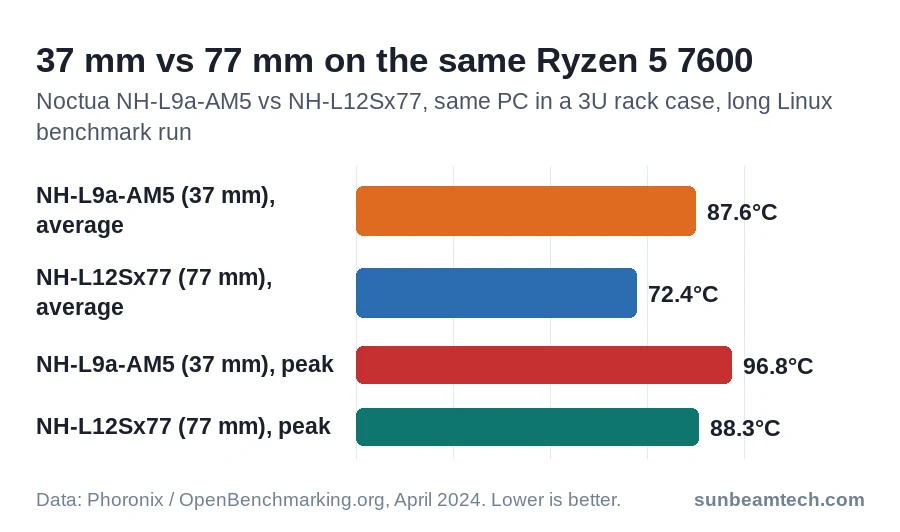
Height decides most of what you get. On the same Ryzen 5 7600 in the same 3U rack case, Noctua’s 77 mm NH-L12Sx77 averaged about 15 °C less than its 37 mm NH-L9a-AM5. So find out exactly how much room you have, pick the tallest cooler that fits, then check what it could hit: your RAM and the heatsinks around the socket.
We don’t test coolers ourselves. Every temperature below comes from a named outlet, with the CPU and the setup it was measured on. A number without its test setup tells you very little.
| Cooler | Height | Get it if | What testing showed |
|---|---|---|---|
| Thermalright AXP120-X67 | 67 mm | Your case allows 67 to 76 mm | Held a Core i9-13900K at 198 W, at or near its temperature limit |
| Scythe Big Shuriken 4 | 67 mm | You find one in stock | Averaged 79.5 °C on a Ryzen 9 9950X limited to 150 W |
| Noctua NH-L12Sx77 | 77 mm | Your case allows 77 mm or more | About 15 °C cooler than the 37 mm Noctua on the same Ryzen 5 7600 |
| Thermalright AXP90-X47 Full Copper | 47 mm | Your case allows 47 to 66 mm | 76.7 °C on an undervolted Ryzen 7 7800X3D in a T1 case, fan at full speed |
| Noctua NH-L9a-AM5 or NH-L9i-17xx | 37 mm | Your case allows less than 47 mm, with a 65 W-class CPU | The AM5 version peaked at 76.5 °C on a Ryzen 9 7900 at 88 W; a stock 7900X throttled |
First, Find Your Real Height Limit
Take the number from your case maker, then check whether it changes with your graphics card. In several small cases the motherboard tray or the GPU bracket moves, and a thicker card leaves less room above the CPU.
Fractal Design’s Terra is the extreme example. Its spine has seven positions: 77 mm of cooler height with a graphics card up to 43 mm thick, down to 48 mm with a card up to 72 mm thick (for cards under 131 mm tall). The product page lists only 48 mm, the tightest setting; the Terra manual has the full table.
The fan counts toward the height. Thermalright lists the heatsink and its 15 mm fan separately, so the AXP120-X67 is a 52 mm heatsink plus a 15 mm fan: 67 mm in total.
| Case | CPU cooler limit | Watch out for |
|---|---|---|
| Jonsbo NV10 | 38 mm | Low-profile graphics cards only |
| FormD T1 (V2.1) | 48 to 93 mm | Set by GPU thickness: 48 mm with a 3.25-slot card, 53 mm with 3 slots, 68 mm with 2.25 |
| Fractal Design Terra | 48 to 77 mm | Depends on the spine position, which depends on GPU thickness |
| InWin Chopin Max | 54 mm | InWin’s limit: no CPU above 65 W TDP |
| SSUPD Meshroom S V2 | 54 or 74 mm | 74 mm with the GPU in 3-slot mode, 54 mm in 4-slot mode |
| Lian Li A4-H2O | 55 mm | Also takes a 240 mm radiator on top |
| Fractal Design Node 202 | 56 mm | No longer among Fractal’s current Node cases |
| SilverStone ML08 | 58 mm | The cooler may overhang the board’s top edge by up to 15 mm |
| Jonsbo T9 | 58 to 78 mm | Three board heights, set by GPU thickness |
| SilverStone SG13 | 61 mm | The cooler may overhang the board edge by up to 8 mm |
| Lian Li Q58 | 67 mm | Lian Li’s single figure |
| Cooler Master NR200P V2 | 67 mm | A 67 mm cooler fits with nothing to spare |
| Fractal Design Ridge | 70 mm | GPU thickness drops from 82 to 57 mm with the side fans fitted |
| Cooler Master NR200P V3 | 70 mm | Cooler Master’s single figure |
| SilverStone RVZ03 | 83 mm | Height for every cooler in this guide; the cooler may overhang the board’s top edge by up to 11 mm |
| Any other case | Maker’s spec page or manual | Look for a second figure tied to GPU or radiator position |
A cooler that matches your limit exactly fits on paper with nothing to spare. If you have the choice, leave a few millimeters.
The Best Low Profile CPU Coolers by Height
67 mm: Thermalright AXP120-X67
This is the pick for the big group of cases with 67 to 76 mm of room. That covers the Ridge, both NR200P versions, the Q58, the Meshroom S in 3-slot mode, the Terra in spine positions 2 and 3, and a FormD T1 with a 2- or 2.25-slot card. It pairs a 52 mm heatsink with a 15 mm thick 120 mm fan that runs up to 1,800 RPM. Thermalright lists support for AM4, AM5, LGA1700 and LGA1851.
Tom’s Hardware tested it on a Core i9-13900K in a large test case with the case fans at 35%. With a 200 W limit it sustained 198 W, running at or near the CPU’s temperature limit the whole time. At 125 W it ran silently and a little warmer than the other coolers in that test, without losing performance. In the worst case it delivered 88% of the performance the same chip got with a high-end AIO.
That’s far more than a 65 W chip needs. The catch is the 123.5 by 120 mm fin stack. Thermalright gives no RAM clearance figure and only asks you to leave room for tall memory modules, so low-profile RAM is the safe pairing. Tom’s gave its MSRP as $45.97 in November 2022; prices move, so check the current listing.
67 mm Alternative: Scythe Big Shuriken 4, While Stock Lasts
Tom’s Hardware reviewed Scythe’s Big Shuriken 4 in December 2025 on a Ryzen 9 9950X inside a closed case.
- At a 100 W limit it held 62.7 °C, 5 to 6 °C behind regular single-tower coolers.
- At 150 W it averaged 79.5 °C. The reviewer called that about the highest limit he’d recommend to keep the CPU under its maximum temperature.
- With PBO on, it still handled 90% of the 9950X’s default power limit, and it peaked at 39.6 dBA in Tom’s noise test.
Scythe’s smaller 39 mm Shuriken 3 couldn’t handle the 150 W run in the same review and dropped to 134 W in the full-power run.
The Big Shuriken 4 is 67 mm including the screw heads, with a 120 mm, 15 mm thick fan, and supports AM4, AM5, LGA1700 and LGA1851. Tom’s Hardware found it doesn’t overhang the memory slots, so tall RAM isn’t a problem.
The problem is supply: Scythe’s Japanese site now lists it under discontinued products. Tom’s saw it at $34.99 at Amazon in December 2025 (MSRP $39.99). If you find new stock at that kind of price, it’s a good buy; if not, the X67 is the same height. Don’t mix it up with the Big Shuriken 3, an older model without AM5 or LGA1851 support.
77 mm: Noctua NH-L12Sx77
With 77 mm or more (the Terra’s first spine position, SilverStone’s RVZ03, a Jonsbo T9 on its tallest setting, a FormD T1 with a 1.75-slot or thinner card), get the NH-L12Sx77. It’s the taller cooler with the most test data behind it.
It’s 77 mm with its 120 mm fan under the fins, blowing upward, and the fan runs up to 1,850 RPM. That default setup leaves 44 mm for your RAM. It supports AM5, AM4, LGA1700 and LGA1851, and Noctua gives six years of warranty.
It scores 100 on NSPR, Noctua’s relative performance rating, against 88 for the 70 mm NH-L12S and 61 for the 37 mm NH-L9a-AM5. Independent numbers back that up:
- Phoronix (April 2024) ran a Ryzen 5 7600 in a 3U rack case through a long set of Linux benchmarks. The NH-L12Sx77 averaged 72.4 °C with a peak of 88.3 °C; the NH-L9a-AM5 in the same PC averaged 87.6 °C and peaked at 96.8 °C.
- Overclocking.com (May 2024) tested it on an open bench with a Core i5-13600K: 64 °C at 95 W with the fan at full speed. At 130 W it reached 81 °C at full speed and 88 °C at 1,400 RPM, and at 1,000 RPM it couldn’t hold the CPU.
Launch price was around $75 (Phoronix, April 2024). Thermalright’s newer AXP120-X77 is the same height, with a 120 mm fan that spins up to 3,150 RPM and a six-year warranty. No outlet had published a test of it when we checked, so it can’t be ranked yet.
47 to 66 mm: Thermalright AXP90-X47 Full Copper
Cases in this range include the A4-H2O, SG13, ML08, Chopin Max and Node 202, the Meshroom S in 4-slot mode, a FormD T1 with a 2.5- to 3-slot card and the Terra in spine positions 4 to 7. The AXP90-X47 Full Copper is 47 mm: a 32 mm copper heatsink with a 92 mm, 15 mm thick fan that runs up to 2,700 RPM. Thermalright lists AM4, AM5, LGA1700 and LGA1851.
Tiny Tech Tweaks (April 2024) ran six coolers from 37 to 53 mm on a Ryzen 7 7800X3D in an Ncase T1 2.5 in 3-slot mode, with two case fans at 30%. The chip ran at 76.7 W with a -20 Curve Optimizer undervolt (an AMD setting that lowers the voltage), through 30 minutes of Cinebench R23.
- At full fan speed the X47 Full Copper held 76.7 °C at 44 dB(A). The aluminum X47 Black and the 53 mm X53 stayed under 80 °C, the X53 at a louder 48 dB(A).
- The 37 mm NH-L9a-AM5 reached 87.6 °C at full speed. Set to a quiet 32 dB(A), it couldn’t keep the chip under its limit without the clocks dropping a little.
- In Cities: Skylines 2 at 38 dB(A), every cooler kept the CPU in the mid to high 70s.
The aluminum X53 ran about 1 °C behind the X47 Full Copper at the same noise level. Taller isn’t better here. SFFLABS, testing a 7800X3D on an open bench with the fan set to 35 dB(A), also found the X47 Full ahead of every other cooler of its height.
A Noctua fan in place of the stock one gained only 1 to 1.5 °C at lower fan speeds. Tiny Tech Tweaks listed the X47 Full Copper at $33.90 in spring 2024.
The X47 mounts with a fiddly clamp from the back of the motherboard, so fit it before the board goes into the case. If your board allows it, point the heat pipes toward the rear I/O cover. In SFFLABS’s testing, the similar X53 Full performed better that way.
Noctua’s 65 mm NH-L9x65 is the other name you’ll see in this range. It doesn’t overhang the RAM or PCIe slots on ITX boards and supports AM5 and LGA1851. But it scores 67 on NSPR, only a step above the 37 mm NH-L9a-AM5’s 61.
Under 47 mm: Noctua NH-L9a-AM5 or NH-L9i-17xx
For the tightest cases, such as the 38 mm Jonsbo NV10, Noctua’s 37 mm coolers are the ones with real test data. At exactly 48 mm (a FormD T1 with a 3.25-slot card, or the Terra’s last spine position) you can choose: the X47 fits with 1 mm to spare, the Noctua with 11.
The NH-L9a-AM5 fits AM5 only; the NH-L9i-17xx fits LGA1700 and LGA1851. Both use a 92 mm, 14 mm thick fan on a 23 mm heatsink, overhang neither the RAM nor the PCIe slot, and carry Noctua’s six-year warranty. Noctua’s spec pages are blunt about the limit: “Not suitable for CPUs that create high heat loads.”
- Hermitage Akihabara (March 2023, sample supplied by Noctua) ran the NH-L9a-AM5 on an open bench with a Ryzen 9 7900 at its 88 W power limit: mostly 65 to 70 °C, a peak of 76.5 °C, around 40 dBA. A Ryzen 9 7900X at stock settings hit 95 °C and throttled to about 140 W.
- HWCooling (April 2022) ran the NH-L9i-17xx on a Core i5-12400 in its wind tunnel at full fan speed: 62.4 °C at 65 W and 77.0 °C with no power limit, where the chip drew around 93 W.
- On a Core i9-13900K, Tom’s Hardware saw the NH-L9i-17xx reach the CPU’s temperature limit in hotter workloads.
Notebookcheck listed the NH-L9a-AM5 at $44.95 on Amazon in March 2023. Pair either one with a 65 W chip only, and even then expect it to run hot in a tight case: in Phoronix’s rack case, the 65 W Ryzen 5 7600 peaked at 96.8 °C. Anything hotter belongs in a case with room for a taller cooler.
Two 45 mm alternatives have less behind them. ID-Cooling’s IS-40X V3 carries a 100 W rating, and we found no recent independent test of it. be quiet!’s Pure Rock LP matched an older Noctua NH-L9i within about a degree at 75 W and 100 W in igor’sLAB’s open-bench test on a Ryzen 9 3950X, and throttled at 150 W. It’s listed for AM5 and LGA1700, not LGA1851.
How Much CPU Can a Low Profile Cooler Handle?
Find your CPU below and match the cooler to what it actually draws. The power and temperature figures are AMD’s and Intel’s own; the last column is what the tests on this page point to.
| CPU | Maker’s figure | Max temp | Low-profile fit |
|---|---|---|---|
| Ryzen 5 7600 | 65 W TDP, ships with AMD’s Wraith Stealth | 95 °C | Any pick here; the 37 mm Noctua ran hot in a 3U rack case |
| Ryzen 5 9600X | 65 W TDP, no cooler in the box | 95 °C | As for the 7600 |
| Core i5-14400 | 65 W base power, 148 W maximum turbo power | 100 °C | 37 mm at 65 W; 67 mm or taller if you let it turbo |
| Ryzen 7 7800X3D | 120 W TDP; AMD recommends a liquid cooler | 89 °C | 47 mm or taller with an undervolt; see the T1 test above |
| Ryzen 7 9800X3D | 120 W TDP; AMD recommends a liquid cooler | 95 °C | 67 mm or taller, then check temperatures in your games |
AMD recommends a liquid cooler for both X3D chips, but they don’t draw the same power. In Tom’s Hardware’s review, the 7800X3D’s highest average draw was 86 W, well under its 120 W rating.
In Hermitage Akihabara’s August 2026 test with a large tower cooler, a 9800X3D pulled about 140 W in Cinebench 2026 and 150 W in OCCT. That’s about the 150 W the Big Shuriken 4 held on a 9950X. It’s also far above the 76.7 W the 47 and 53 mm coolers were tested at.
So give a 9800X3D the tallest cooler that fits, and if that’s under 67 mm, watch it closely in your games. If your case takes a 240 mm radiator, like the A4-H2O, that’s the liquid cooling AMD recommends. Games usually load the CPU less than those stress tests, so the temperature in the game you actually play is the number that counts.
If your CPU runs too hot on the cooler that fits, lower its power limit before you reach for a louder fan. On Ryzen 7000 and 9000 X models such as the 7600X or 9900X, open AMD Ryzen Master, select Eco and apply. For Ryzen 9000 chips rated at 120 W, including the 9800X3D, AMD added a 105 W Eco Mode to Ryzen Master.
Hermitage Akihabara ran Scythe’s 39 mm Shuriken 3 on a Ryzen 9 9900X both ways. At stock it sat at 95 °C and fell back to about 120 W. In Eco Mode, which set it to the same 88 W limit as 65 W chips like the 9600X, it held about 77 °C.
The 7800X3D in the T1 test also ran a -20 Curve Optimizer offset. You’ll find Curve Optimizer in Ryzen Master and in the BIOS. Tom’s Hardware reports that most 7800X3D chips hold -10 to -15, so start there; if your game crashes, go back toward 0.
On Intel, the power limits are in the BIOS. On ASUS ROG Strix B760 boards it works like this:
- Press Delete or F2 at start-up, then F7 for Advanced Mode.
- Open Ai Tweaker > Internal CPU Power Management.
- Set Long Duration Package Power Limit (Intel’s PL1) and Short Duration Package Power Limit (PL2) to the wattage you want. To hold an i5-14400 at its base power, enter 65 in both.
- Press F10 and confirm with Ok.
On other boards, search the manual for “power limit”.
Three Checks Before You Order
- Your RAM height. A 120 mm low-profile cooler can sit over the memory slots. The Noctua figures: 44 mm of RAM clearance under the NH-L12Sx77 and 35 mm under the NH-L12S with its fan below the fins, while the 37 mm NH-L9 models don’t overhang the RAM at all. Thermalright and ID-Cooling give no RAM clearance figure, so for their coolers look up your memory’s module height on its spec sheet and choose low-profile RAM if you’re unsure.
- Your socket. The NH-L9a-AM5 is AM5 only and the NH-L9i-17xx is Intel only, so order the version for your platform. The older NH-L9a-AM4 fits AM4 only, and the plain NH-L9i stops at LGA1200. On LGA1851, Noctua says all of its coolers and mounting kits for LGA1700 also fit. For other brands, check that LGA1851 or AM5 is on the spec page, not just in the product photos.
- The heatsinks around your socket. They can block a low-profile cooler’s heat pipes. Tom’s Hardware couldn’t fit be quiet!’s 75 mm Shadow Rock LP on a Gigabyte B660i Aorus Pro because its heat pipes hit the board’s heatsinks. Compare a photo of your board with the cooler’s footprint before you buy.
If your case has room for a regular tower after all, our best budget CPU coolers guide covers towers under $50.
After You Fit It: Check It Under Your Real Load
Run the game or job you bought the PC for, with the side panel on, for 15 to 20 minutes. Watch the CPU temperature in HWiNFO’s Sensors-only mode: CPU (Tctl/Tdie) on Ryzen, CPU Package on Intel. Our guide to an overheating CPU walks through those readings and the throttling rows. A short benchmark in an open case tells you little about a closed small case.
- Close to your CPU’s max temperature (in the table above, or on AMD’s or Intel’s spec page)? Lower the power limit as described above.
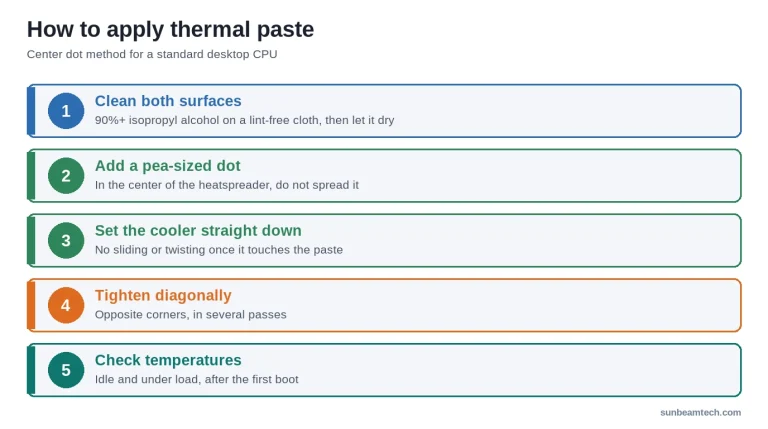
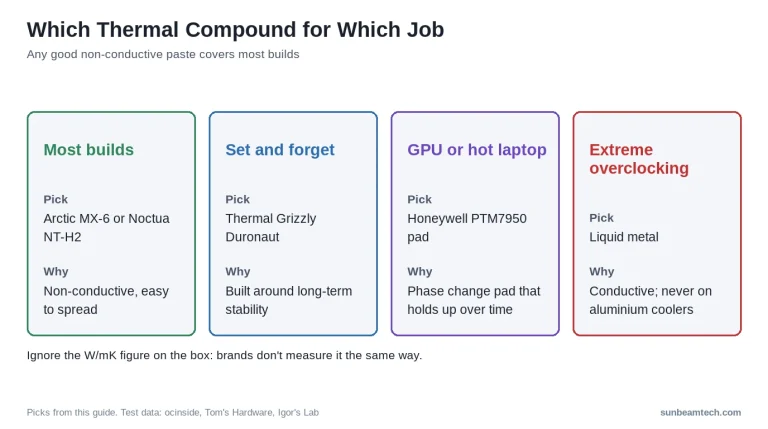
- Higher than the tests above for your power level? Check the mounting pressure and the paste. Our thermal paste guide covers what actually makes a difference.
- A CPU fan error at boot after the swap? That guide walks through the checks.
- PC shuts off under load? Our guide to a computer that randomly turns off helps you find out whether it’s heat or power.
Want our guides higher in your Google results? Add SunbeamTech as a preferred source.


Alex Rivera writes SunbeamTech’s guides on BIOS settings, motherboard headers, cooling and PC builds. Every guide starts from the manufacturer’s documentation and the questions builders actually search for, and gets checked against AMD, Intel, NVIDIA and board-vendor sources before it goes live. Spotted a mistake? Email [email protected] and it gets fixed.