Best Thermal Paste 2026: What the Measurements Show
The paste you choose is worth about a degree. The paste you replace can be worth twenty. This guide separates the two, using measurements rather than the numbers printed on the box.
Last updated: October 2026
Table of Contents
- The Short Answer
- Why W/mK Numbers Cannot Be Compared Across Brands
- What Independent Testing Actually Measures
- The Pastes, Compared
- Best Thermal Paste by Use Case
- For a Normal Build: Arctic MX-6 or Noctua NT-H2
- For Something You Will Not Open Again: Thermal Grizzly Duronaut
- For a Graphics Card or a Hot Laptop: Honeywell PTM7950
- For Extreme Overclocking: Liquid Metal, With Conditions
- How Much Difference Does Paste Actually Make?
- Application Matters More Than Brand
- Frequently Asked Questions
- What is the best thermal paste in 2026?
- Is a higher W/mK number better?
- How much cooler will a better thermal paste make my CPU?
- Is thermal paste electrically conductive?
- How long does thermal paste last in the tube?
- The Bottom Line
The Short Answer
For almost every build, buy a well-reviewed non-conductive paste and stop thinking about it. Noctua NT-H2, Thermal Grizzly Kryonaut Extreme, Cooler Master MasterGel Pro and Arctic MX-4 all finished within a degree of each other in one ten-way comparison, and the gap between the best and the worst compound there was five degrees. Where the real temperature lives is in the application and in the age of what you are replacing.
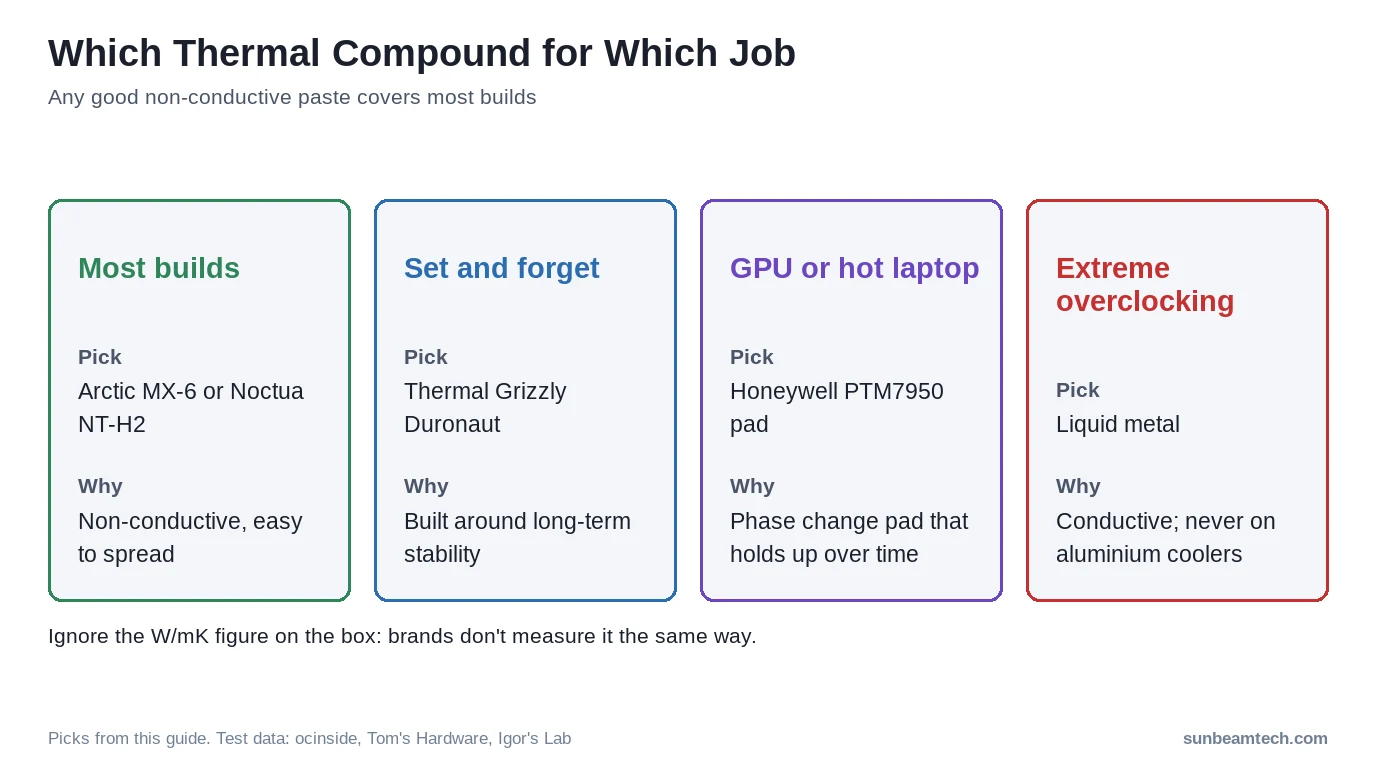
- Most builds: Arctic MX-6 or Noctua NT-H2. Non-conductive, easy to spread, sold in sizes that last several builds.
- A machine you do not want to open again: Thermal Grizzly Duronaut, which its maker designed and named around long-term stability.
- A graphics card, or a laptop that runs hot: a Honeywell PTM7950 phase change pad, for the reason in the section on it below.
- Extreme overclocking on a delidded chip: liquid metal, with the warnings in that section read first.
- What not to buy on: the W/mK figure on the packaging. The next section explains why.
Why W/mK Numbers Cannot Be Compared Across Brands
Every paste listing quotes a thermal conductivity figure, and they are not comparable with each other. Two of the biggest manufacturers have stopped publishing them entirely, and both have said why in public.
Thermal Grizzly’s statement: “The mostly theoretically determined thermal conductivity values differ greatly depending on the application, as important factors such as contact pressure, temperature or surface cannot be taken into account uniformly. All our cooling products have therefore no longer given specific thermal conductivity values since the 4th quarter of 2020. We continue to rely on the test results of independent tests and reviews so that our customers can get a more realistic impression of the performance of our products in practice under comparable circumstances.” That is why no current Thermal Grizzly datasheet carries a W/mK number, and why the 12.5 figure quoted everywhere for Kryonaut comes from retailers rather than from the manufacturer.
Arctic is blunter, and names that exact figure: “ARCTIC made a conscious decision not to specify any values for the thermal conductivity of its thermal paste and thermal pads, because many manufacturers invent, artificially inflate or embellish this value. Thermal paste has a thermal conductivity of 1 to 4 W/mK. Values outside of this range, such as 12.5 W/mK, are at odds with the truth. Many competitors quote values above 4 W/mK to suggest better performance. This often leads to false expectations and dissatisfied users.” (Arctic). Arctic’s own MX-4 and MX-6 specification tables print the words “Thermal conductivity: FAQ” with a link to that page, in place of a number.
Independent laboratory measurement backs the order of magnitude they describe rather than the marketing one. Measured on an ASTM D5470 rig, nothing tested reaches the double-digit numbers on the packaging.
| Compound | Measured conductivity | Method | Source |
|---|---|---|---|
| Thermal Grizzly Duronaut Pro | 6.433 ± 0.078 W/mK | ASTM D5470 laboratory rig | Igor’s Lab |
| Honeywell PTM7950 (phase change pad) | 6.374 W/(m·K) effective | ASTM D5470 laboratory rig | Igor’s Lab |
| Corsair XTM70 | 4.724 W/(m·K) effective | ASTM D5470 laboratory rig | Igor’s Lab |
So when one paste claims 12.5 and another 8.5, that tells you which marketing department is more aggressive, not which one will cool your processor. Use measured temperatures instead.
What Independent Testing Actually Measures
One of the clearest public comparison tables comes from ocinside.de, which in 2022 ran ten compounds on one Ryzen 7 1800X under a 360 mm liquid cooler at full fan and pump speed, thirty minutes of Prime95 each, after a warm-up run (ocinside.de). It is an older chip, so read it for the spread, not as a current ranking.
| Compound | CPU temperature | Behind the best |
|---|---|---|
| Cooler Master MasterGel Pro | 51°C | Joint best |
| Noctua NT-H2 | 51°C | Joint best |
| Thermal Grizzly Kryonaut Extreme | 51°C | Joint best |
| Arctic MX-4 | 52°C | +1°C |
| Cooler Master Cryofuze | 52°C | +1°C |
| Noctua NT-H1 | 52°C | +1°C |
| SilentiumPC / Endorfy Pactum PT-4 | 52°C | +1°C |
| Streacom TX13 | 54°C | +3°C |
| Thermal Grizzly Aeronaut | 54°C | +3°C |
| Thermal Grizzly Hydronaut | 56°C | +5°C |
Three things worth taking from that table. The top four are within a degree of each other, which is close to run-to-run variation on any test rig. The whole field spans five degrees, so even the worst compound there is not a disaster. And ocinside gives first place jointly to three compounds: Kryonaut Extreme, Noctua NT-H2 and Cooler Master MasterGel Pro. Its results table shortens the first to “Kryonaut”, but its product list, spec table and verdict all name Kryonaut Extreme, so that is the version it tested.
Tom’s Hardware reaches a similar conclusion on current hardware, testing on a Ryzen 9 9950X under a 240 mm cooler. Its top paste pick is Thermal Grizzly Duronaut. It places Arctic MX-6 in “the 2nd best spot for traditional thermal pastes”, and reports that Thermal Grizzly’s KryoSheet, a graphene pad rather than a paste, “outperformed all traditional thermal pastes” on that processor (Tom’s Hardware). Its per-compound temperatures are published as chart images rather than as text, so we are not reproducing numbers we cannot quote directly.
The Pastes, Compared
Specifications below are the manufacturers’ own. Where a maker publishes no figure, the cell says so rather than borrowing a number from a shop listing.
| Compound | Type | Electrically conductive | Operating range | Sizes | Source |
|---|---|---|---|---|---|
| Arctic MX-4 | carbon | No | -50 to 150 °C | 2 g | 4 g | 8 g | 20 g | 45 g | maker |
| Arctic MX-6 | carbon | No | -50 to 150 °C | 2 g | 4 g | 8 g | maker |
| Corsair TM30 | ceramic/metal oxide | No | Not stated | 3 g | maker |
| Corsair XTM70 | ceramic/metal oxide | No | Not stated | 3 g | maker |
| Gelid Solutions GC-Extreme | ceramic/metal oxide | No | -45 to +180 °C | 1 g | 3.5 g | 10 g | maker |
| Honeywell (now sold by Solstice Advanced Materials) PTM7950 | phase change pad | Not stated | Not stated | Pads 0.2 | 0.25 | 0.3 | 0.4 | 0.5 mm thick | maker |
| Noctua NT-H1 | ceramic/metal oxide | No | -50 to +110 °C | 3.5 g | 10 g | maker |
| Noctua NT-H2 | ceramic/metal oxide | No | -50 to 200 °C | 3.5 g; also sold as 10 g | maker |
| Prolimatech PK-3 Nano Aluminium | ceramic/metal oxide | No | Not stated | 1.5 g | 5 g | 30 g | maker |
| Thermal Grizzly Conductonaut | liquid metal | Yes | -50 to +200 °C | 1 g | 5 g | maker |
| Thermal Grizzly Duronaut | ceramic/metal oxide | No | Not stated | 2 g | 6 g | 30 g | maker |
| Thermal Grizzly Hydronaut | ceramic/metal oxide | No | -200 to +350 °C | 1 g | 1.5 ml | 3 ml | 10 ml | maker |
| Thermal Grizzly Kryonaut | ceramic/metal oxide | No | -250 to +350 °C | 1 g | 1.5 ml | 3 ml | 10 ml | maker |
| Thermal Grizzly Kryonaut Extreme | ceramic/metal oxide | No | -250 to +350 °C | 2 g | 6 g | 9 ml | maker |
| Thermalright TF7 | ceramic/metal oxide | No | Listed as 150 / 250 °C | 2 g | 4 g | 8 g | maker |
| Thermalright TFX | ceramic/metal oxide | No | Listed as 250 / 300 °C | 2 g | 6.2 g | 12.8 g | maker |
Electrical conductivity is the specification that actually matters for safety. A non-conductive paste that touches a capacitor is a mess; a conductive one can be a dead board.
Best Thermal Paste by Use Case
For a Normal Build: Arctic MX-6 or Noctua NT-H2
Both are non-conductive, both spread easily at room temperature, and both finish at or near the top of independent comparisons. MX-6 comes in sizes up to 8 g, which is several builds’ worth, and Arctic is the manufacturer honest enough to refuse to print a conductivity figure. NT-H2 ships with cleaning wipes and has the most forgiving consistency of anything here, which matters more than a degree if this is your first application. Our guide to applying thermal paste covers the part that actually costs you temperatures.
For Something You Will Not Open Again: Thermal Grizzly Duronaut
Duronaut is built around staying put rather than around a peak number. Thermal Grizzly describes it as designed “with a focus on outstanding thermal conductivity and exceptional long-term stability… These optimized particle shapes and sizes minimize the ‘pump-out effect’” (Thermal Grizzly). Other makers in this list make long-term claims too, Arctic for MX-6 and Noctua for NT-H2 among them, but Duronaut is built and named around durability, and Igor’s Lab has measured the retail version against the professional one on a laboratory rig, finding them within a fraction of each other at a thin bond line (Igor’s Lab). For a server, a NAS or a machine in a cupboard, that is the right trade.
For a Graphics Card or a Hot Laptop: Honeywell PTM7950
PTM7950 is not a paste but a phase change pad: solid at room temperature, softening once the chip warms up. Igor’s Lab measured it at an effective 6.374 W/(m·K) and, more usefully, ran it on a real graphics card where it held 66 to 67°C at steady state, matching what the factory paste did when new (Igor’s Lab). Its advantage is what happens later, which is covered in the next section. It is fiddly to fit, because you cut the pad to size and it needs a heat cycle to settle, so read a GPU repaste guide before starting.
For Extreme Overclocking: Liquid Metal, With Conditions
Liquid metal runs cooler than any paste and comes with rules that are not optional. Thermal Grizzly’s own warnings for Conductonaut: “Conductonaut thermal paste must not be used with aluminium coolers!”, and “If the liquid metal diffuses into the heatspreader, the engraved information may become illegible and there is a risk that the manufacturer’s warranty will be invalidated.” The company recommends nickel-plated copper cooler bases (Thermal Grizzly). It is electrically conductive, so a drop in the wrong place kills hardware. Our comparison of liquid metal against regular paste goes through whether it is worth the risk.
How Much Difference Does Paste Actually Make?
Between two reputable compounds, about a degree. Between a good compound and a bad one, around five. Between fresh paste and paste that has failed, far more than either.
Igor’s Lab documented the last case on a Manli GeForce RTX 4080 Gallardo: after six months the hotspot was at 103°C instead of the 79°C it ran at when delivered, because the cheap, silicone-heavy factory paste had broken down (Igor’s Lab). A repaste brought the hotspot back to 78 to 79°C (Igor’s Lab). That is a worst case caused by a bad factory compound, not typical ageing. Still, no swap between two decent pastes produces a swing like that. Replacing failed material does.
Which is the practical conclusion of this whole guide. If your machine runs hotter than it used to on the same workload, and the heatsink is clean, the paste is worth replacing and it barely matters which of the compounds above you use. If your machine is fine, changing paste to chase a degree is not a good use of an afternoon. Our guide on how long thermal paste lasts and how often to replace it covers when that point arrives.
Application Matters More Than Brand
Every comparison above holds the application method constant, because it has to. In your own build it is the variable you control, and it is worth more than the choice of compound.
- Quantity: a pea-sized amount for a normal heatspreader. Too little leaves gaps; too much is merely wasteful on a non-conductive paste and dangerous on liquid metal. See how much to use.
- Pattern: the dot, line and spread methods all work on a normal chip. The pattern comparison covers where it does matter, which is long rectangular heatspreaders.
- Removal: clean both surfaces properly before reapplying. Removing the old paste takes longer than applying the new.
- Mounting pressure: a cooler that is not seated evenly costs more degrees than any compound in this guide can win back.
Frequently Asked Questions
What is the best thermal paste in 2026?
For a normal build, Arctic MX-6 or Noctua NT-H2. Both are electrically non-conductive, easy to apply and finish within about a degree of the best compounds in independent comparisons. Thermal Grizzly Kryonaut Extreme shared first place with NT-H2 and Cooler Master MasterGel Pro in ocinside’s 2022 test. For something you do not want to reopen, Thermal Grizzly Duronaut is designed around long-term stability instead of a peak number. For a graphics card or a laptop, a Honeywell PTM7950 phase change pad is the better answer. There is no compound that will transform your temperatures, because the spread between good pastes is about one degree.
Is a higher W/mK number better?
You cannot compare them across brands. Thermal Grizzly stopped publishing thermal conductivity in 2020, saying the values are mostly theoretical and depend on contact pressure, temperature and surface finish. Arctic refuses to publish one at all, states that real thermal paste sits between 1 and 4 W/mK, and names 12.5 W/mK specifically as a value that is at odds with the truth. Laboratory measurement on an ASTM D5470 rig puts real compounds in the range of about 4 to 6.5 W/mK. So a paste advertised at 12.5 is not measurably better than one advertised at 8.5. Look at measured temperatures instead.
How much cooler will a better thermal paste make my CPU?
About one degree between two reputable compounds, and around five degrees between the best and worst of a ten-way test. Replacing paste that has broken down is a different matter: on an RTX 4080 with a cheap factory compound, Igor’s Lab saw the hotspot go from 79 degrees when delivered to 103 degrees after six months, and a repaste brought it back to 78 to 79. If your system runs hotter than it used to and the heatsink is clean, repaste. If it does not, changing brand will not do much.
Is thermal paste electrically conductive?
Standard ceramic and carbon-based pastes are not, which is why a smear on the board is a cleaning job rather than a disaster. Liquid metal is conductive and will short components; Thermal Grizzly also warns that it must not be used on aluminium coolers and that it can void a processor warranty by diffusing into the heatspreader. Older silver-loaded compounds sit in between and are best avoided for new builds.
How long does thermal paste last in the tube?
Thermal Grizzly’s answer for its own products is that, stored and packaged correctly, paste “can be used for at least 3 years without any problems, and in many cases for considerably longer”. Store it cool, dry and out of sunlight, cap it tightly, and check that it has not separated before use.
The Bottom Line
Buy a non-conductive paste from a maker that tests its products, apply it properly, and spend the attention you were going to give the W/mK figure on your cooler mounting and your case airflow instead. If you already have a tube of MX-4, Kryonaut or NT-H2 in a drawer, that is the right paste for your next build. The measurable gains are in replacing what has failed, not in choosing between compounds that finish a degree apart.

Alex has been building and tweaking custom PCs for over 12 years. From budget builds to full custom water loops, he’s assembled more than 50 systems and helped hundreds of builders troubleshoot their rigs. When he’s not benchmarking the latest hardware, you’ll find him optimizing airflow setups or stress-testing overclocks.