Liquid Metal vs Regular Thermal Paste: Worth It?
Liquid metal thermal paste is a gallium-based alloy that stays liquid at room temperature and conducts heat far better than regular paste, but it also conducts electricity.
Last updated: September 2026
Table of Contents
- Quick Answer: Is Liquid Metal Thermal Paste Worth It?
- What Is Liquid Metal Thermal Paste, Exactly?
- The Chemistry Behind It
- Why the Particle Problem Matters
- Liquid Metal vs. Regular Thermal Paste: The Numbers
- Thermal Conductivity: The Core Spec
- Real-World Temperature Differences
- The Risks of Liquid Metal Thermal Paste
- Electrical Conductivity: The Biggest Danger
- Aluminum Corrosion: The Silent System Killer
- Application Difficulty
- Does Liquid Metal Dry Out?
- How Long Does Liquid Metal Thermal Paste Last?
- Who Should Actually Use Liquid Metal Thermal Paste?
- Skill-Level Risk/Reward Classifier
- The Delidding Use Case
- Liquid Metal on Laptops and the PS5
- Laptops
- PS5 Liquid Metal
- Best Liquid Metal Thermal Paste Products: What to Buy
- Top Picks Ranked
- How to Apply Liquid Metal Thermal Paste Safely
- What You’ll Need
- Step-by-Step Application
- Liquid Metal Thermal Paste: Cost vs. Performance Over Time
- FAQ: Liquid Metal Thermal Paste Questions Answered
- How long does liquid metal thermal paste last?
- Does liquid metal dry out?
- Is liquid metal thermal paste safe for all CPUs?
- What is liquid metal thermal paste made of?
- Is liquid metal better than thermal paste?
- Does liquid metal work on GPUs?
- The Bottom Line
Quick Answer: Is Liquid Metal Thermal Paste Worth It?
For most builds, no. Liquid metal does lower temperatures, but on a normal CPU with a good cooler the gain over a quality paste is often small, while the risks are real: it conducts electricity, it destroys aluminum, and a spill can kill a motherboard. Where it earns its place is delidded CPUs, direct-die setups, extreme overclocking and some laptops, where the thermal interface is the biggest bottleneck.
If you’re not in one of those groups, a good non-conductive paste is the better choice. Our best thermal paste guide compares them.
Liquid metal quick reference
- 🟢 Best use: delidded CPUs, direct-die cooling, extreme overclocking, some laptop repastes
- 🟢 Safe surfaces: nickel-plated copper (most CPU heat spreaders) and bare silicon dies
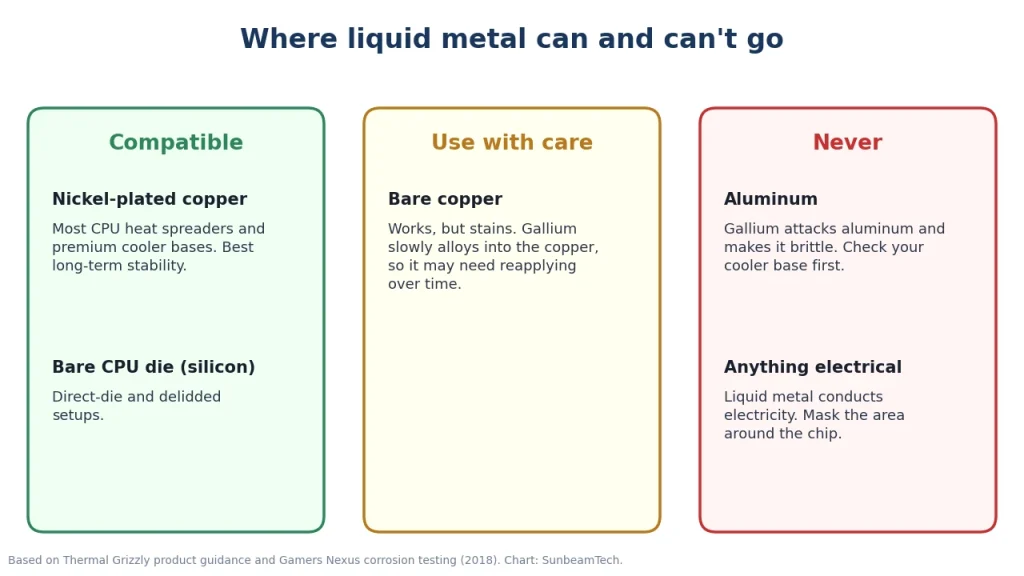
- 🟡 Bare copper: works, but stains, and gallium slowly alloys into it, so it may need reapplying
- 🔴 Aluminum: never; gallium attacks it and makes it brittle
- 🔴 Electrically conductive: a stray drop can short components
- 🔴 Not for beginners: needs masking, precision and patience

What Is Liquid Metal Thermal Paste, Exactly?
The Chemistry Behind It
Regular thermal paste is a carrier, usually silicone or oil, filled with heat-conducting particles such as zinc oxide or aluminum oxide. Liquid metal has no carrier and no particles. It’s a metal alloy, typically gallium mixed with indium and tin. Gamers Nexus notes that Thermal Grizzly’s Conductonaut, one of the best-known products, is a eutectic gallium-indium-tin alloy, with gallium making up most of the mix.
Pure gallium melts at about 29.8°C (85.6°F). Alloying it with indium and tin lowers the melting point below room temperature, so the compound is a liquid when you apply it.
Why the Particle Problem Matters
A CPU heat spreader and a cooler base look flat but are covered in microscopic ridges and dips. Regular paste fills those gaps with particles suspended in a carrier, which leaves a layer of a certain thickness between the two metals. Liquid metal wets both surfaces and flows into the gaps as a continuous metal layer. That thinner, more conductive layer is where its advantage comes from.
Liquid Metal vs. Regular Thermal Paste: The Numbers
Thermal Conductivity: The Core Spec
Liquid metals are commonly quoted at several times the thermal conductivity of paste: you’ll often see 73 W/m·K for Conductonaut and 12.5 W/m·K for Kryonaut. Treat those as marketing figures. Thermal Grizzly no longer prints conductivity values, explaining in its FAQ that they vary too much with contact pressure, temperature and surface, and ARCTIC deliberately doesn’t specify them either. Real-world temperatures depend on the whole setup.
| Product | Type | Published W/m·K | Electrically conductive | Safe with aluminum |
|---|---|---|---|---|
| ARCTIC MX-6 | Paste | Not published | No | Yes |
| Noctua NT-H2 | Paste | Not published | No | Yes |
| Thermal Grizzly Kryonaut | Paste | Not published (often quoted: 12.5) | No | Yes |
| Thermal Grizzly Conductonaut | Liquid metal | Not published (often quoted: 73) | Yes | No |
| Thermal Grizzly Conductonaut Extreme | Liquid metal | Not published | Yes | No |
Real-World Temperature Differences
How much you gain depends on where the bottleneck in your cooling is:
- Normal CPU, normal cooler: the gain over a quality paste is often only a few degrees, because the cooler and the CPU’s own internal interface limit performance more than the paste does.
- Delidded CPUs: the biggest wins. On chips that used regular paste under the heat spreader, replacing that internal layer with liquid metal is what delidding is for.
- Direct-die and laptops: the chip touches the cooler directly with a tiny contact area, so a better interface makes a noticeable difference.
If you’re chasing a few degrees on a standard desktop, check your cooler, fan curve and airflow first. Those usually matter more.
The Risks of Liquid Metal Thermal Paste
Electrical Conductivity: The Biggest Danger
Liquid metal conducts electricity like a wire. If it gets onto motherboard traces, capacitors or the tiny components around a laptop or GPU die, it can short them and cause permanent damage. That’s why experienced users mask the area around the chip with Kapton tape (and sometimes coat nearby components with clear nail polish) before applying it, and use very little.
Standard pastes are non-conductive or have very low conductivity, so a small smear is messy but harmless. That difference is the main reason liquid metal isn’t a beginner product.
Aluminum Corrosion: The Silent System Killer
Gallium attacks aluminum. In Gamers Nexus’ corrosion test, liquid metal on aluminum made the metal brittle and broke it down, while nickel-plated copper was a non-issue and bare copper stained heavily but kept performing. Thermal Grizzly itself warns that Conductonaut must never be used with aluminum coolers.
What that means in practice:
- CPU heat spreaders: current Intel and AMD desktop CPUs use nickel-plated copper heat spreaders, which are compatible. Liquid metal may leave marks on them and can make the printed markings hard to read; Thermal Grizzly warns this can affect your CPU warranty.
- Cooler bases: many budget air coolers use aluminum or direct-contact heat pipes in an aluminum block. Check the specs before you open the tube.
- Safe surfaces: nickel-plated copper is the best choice for long-term stability. Bare copper works but is not ideal (see below).
Application Difficulty
Liquid metal doesn’t behave like paste. You can’t put a dot in the middle and let the cooler spread it. You work it across the surface with the applicator or a cotton swab until it forms a thin, even, shiny film on both surfaces. It spreads further than you’d expect, so start with less than you think you need. Cleaning up a mistake is much harder than with paste.
Does Liquid Metal Dry Out?
Not in the way paste does. There’s no carrier to evaporate. But it can still disappear from the joint over time, depending on what it touches:
- On nickel-plated surfaces and bare dies, it’s generally stable for years.
- On bare copper, gallium slowly alloys into the copper. The liquid layer thins, the surfaces can end up stuck together, and temperatures rise. This is why many laptop owners using liquid metal on bare copper heatsinks end up reapplying it after a while.
Thermal Grizzly recommends nickel-plated copper surfaces for the best long-term results with its liquid metals.
How Long Does Liquid Metal Thermal Paste Last?
On nickel-plated copper, a correct liquid metal application can last for years without needing attention. On bare copper, expect it to degrade sooner as gallium is absorbed into the metal, and check your temperatures periodically. On aluminum it doesn’t “last” at all, because it damages the cooler.
Regular paste works differently: it can slowly dry out or get pushed out of the joint by heat cycles, but quality pastes typically last five years or more on a desktop CPU. See our guide on how long thermal paste lasts and how often to replace it.
Who Should Actually Use Liquid Metal Thermal Paste?
Skill-Level Risk/Reward Classifier
| User profile | Recommended? | Why |
|---|---|---|
| First-time builder | No | Conductivity and corrosion risk outweigh a small gain. Use a quality paste. |
| Experienced builder, normal cooling | Probably not | Gains are usually small; only worth it if you’re hitting thermal limits and your cooler is nickel-plated. |
| Overclocker with nickel-plated cooler | Yes | Every degree counts and the hardware is compatible. |
| Delid or direct-die enthusiast | Yes | This is the use case liquid metal is best at. |
| Laptop repaste | Only if experienced | Can help a lot, but dense components around the die make shorts a real risk. |
| PS5 owner | Only if experienced | The PS5 uses liquid metal from the factory; follow a model-specific guide. |
The Delidding Use Case
Delidding means removing a CPU’s heat spreader to replace the material between the silicon and the lid. It made the biggest difference on Intel CPUs that used regular paste under the heat spreader, such as the Core i7-8700K and earlier mainstream chips. From the 9th-generation K-series onward, Intel returned to soldering the heat spreader, which reduced the benefit of delidding. It’s risky, voids your warranty, and for most modern CPUs it’s an enthusiast project rather than a practical upgrade.
Liquid Metal on Laptops and the PS5
Laptops
Some gaming laptops use liquid metal from the factory. ASUS, for example, uses it on many ROG models. If your laptop came with liquid metal, don’t replace it with paste unless you know the cooler can take it, and don’t scrape it off carelessly: it’s conductive, and laptop boards are packed with tiny components right next to the chip.
Applying liquid metal to a laptop that shipped with paste can improve temperatures, but it’s one of the riskiest DIY jobs in PC hardware. Full teardown, careful masking and a check of the heatsink material (bare copper or nickel-plated) are essential. If the heatsink is bare copper, plan on reapplying it at some point.
PS5 Liquid Metal
Sony’s PlayStation 5 uses liquid metal between the processor and its cooler from the factory, with a seal around the chip to keep it contained. Unless your console is overheating after the warranty has ended, leave it alone. If you do open it, stick with liquid metal and follow a PS5-specific guide, because the cooler is designed around it.
Best Liquid Metal Thermal Paste Products: What to Buy
Top Picks Ranked
1. Thermal Grizzly Conductonaut: the default choice. The most widely used liquid metal among enthusiasts, often quoted at 73 W/m·K, and supplied with a needle applicator. Best on nickel-plated surfaces and bare dies.
2. Thermal Grizzly Conductonaut Extreme: the newer version. Thermal Grizzly describes it as a further development of Conductonaut and recommends nickel-plated coolers for the best long-term results. It costs more, and it still must not be used with aluminum.
3. Other liquid metals. Several brands sell gallium-based liquid metals, including Thermaltake’s TG-60. The same rules apply to all of them: conductive, aluminum-incompatible, and best on nickel.
How to Apply Liquid Metal Thermal Paste Safely
What You’ll Need
- Liquid metal with its applicator
- Kapton tape to mask around the chip, and optionally clear nail polish for nearby components on laptops and GPUs
- Isopropyl alcohol (90%+) and lint-free cloths or coffee filters
- Cotton swabs for spreading and cleanup
- Gloves, because it stains skin
Step-by-Step Application
- Confirm both surfaces are copper or nickel-plated copper. No aluminum.
- Clean the CPU and cooler base thoroughly with isopropyl alcohol.
- Mask the area around the chip with Kapton tape so any excess can’t reach the board.
- Apply a very small drop and work it across the surface until it forms a thin, even, shiny film. Coat the cooler base lightly as well.
- Check the edges for any beads of excess and remove them with a dry swab.
- Mount the cooler carefully and evenly, then check temperatures.
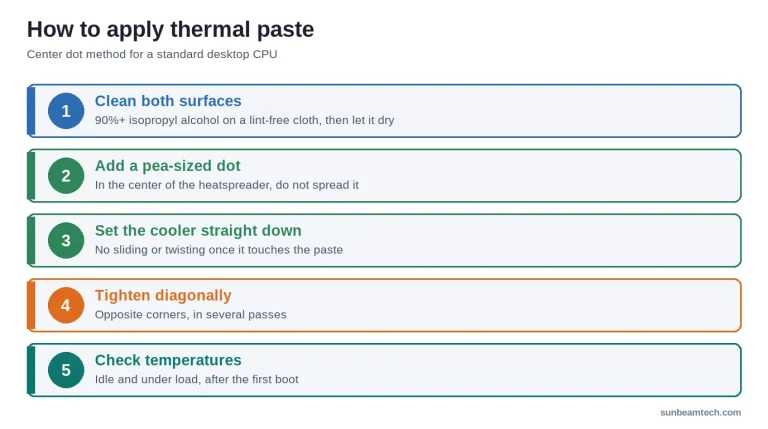
For general cooler mounting and surface prep, see how to apply thermal paste the right way.
Liquid Metal Thermal Paste: Cost vs. Performance Over Time
Price isn’t the deciding factor. A tube of liquid metal and a tube of premium paste cost about the same. What decides it is risk versus reward. On compatible, nickel-plated hardware where the interface is the bottleneck, liquid metal can buy you lower temperatures, quieter fans or a little more overclocking headroom. On a typical desktop at stock settings, a quality paste gets you most of the way there with none of the risk.
FAQ: Liquid Metal Thermal Paste Questions Answered
How long does liquid metal thermal paste last?
On nickel-plated copper and bare dies, it can last for years. On bare copper, gallium slowly alloys into the metal, so the layer thins and it may need reapplying. It must never be used on aluminum.
Does liquid metal dry out?
It doesn’t evaporate like paste, but on bare copper it can appear to dry out because gallium is absorbed into the copper. On nickel-plated surfaces this happens far less.
Is liquid metal thermal paste safe for all CPUs?
Current Intel and AMD desktop CPUs have nickel-plated copper heat spreaders, which are compatible, though liquid metal can stain them and affect the markings. The real restrictions are aluminum coolers, which it attacks, and anything electrical, because it conducts electricity.
What is liquid metal thermal paste made of?
A gallium-based alloy, usually gallium with indium and tin. It has no carrier and no filler particles, and it’s liquid at room temperature.
Is liquid metal better than thermal paste?
It transfers heat better, but for most desktop builds the real-world gain is small compared to the risk. It’s better for delidded CPUs, direct-die cooling and some laptops; a quality paste is better for almost everyone else.
Does liquid metal work on GPUs?
It can, but GPU dies are surrounded by tiny components, so the short-circuit risk is higher than on a CPU. For most people repasting a graphics card, a non-conductive paste is the right choice. See our GPU repasting guide.
The Bottom Line
Liquid metal is the best-performing thermal interface you can buy, and the easiest to get badly wrong. Use it on nickel-plated copper or bare dies, never on aluminum, and mask everything around the chip. If you’re not delidding, running direct-die or squeezing every degree out of an overclock, a quality non-conductive paste is the smarter choice. Start with our guide on what thermal paste is if you’re weighing your options.

Alex has been building and tweaking custom PCs for over 12 years. From budget builds to full custom water loops, he’s assembled more than 50 systems and helped hundreds of builders troubleshoot their rigs. When he’s not benchmarking the latest hardware, you’ll find him optimizing airflow setups or stress-testing overclocks.