CMOS Battery: What It Does, Signs It’s Dying and How to Replace It
The CMOS battery is a coin cell, usually a CR2032, that keeps your motherboard’s clock and BIOS settings alive while the PC has no power.
Last updated: September 2026
Table of Contents
- What the CMOS Battery Does
- Signs Your CMOS Battery Is Dying
- How Long Does a CMOS Battery Last?
- Which Battery Do You Need?
- Before You Start
- 1. Your BitLocker recovery key
- 2. Photos of your BIOS settings
- How to Replace the CMOS Battery in a Desktop
- Boards with a battery on a cable
- Laptops and Branded Desktops
- After Replacing: Settings to Put Back
- Frequently Asked Questions
- What does the CMOS battery do?
- Can a PC run without a CMOS battery?
- Is a CMOS battery a CR2032?
- Can I use a CR2025 instead of a CR2032?
- How do I know if my laptop CMOS battery is bad?
- Will replacing the CMOS battery delete my files?
- Does removing the CMOS battery reset the BIOS?
- If the Problem Doesn’t Go Away
If your PC keeps waking up in the wrong year, or your BIOS settings vanish every time you pull the plug, the small silver coin on your motherboard is the first suspect. Replacing it is one of the simplest jobs inside a PC. This guide covers what the CMOS battery actually does, the signs that it’s running out, which battery to buy, how to swap it on a desktop, a compact board or a laptop, and what to set again afterwards so Windows doesn’t lock you out.
- 🟢 Most desktops use a CR2032: 3 volts, 20 mm across
- 🟢 Classic sign: wrong date and time after the PC was unplugged
- 🟡 Removing the battery erases your BIOS settings, so photograph them first
- 🟡 Using BitLocker? Have your recovery key ready before you start
- 🔴 Unplug the PC first, and keep coin cells away from children: a swallowed one can cause serious burns within hours
- 🟢 Afterwards: set date and time, load defaults, then put back XMP, boot order and TPM
What the CMOS Battery Does
Your motherboard stores its settings in a small block of memory next to the real-time clock. ASUS describes it as the Real Time Clock (RTC) RAM in CMOS, which holds the date, time, BIOS password and BIOS setup parameters. That memory needs a trickle of power to keep its contents, and when the PC is unplugged, the coin cell supplies it.
HP’s overview lists what depends on it: system time and date, hardware configuration, boot sequence, power management settings and the BIOS password if you set one. It does not store Windows, your files or the BIOS firmware itself. Those live on your drive and on the BIOS flash chip, and a flat battery doesn’t touch them.
One detail explains why some PCs go years without trouble and others lose the clock quickly. On its NUC mini PCs, ASUS states that standby current from the power supply extends the battery’s life while the unit is plugged in. A PC that stays connected to a live outlet leans on the battery less than one that sits on a switched-off power strip or in a closet.
Signs Your CMOS Battery Is Dying
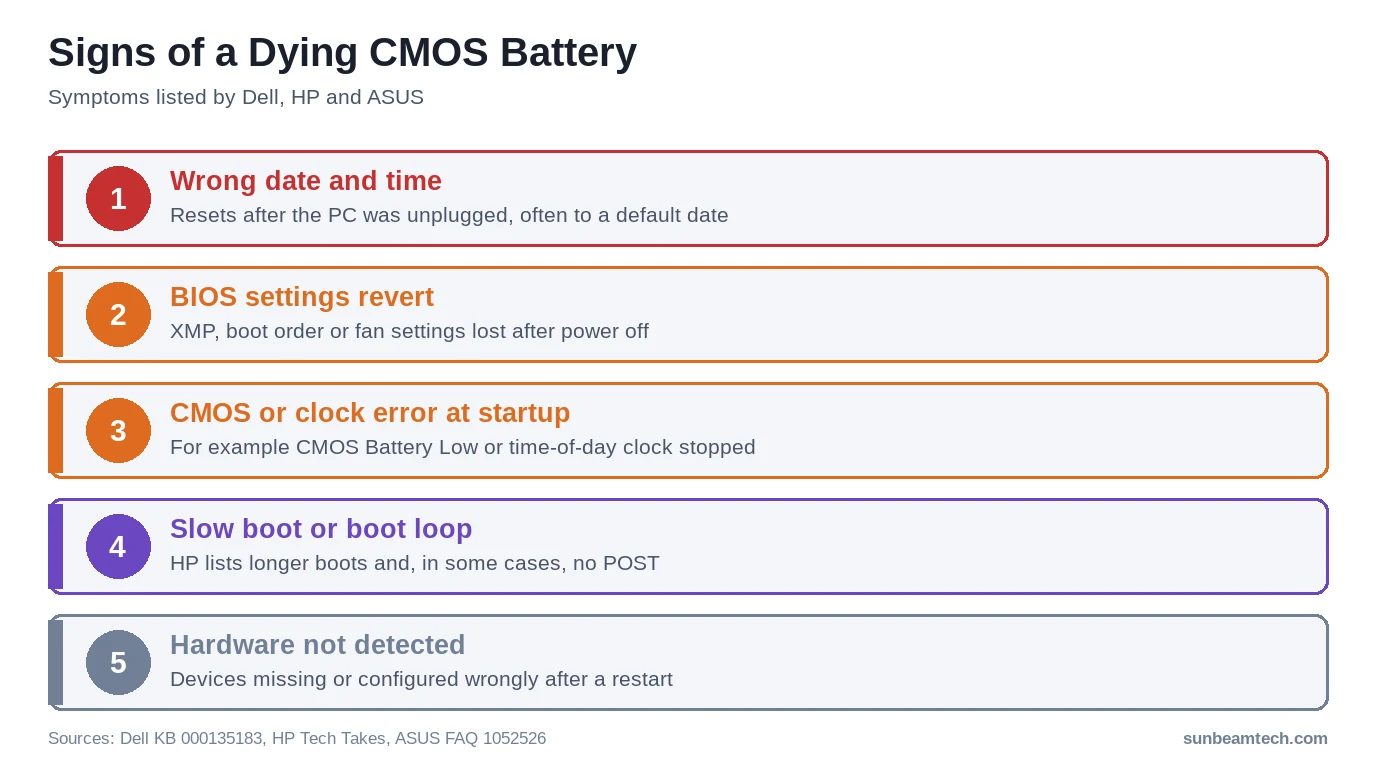
Manufacturers describe a consistent set of symptoms. Dell lists an incorrect or slow date and time in the BIOS, BIOS settings lost when the computer is powered off, and a “time-of-day clock stopped” error message. HP adds a date that falls back to a default such as January 1, 2000, CMOS or BIOS error messages at startup, hardware that isn’t detected or configured correctly, noticeably longer boots, and in some cases a failure to POST or a boot loop. On NUC systems ASUS says the message CMOS Battery Low can appear at startup.
The pattern matters more than any single symptom. A clock that is wrong only after the PC was fully unplugged, and settings like XMP that revert at the same moment, point strongly at the battery. A clock that drifts while the PC is running normally is more likely a Windows time sync issue.
Settings that won’t stick are a common side effect. Our guide to SVM mode in BIOS names the battery as the first suspect when virtualization keeps switching itself off, and the ErP setting guide mentions battery age in its boot troubleshooting too.
How Long Does a CMOS Battery Last?
Sources don’t agree on a single number, and the range is wide:
| Source | Stated lifespan |
|---|---|
| Dell (desktops) | Typically 2 to 3 years |
| ASUS (NUC) | An estimated 3 years when not plugged into AC power; longer while plugged in |
| HP | 2 to 10 years, depending on battery quality, operating conditions and use |
| Corsair | Up to 10 years |
The honest answer is that it depends on how much time the PC spends without standby power. A desktop that’s always plugged in can go many years; a machine stored unplugged drains its cell much faster. Don’t replace a working battery on a schedule. Replace it when the symptoms above show up.
Which Battery Do You Need?
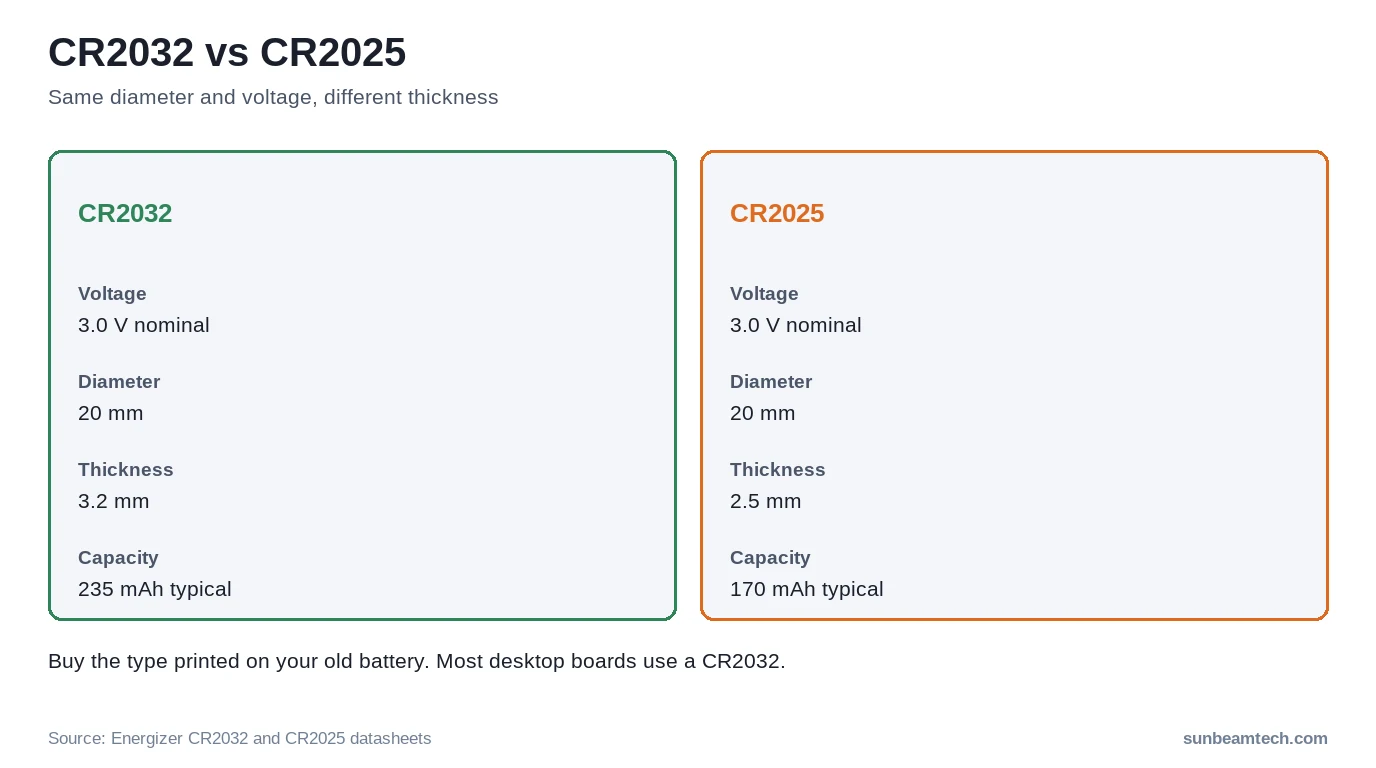
Dell, HP and Corsair all name the CR2032 as the usual desktop CMOS battery, and ASUS uses one in its NUCs as well. Dell describes it as a 3V lithium coin cell, the same kind found in watches and small electronics. According to Energizer’s CR2032 datasheet, the cell is 20 mm across and 3.2 mm thick, with a nominal 3.0 volts and a typical capacity of 235 mAh.
The CR2025 looks almost identical. It has the same 20 mm diameter and the same 3.0 volts, but Energizer’s CR2025 datasheet lists it at 2.5 mm thick with a typical 170 mAh. A thinner cell can sit loosely in a holder built for a CR2032 and has less capacity. Dell’s laptop guide says to replace the battery only with one of the same type, so read the model number printed on the old cell and buy that.
Two more buying notes:
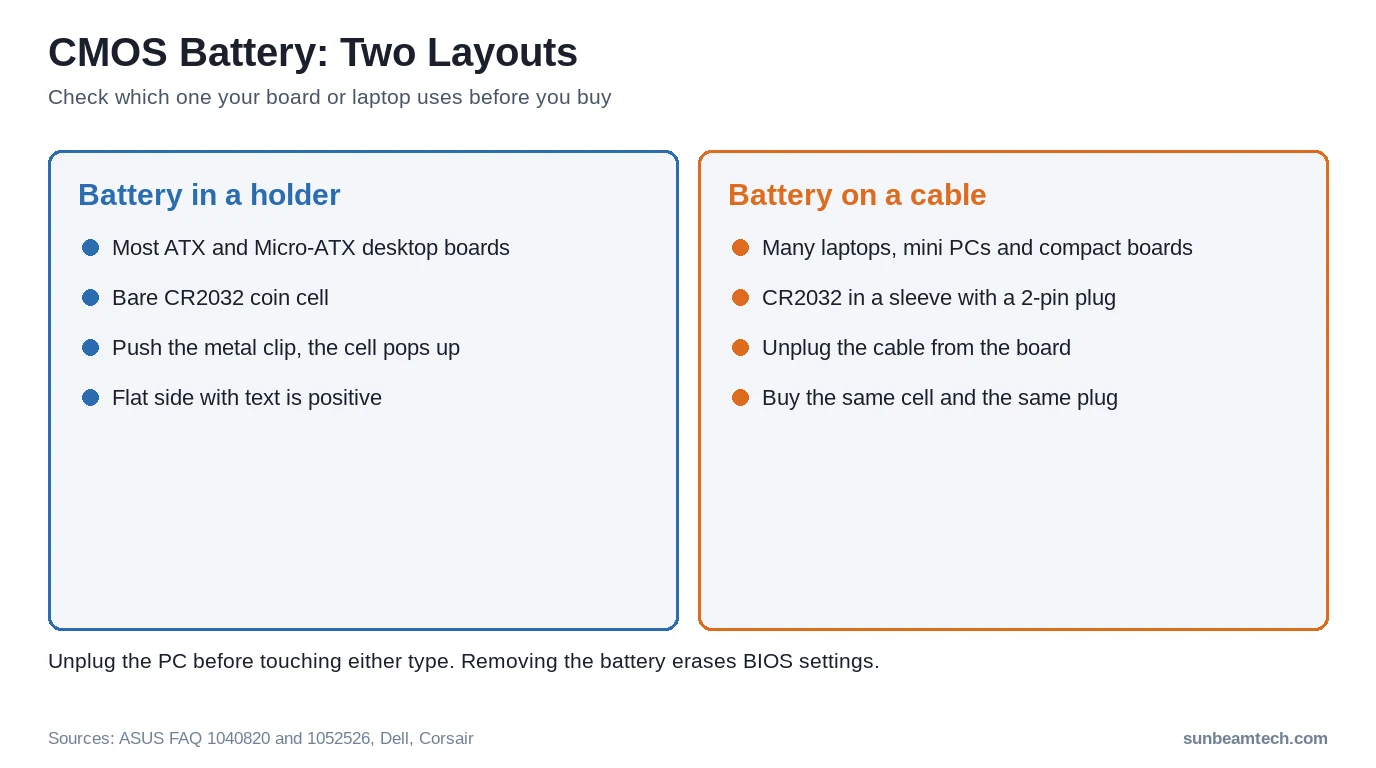
- Batteries on a cable. Many laptops, mini PCs and some small boards use a coin cell wrapped in plastic with two wires and a small plug. ASUS notes for its NUCs that it doesn’t sell replacements and that CR2032 cells with a wire and Molex connector may not be available locally. Match the plug, not just the cell.
- Buy new. Dell says to install only brand-new batteries, never one pulled from another device.
Before You Start
Pulling the battery erases the BIOS settings along with the clock, which Dell states directly. Two things to sort out first:
1. Your BitLocker recovery key
Many Windows 11 PCs have BitLocker or device encryption on by default. Microsoft’s BitLocker recovery overview lists turning off or clearing the TPM among the events that send Windows into recovery mode. On most desktop boards the firmware TPM (fTPM on AMD, PTT on Intel) is a BIOS setting, so a reset to defaults can change it. If Windows then asks for the 48-digit key, you need it. Microsoft keeps a copy in your Microsoft account at aka.ms/myrecoverykey if the key was backed up there. Check that before you open the case.
2. Photos of your BIOS settings
Take phone photos of any BIOS page you changed: memory profile, fan curves, boot order, virtualization, TPM and Secure Boot. You’ll set these again in a few minutes.
How to Replace the CMOS Battery in a Desktop
- Shut down and unplug. Dell says to disconnect all power sources before opening the cover. Then press and hold the power button for 10 to 15 seconds to discharge static electricity, as Dell recommends.
- Ground yourself. Use a wrist strap or touch an unpainted metal part of the case now and then.
- Find the battery. It’s a silver disc about 20 mm across, as Corsair describes it. On ATX boards it often sits near the PCIe slots and can hide under a long graphics card. If you can’t see it, check the board layout page in your manual, or remove the GPU to reach it.
- Release it. Most holders have a small metal clip. Push it gently away from the battery and the cell pops up. Dell recommends a plastic scribe and no metal objects, so use a plastic spudger or a fingernail rather than a screwdriver.
- Note the orientation. The flat side with the text is the positive side. Dell says the positive side is the flat side, and Corsair says to insert it positive side facing out, which on most boards means facing up.
- Insert the new cell. Slide it under the retaining edge and press until it clicks into the holder.
- Close up, reconnect and power on. Enter the BIOS (usually Delete or F2), set the date and time, and go through the settings list further down.
Dispose of the old battery according to local rules. Dell says as much, and ASUS manuals tell you not to throw the button cell in municipal waste. Many electronics stores run battery drop-off bins.
Boards with a battery on a cable
Some compact boards and mini PCs such as the NUC use a battery on a short 2-pin cable instead of a holder. ASUS’s own instruction for this layout is to remove the battery’s 2-pin cable from the board. The cell is often stuck to the board or case with adhesive tape. On most NUCs ASUS says the battery sits on the underside of the motherboard, so the board has to come out, and ASUS recommends care and an anti-static wrist strap for that job.
Laptops and Branded Desktops
Laptops rarely make this easy. HP notes that reaching the battery may mean removing the bottom panel or taking the laptop further apart, and many models use the wired type described above. Dell’s laptop guide sends you to the service manual for your exact model and warns that the system board can be damaged by prying off the socket or breaking circuit traces. It says to use a plastic pry tool between the battery and the socket, and to support the connector firmly while removing a wired battery.
For a laptop or a pre-built desktop, search the maker’s support site for your model name plus “service manual” and follow the coin-cell section. If the laptop is still under warranty, check the warranty terms before you open it.
After Replacing: Settings to Put Back
The board now runs on defaults. Work through this list before you close the BIOS:
| Setting | Why it matters |
|---|---|
| Date and time | Reset to a default date; set it in the BIOS main page |
| Load optimized defaults | Gives you a clean starting point before you change anything else |
| XMP or EXPO | RAM falls back to base speed until you enable XMP in the BIOS again |
| Boot order and CSM | Windows Boot Manager first; check that the CSM setting matches how Windows was installed |
| TPM (fTPM / PTT) and Secure Boot | Needed for Windows 11 and for BitLocker to unlock without the recovery key |
| Fan curves and limits | A lowered CPU fan limit is gone too, which can bring back a CPU fan error with quiet fans |
Save with F10 and let Windows boot. Once you’re online, let Windows sync the clock so the time is exact.
Frequently Asked Questions
What does the CMOS battery do?
It powers the small memory that holds your BIOS settings, the BIOS password and the real-time clock while the PC has no mains power. Without it, the date, time and settings are lost whenever the PC is unplugged.
Can a PC run without a CMOS battery?
Often it can start, but it forgets the time and BIOS settings every time it loses power, and HP and Dell both list boot problems, including failure to POST or to load the operating system, among the possible effects. Treat it as a temporary state and fit a new cell.
Is a CMOS battery a CR2032?
On most desktop motherboards, yes: Dell, HP and Corsair all name the CR2032. Laptops and mini PCs often use a CR2032 in a plastic sleeve with wires and a plug instead, and some devices use other sizes, so check the number on your old battery.
Can I use a CR2025 instead of a CR2032?
It has the same diameter and voltage, but Energizer lists it as 2.5 mm thick instead of 3.2 mm, with less capacity, so it may sit loosely in a CR2032 holder. Dell says to replace the battery with the same type, so buy a CR2032 if that’s what came out.
How do I know if my laptop CMOS battery is bad?
The signs are the same as on a desktop: the date and time are wrong after the laptop was fully drained or disconnected, BIOS settings revert, or a CMOS or clock error appears at startup. Because laptop batteries are harder to reach, confirm the pattern a couple of times before opening the case.
Will replacing the CMOS battery delete my files?
No. It resets the BIOS settings and the clock, not your drives. Windows, programs and files stay where they are. The one surprise to prepare for is a BitLocker recovery prompt if the TPM setting changed.
Does removing the CMOS battery reset the BIOS?
Removing it erases the settings, as Dell notes, but on its own it can be slow and unreliable as a reset method. ASUS combines battery removal with shorting the clear CMOS pins. For a deliberate reset, follow our guide on how to clear CMOS.
If the Problem Doesn’t Go Away
The clock is still wrong after a new battery. Check that the cell is fully seated and the right way up, with the flat positive side facing out. A loose CR2025 in a CR2032 holder can lose contact. If the time is correct in the BIOS but wrong in Windows, the battery is fine and the problem is the time zone or time sync in Windows.
The PC won’t POST after the swap. The battery rarely causes that on its own. Check that nothing else got knocked loose while you reached for the cell, especially the graphics card, RAM and the CPU power cable. Memory training after a reset can also take a minute or more before a picture appears. If it still doesn’t start, work through our PC won’t turn on checklist. Problems that started right after a power cut are covered in PC won’t turn on after a power outage.
Windows asks for the BitLocker recovery key. Enter the key from aka.ms/myrecoverykey, then go back into the BIOS and switch fTPM or PTT and Secure Boot on as they were.
Settings still reset with a fresh battery. Note down your motherboard model and BIOS version (both on the BIOS main page), what you changed, and exactly when the settings disappear. That’s the information the board maker’s support team will ask for first.

Alex has been building and tweaking custom PCs for over 12 years. From budget builds to full custom water loops, he’s assembled more than 50 systems and helped hundreds of builders troubleshoot their rigs. When he’s not benchmarking the latest hardware, you’ll find him optimizing airflow setups or stress-testing overclocks.


