Motherboard Sizes: ATX vs Micro-ATX vs Mini-ITX vs E-ATX (Exact Dimensions)
ATX is 305 x 244 mm, micro-ATX up to 244 x 244 mm, Mini-ITX 170 x 170 mm. E-ATX has no single size. For most builds, buy ATX.
Last updated: November 2026
Table of Contents
Motherboard size decides three things: which cases the board fits, how many slots and drives you can add later, and how crowded the build gets. It doesn’t decide how fast your PC is. The same chipset and socket come in ATX, micro-ATX and Mini-ITX, as the B850 boards further down show.
Three sizes come from real specifications with fixed dimensions and mounting holes: ATX, micro-ATX and Mini-ITX. E-ATX is a label that board makers use for anything deeper than ATX, and two “E-ATX” boards can differ by almost a centimeter. It gets its own section below.
Our advice for most builds: ATX in a mid-tower. Go smaller when the case is the point of the build, and go bigger only for a specific board you need, after checking the case in millimeters. Already have a case? Which motherboard fits which case starts with how to check the board you have now.
Motherboard dimensions: the exact numbers
These are the maximum sizes. A board can be smaller than its form factor and still fit, but never bigger. The ATX and micro-ATX outlines come from the ATX specification, which also fixes the mounting holes and the slot spacing of 0.8 inch (20.3 mm) between expansion slots.
| Size | Dimensions | Expansion slots | Standard? |
|---|---|---|---|
| ATX | 12 x 9.6 in (305 x 244 mm) | Up to 7 | Yes, fixed outline and holes |
| Micro-ATX | Up to 9.6 x 9.6 in (244 x 244 mm) | Up to 4 | Yes, shares most ATX holes |
| Mini-ITX | 6.7 x 6.7 in (170 x 170 mm) | 1 | Yes, one fixed size |
| E-ATX | 12 in x about 10.6 to 10.9 in (305 x 269 to 277 mm) on current boards | Varies | No, each maker picks its own depth |
| EEB | 12 x 13 in (305 x 330 mm) | 7 on the WRX90E-SAGE SE below | Server and workstation size |
The 12-inch side is the rear edge, with the I/O ports at the top and the slot openings below them. That’s why E-ATX and EEB, which keep the 12-inch edge, grow in one direction only: toward the front of the case. The drawing shows all of them at the same scale, with the mounting holes from the ATX spec.
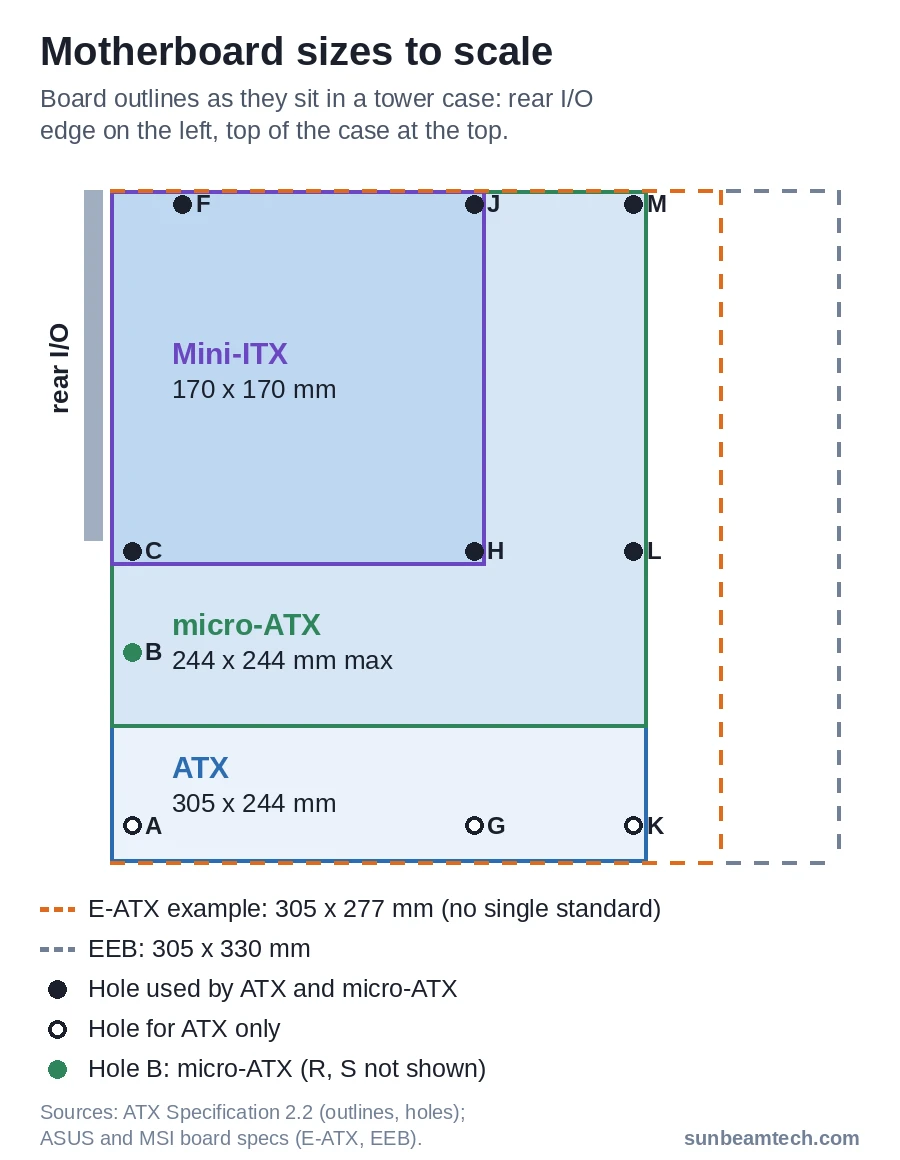
Two things in that drawing matter when you build. Micro-ATX is ATX with the bottom 61 mm cut off, which removes three slot positions and the bottom row of holes. And a micro-ATX board can be narrower than 244 mm: the PRIME B850M-K is 244 x 221 mm and drops to two RAM slots to get there.
E-ATX vs ATX: E-ATX isn’t one size
E-ATX has no single depth that board makers stick to. They keep the 305 mm edge and go deeper than 244 mm, and how much deeper is up to them:
| Board | Sold as | Size | Deeper than ATX by |
|---|---|---|---|
| Gigabyte X870E AORUS XTREME AI TOP | E-ATX | 305 x 269 mm | 25 mm |
| ASUS ROG CROSSHAIR X870E EXTREME | E-ATX | 305 x 277 mm | 33 mm |
| MSI MEG X870E GODLIKE | E-ATX | 305 x 277 mm | 33 mm |
| ASUS Pro WS WRX90E-SAGE SE | EEB | 305 x 330 mm | 86 mm |
Case makers deal with this by giving a limit in millimeters. The Lian Li O11 Dynamic EVO lists E-ATX “Under 280mm”, so all three E-ATX boards above are within its limit, and an EEB board isn’t. A case that only says “E-ATX” without a number doesn’t tell you anything about the deepest boards. Look for the number, or ask the case maker before you buy.
EEB and E-ATX aren’t interchangeable either, even where the outline is the same. Asked about one of its E-ATX server boards, Supermicro points out that “not all screw holes line up the same” between E-ATX and SSI-EEB cases. For an EEB board such as the WRX90E-SAGE SE, buy a case that lists EEB.
On a consumer platform, E-ATX buys you less than the size suggests. The CROSSHAIR X870E EXTREME still has four RAM slots, the same as a mid-range ATX board. What it does add is heavier power delivery and two extra M.2 slots on a plug-in DIMM.2 card. Of the 43 boards on the ASUS AMD 800-series spec sheet, only two are E-ATX.
What each size gets you on real boards
Size limits the slots and connectors, and that’s where the real difference shows. Here’s one generation from one maker, so only the size and the price tier change:
| Board (size) | RAM slots | M.2 / SATA | PCIe slots |
|---|---|---|---|
| TUF GAMING B850-PLUS WIFI (ATX) | 4 | 3 / 4 | x16, x16-size running x4, two x1 |
| TUF GAMING B850M-PLUS WIFI (micro-ATX) | 4 | 3 / 4 | x16, one x1 |
| PRIME B850M-K (narrow micro-ATX) | 2 | 2 / 4 | x16, x16-size running x4 |
| ROG STRIX B850-I GAMING WIFI (Mini-ITX) | 2 (max 128 GB) | 2 / 2 | x16 only |
Read it like this. The graphics slot is the same PCIe 5.0 x16 on all of them with a Ryzen 7000 or 9000, so a single graphics card runs the same on any size. What you lose going down is everything around it.
- ATX to micro-ATX: you mostly lose the extra slots below the graphics card. A full-size micro-ATX board can keep four RAM slots and three M.2 slots, so what you give up is room for extra cards.
- Cut-down micro-ATX: a board narrower than 244 mm can drop to two RAM slots and fewer M.2 slots, like the B850M-K. Check the RAM slot count if you plan to add memory later.
- Mini-ITX: two RAM slots, one slot for the graphics card, and two SATA ports on both ITX boards named here. Some ITX boards put an M.2 slot on the back: on the ASRock B850I Lightning WiFi, M2_2 sits on the back side, so fit that SSD before the board goes into the case.
Power delivery is where size matters least. The micro-ATX TUF B850M-PLUS WIFI has the same 14+2+1 layout of 80 A power stages as the ATX TUF B850-PLUS WIFI. The ATX PRIME B850-PLUS has 8+2+1, and the Mini-ITX ROG STRIX B850-I has 10+2+1 with 90 A stages. In this lineup, VRM strength follows the price tier, not the board size. Compare the power stages of the actual models you’re choosing between, not the form factors.
Count your drives before you pick the smaller size. Our guide to how many SSDs a PC can take explains how M.2 and SATA ports share lanes, and M.2 form factors covers which drive lengths a slot takes. If you’re choosing between chipsets as well, see X870 vs X870E.
Which motherboard fits which case
Start with the board you have. Press Win + R, type msinfo32 and press Enter. With System Summary selected, the BaseBoard Manufacturer and BaseBoard Product lines give the maker and model. Look that model up on the maker’s site: its spec page lists the form factor and the size. No Windows? The model name is printed on the board itself.
Every case lists the board sizes it takes. Go by that list, not by the case name. “Mid-tower” and “full tower” don’t tell you which boards fit.
Smaller boards fit bigger cases because the holes line up. The ATX spec defines nine holes for ATX (A, C, F, G, H, J, K, L, M) and nine for micro-ATX (B, C, F, H, J, L, M, R, S). Six of them are shared, and those six hold a micro-ATX board in an ATX case. That’s why many ATX cases take micro-ATX boards too. The case’s support list is what confirms it has the right standoff positions.
What goes wrong in practice:
- A standoff left under a smaller board. If your case came with standoffs fitted in the ATX positions, check them. A standoff that doesn’t line up with a hole in your board touches bare circuit board. Move or remove it before the board goes in; motherboard standoffs explains why, and standoff screw sizes covers the thread if you need spares.
- E-ATX in a case that only lists ATX. A 277 mm board sticks out 33 mm past the ATX outline, where an ATX-only case has no standoff, and it can cover the cable holes beside the board. Don’t do it: that edge won’t be supported. Look for a case with an E-ATX limit in millimeters that clears your board.
- A thick graphics card in a micro-ATX or ITX build. The ATX slot pitch is 20.3 mm, so a card with a 3-slot cooler covers the two slot positions below it. On a micro-ATX board that can be the only other slot. The cooler can also hang over the front-panel, fan and USB headers on the bottom edge, so plug those cables in before the card goes in. In a small case, also check the case’s maximum card length and slot count before you buy the card; how to install a GPU shows the slot cover and support steps.
- Back-connector boards. Boards with the plugs on the back, such as ASUS’s BTF models, keep a normal ATX or micro-ATX footprint but need a case made for hidden connectors. ASUS lists its own BTF-ready cases and sends you to the case maker for everything else.
For the smallest builds, the case decides almost everything else: cooler height, card length and power supply type. Our Mini-ITX case comparison lists those limits per case, and low-profile CPU coolers sorts coolers by height.
ATX is the right size for most builds; go smaller only for the case
Pick the size in this order:
- Start with ATX. It fits any case that lists ATX, keeps four RAM slots, three M.2 slots on the boards above and room for a second card, and the power delivery is no worse than the smaller boards at the same price tier.
- Choose micro-ATX when you want a smaller case and you’ll only ever run one graphics card. Pick a full 244 x 244 mm board with four RAM slots if you want to add memory later.
- Choose Mini-ITX only when the small case is the goal. Accept two RAM slots, one card and fewer drives, and choose the case first, then the cooler and card that fit it.
- Choose E-ATX only for a specific board whose features you need. Check the board’s depth in millimeters against the case’s E-ATX limit. For a 12 x 13 inch EEB board, buy a case that lists EEB.
If you’re unsure between two sizes, take the bigger one when the case allows it. An unused slot does no harm, and one you need later on a smaller board means a new board.
Want our guides higher in your Google results? Add SunbeamTech as a preferred source.


Alex Rivera writes SunbeamTech’s guides on BIOS settings, motherboard headers, cooling and PC builds. Every guide starts from the manufacturer’s documentation and the questions builders actually search for, and gets checked against AMD, Intel, NVIDIA and board-vendor sources before it goes live. Spotted a mistake? Email [email protected] and it gets fixed.