White Gaming Setup Ideas: Clean Builds That Actually Look Good
A white gaming setup is a PC workstation or console gaming space built around a white color scheme, using white desk surfaces, cases, peripherals, and room decor, often paired with accent colors like black, blue, purple, pink, or natural wood tones for contrast and visual depth.
Last updated: April 2026
Table of Contents
- What Makes a White Gaming Setup Actually Work
- The Core Design Principles (Don’t Skip These)
- White vs. Black Gaming Setup, Which Is Right for You?
- White Gaming Setup Ideas by Color Combination
- Black and White Gaming Setup, The Classic Contrast
- White and Blue Gaming Setup, Crisp and Cool
- White and Purple Gaming Setup, Bold and Distinctive
- Pink and White Gaming Setup, The Aesthetic Darling
- Red and White Gaming Setup, Bold and High-Energy
- Green and White Gaming Setup, Fresh and Organic
- White and Wood Gaming Setup, Warm Minimalism
- Building an All White Gaming PC, What You Actually Need
- White PC Case Options (By Budget)
- White Peripherals That Don’t Compromise Performance
- White CPU Coolers and Fans, The Details That Make a Build
- Choosing the Right White Gaming Desk Setup
- Desk Size and Shape Recommendations
- Top White Gaming Desks by Use Case
- Desk Accessories That Complete the Look
- Room-Level Design, Going Beyond the Desk
- White 3D Wall Panels, The Fastest Room Upgrade
- Lighting Strategy for White Setups
- White Gaming Setup Accessories and Finishing Touches
- White Gaming Setup for PS5 and Console Gamers
- Maintaining a White Gaming Setup, The Honest Truth
- What Actually Gets Dirty and How Fast
- Cleaning and Maintenance Schedule
- FAQ, White Gaming Setup Questions Answered
- What is the best color for a gaming setup?
- Are white PC builds good for gaming?
- Do white PC builds get dirty faster?
- What’s the most popular white gaming setup color combination?
- How much does a full white gaming setup cost?
- Quick-Start White Gaming Setup Checklist
- Wrapping Up
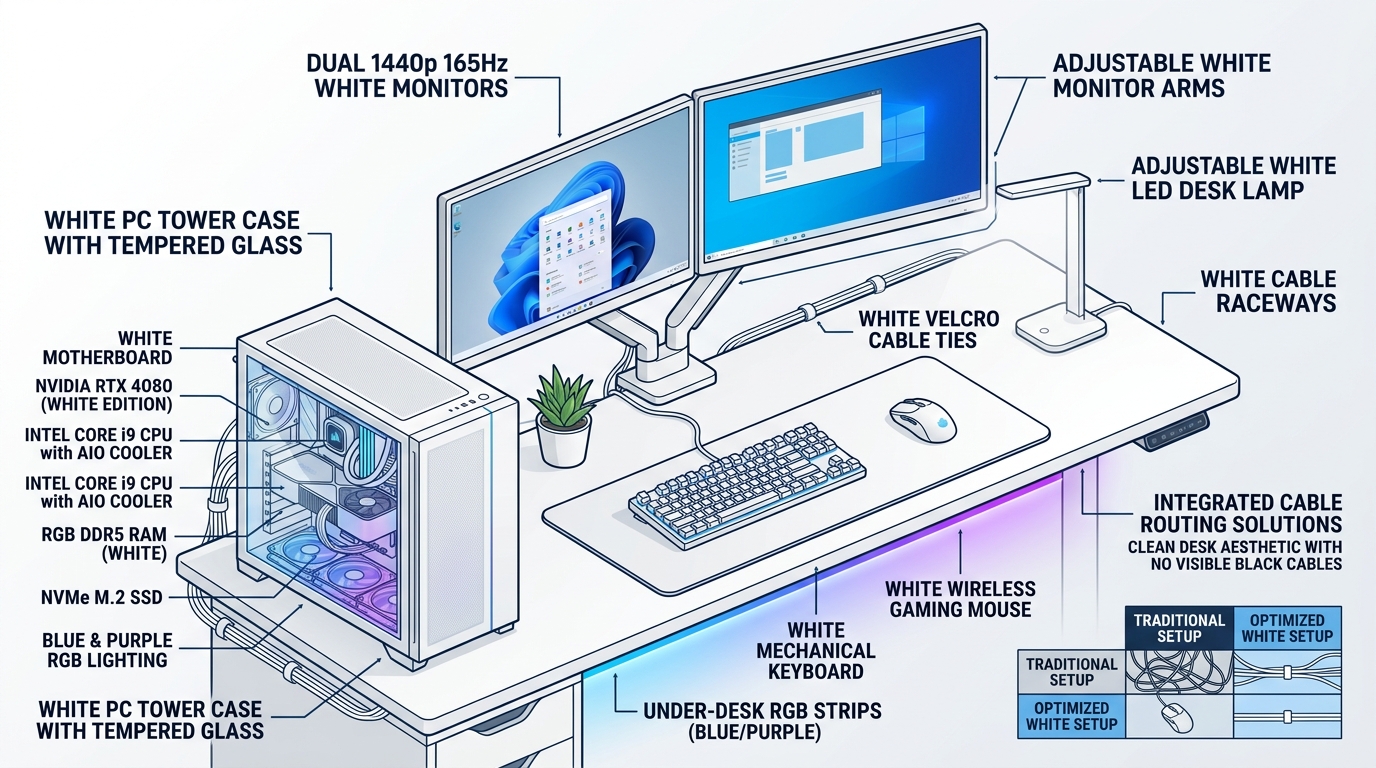
Most gaming setups default to black everything, neon RGB, and a dark room. White flips that entirely. White surfaces amplify light, make RGB pop harder, and create a clean, intentional look that stands out in r/battlestations threads for the right reasons. Pinterest data backs this up: “white gaming setup” pulls over 16,000 monthly searches, putting it in the top three most-searched gaming setup color terms. This guide covers every color combination that works, which white PC cases and peripherals are worth buying, which desks hold up, and how to handle the maintenance reality that most articles skip entirely.
What Makes a White Gaming Setup Actually Work
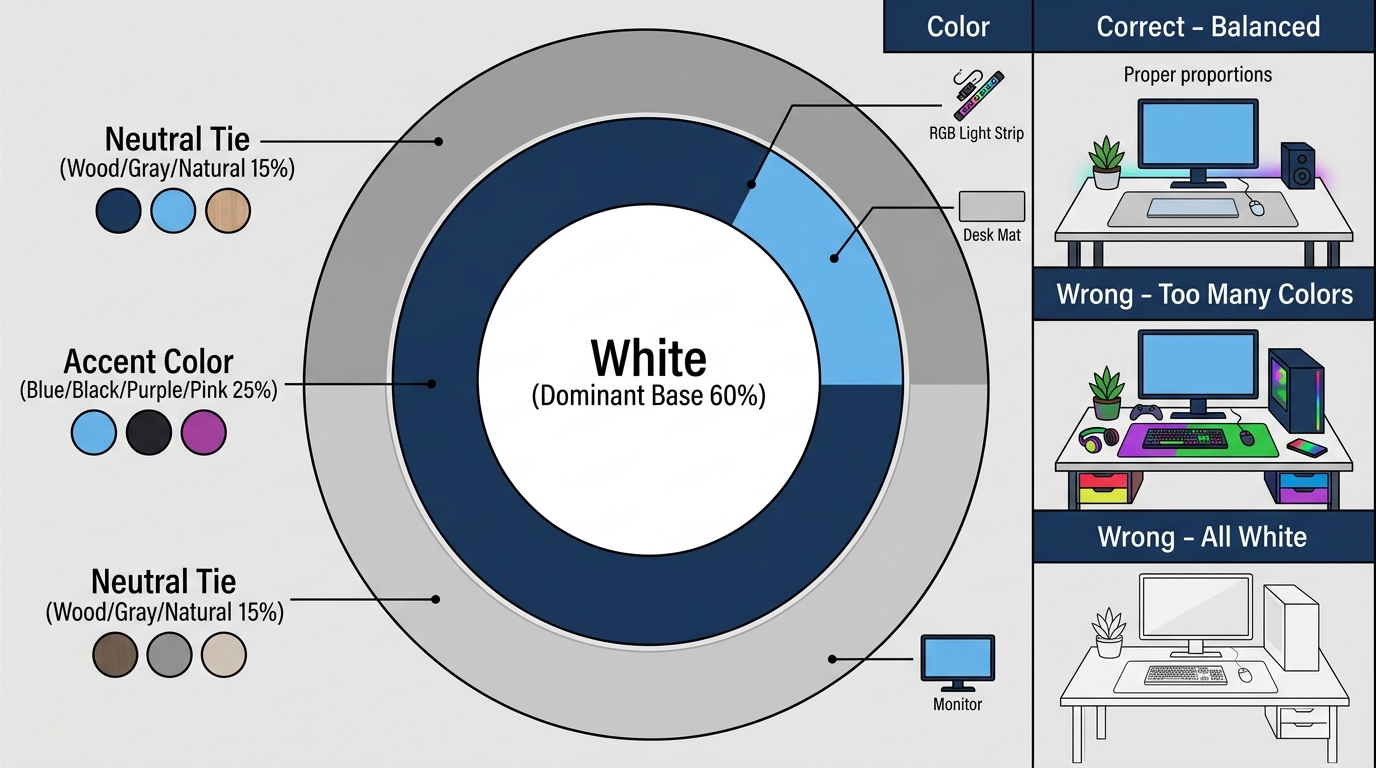
Throwing white components on a desk doesn’t automatically produce a clean setup. There’s a structure behind the setups that look intentional rather than accidental. Skip these principles and you’ll end up with something that looks sterile rather than sharp.
The Core Design Principles (Don’t Skip These)
The rule of three is your foundation: white as your dominant base color, one accent color (blue, black, purple, pink, green, red, or wood tones), and one neutral to tie it together. That’s it. Three elements. Going beyond that is where setups start looking chaotic.
Lighting hits different on white surfaces. White reflects RGB instead of absorbing it, which means a $30 LED strip under a white desk edge produces more visible glow than the same strip under a black desk. You need roughly 30% less RGB brightness on white setups to achieve the same visual effect as a dark setup. This is worth knowing before you crank everything to full saturation and blow out the whole look.
Texture variation is what prevents the “hospital ward” problem. Mixing matte and glossy surfaces, adding a fabric desk mat, using a tempered glass panel on the PC case, and including one organic element (a plant, a wood surface) breaks the monotony. Pure gloss-on-gloss white looks clinical. Matte-dominant white with selective gloss accents looks intentional.
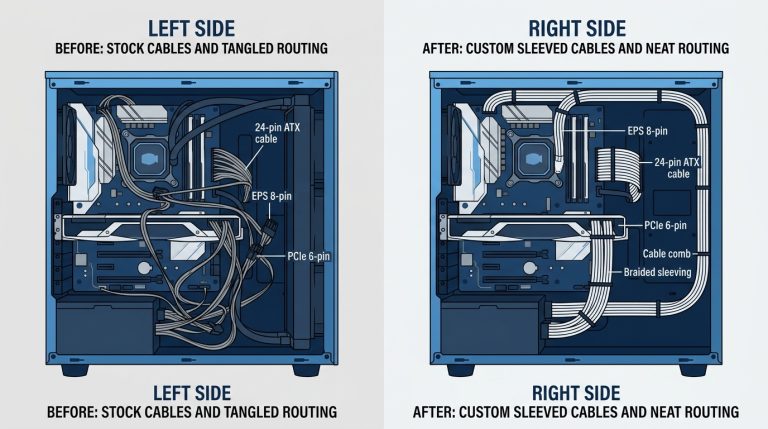
Cable management isn’t optional in an all white gaming setup. Every cable stands out against white surfaces. White cable spines, white velcro ties, and white cable raceways are cheap and eliminate the biggest visual problem before it starts.
White vs. Black Gaming Setup, Which Is Right for You?
Both are strong choices. The decision usually comes down to your room’s existing lighting and how much maintenance you’re willing to commit to.
| Factor | White Setup | Black Setup |
|---|---|---|
| Dust/Dirt Visibility | More visible (light dust shows immediately) | Less visible (light dust blends in) |
| RGB Impact | Higher contrast, colors pop dramatically | Absorbed, creates subtler ambient glow |
| Room Brightness | Amplifies ambient and artificial light | Absorbs light, creates darker feel |
| Hardware Availability | Slightly fewer SKUs, ~15-25% of market | Widest selection across all categories |
| Aesthetic Trend | Rising sharply (2022-2025) | Classic, evergreen, never looks dated |
| Maintenance | Weekly wipe-down recommended | More forgiving, less frequent cleaning needed |
| Price Premium | Averages 5-10% over equivalent black | Baseline pricing across categories |
Verdict: If your room gets decent natural light and you’re willing to do a quick weekly clean, white wins on aesthetics. If you’re in a darker room or want zero maintenance overhead, black remains the safer pick. Most setups that look genuinely great land somewhere in between.
White Gaming Setup Ideas by Color Combination
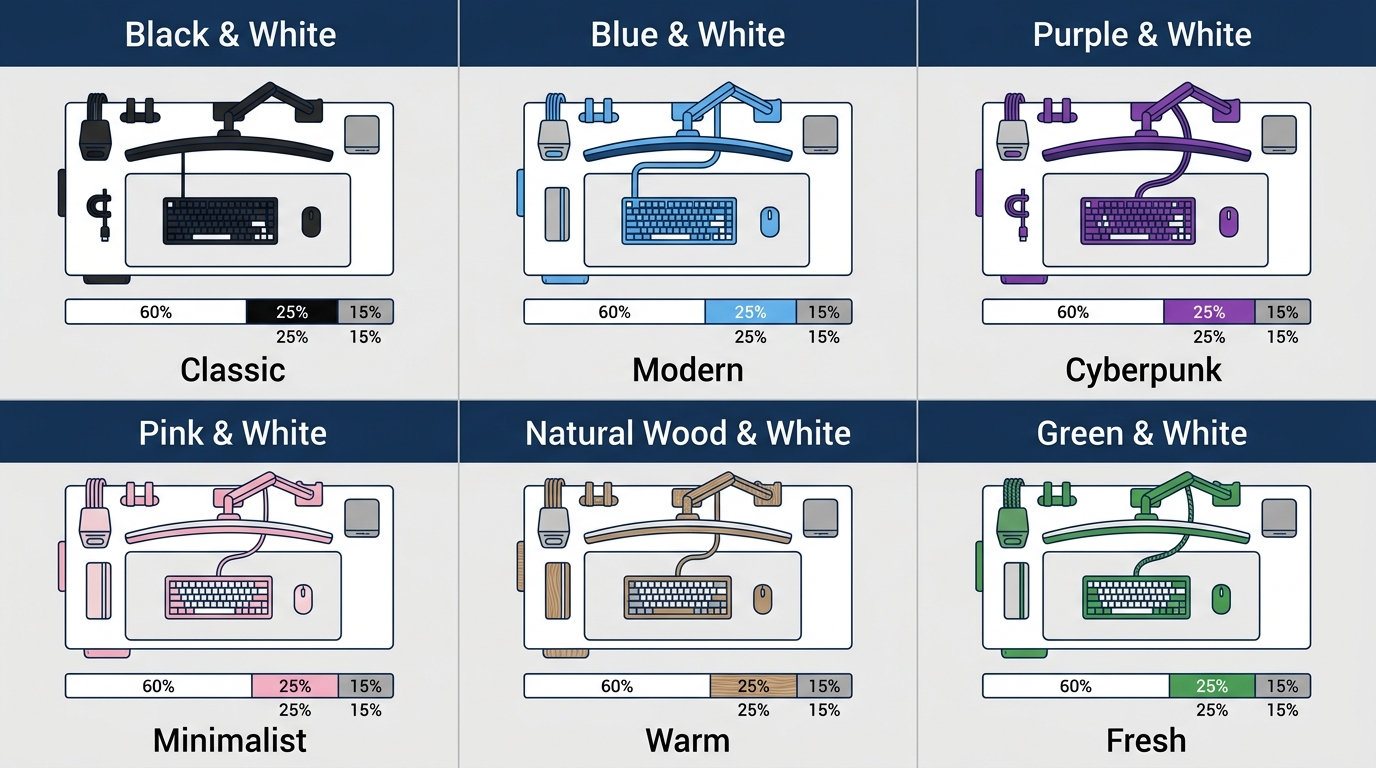
This is where most guides give you vague inspiration. Here’s something more useful: specific gear directions and aesthetic logic for each combination.
Black and White Gaming Setup, The Classic Contrast
This is the most popular combo on Reddit’s r/battlestations and Pinterest, and for good reason. It’s the easiest to execute well. Black provides natural contrast without requiring an accent color decision, and the hardware selection is massive since most components exist in both colorways.
For a sharp black and white gaming setup, start with a white case (the Lian Li O11 Air in white is a community favorite), then go monochrome on the peripherals: white keyboard body with black PBT keycaps, a black-and-white extended desk mat, and matte black monitor arms. A white desk with a black cable spine underneath keeps the contrast intentional rather than accidental. Black monitor bezels against a white wall create natural framing for the whole setup without any additional wall decor.
White and Blue Gaming Setup, Crisp and Cool
Blue RGB on white surfaces reads as sharp and technical. It’s the closest aesthetic to a professional workstation while still being unmistakably a gaming setup. Navy and royal blue desk mats work particularly well here, and the Corsair iCUE ecosystem in white gives you full lighting control across keyboard, mouse, and headset without mixing brands.
For LED strips, go with a cool white or true blue (not teal, not purple-blue). The Govee Dreamview strips work well behind monitors. If you’re also incorporating wood desk surfaces, the white and blue combination with natural oak produces a Scandinavian-influenced look that works in spaces that double as home offices.
White and Purple Gaming Setup, Bold and Distinctive
Purple was the #2 trending accent color for white setups on TikTok and Pinterest through 2024, and it earns that ranking. Purple hits differently on white than it does on dark setups because it reads as rich rather than moody.
The most effective approach: white case with violet-tinted tempered glass, white CableMod cable extensions with purple UV-reactive sleeving, and purple underglow from LED strips mounted under the desk edge. Fan blade color matters more than people expect in white builds, purple-tinted white fans visible through a glass panel add depth without needing external lighting. Keep the desk surface clean white or light gray to let the purple do the work.
Pink and White Gaming Setup, The Aesthetic Darling
Google Trends data from 2023-2024 shows pink and white as the fastest-growing gaming setup color sub-aesthetic, and the builds coming out of this trend are genuinely strong. Not pink-as-an-afterthought, but pink executed with intention.
Rose gold peripherals on a white desk are the starting point. Ducky and Glorious both produce keyboards in white and pink colorways that don’t sacrifice switch quality for looks. Add a pink succulent or small plant in a white ceramic pot for texture, use soft pink LED lighting (not saturated hot pink), and keep everything else neutral. The white gaming desk with pink accents approach works better than trying to find pink hardware for every component.
Red and White Gaming Setup, Bold and High-Energy
This is the most aggressive of the color combos, and it requires the most restraint to pull off. One red accent at a time. Red lighting plus a red keyboard plus a red mousepad is too much. Pick one.
The most effective red and white setups use white as the dominant surface with a single red LED strip as the accent, usually behind the monitor or under the desk edge. Razer’s Quartz edition peripherals and Corsair’s white lineup with red lighting profiles work well here. This combination reads as esports-influenced and competitive rather than decorative, which suits certain setups perfectly.
Green and White Gaming Setup, Fresh and Organic
Green splits into two completely different aesthetics. Tech green (neon, matrix-influenced RGB) creates a high-contrast, digital-forward look against white surfaces. Organic green (real plants, softer tones) shifts the setup toward a biophilic design direction that’s trending in gaming room setups specifically because it reads as livable rather than purely utilitarian.
The organic approach is the stronger of the two for most rooms. A white desk surface, white case, and three to four real plants in white pots produces a setup that looks genuinely premium without expensive gear. This naturally overlaps with the white and wood combination, and the two aesthetics work together without conflict.
White and Wood Gaming Setup, Warm Minimalism
This is the most “adult” option in the white gaming setup spectrum. It translates directly to living spaces and home offices without the setup looking out of place to non-gamers. Oak and walnut surfaces are the strongest pairings with white, both warm tones that prevent the setup from reading as clinical.
The IKEA LAGKAPTEN tabletop in white oak with ALEX drawers underneath is a budget-friendly starting point that’s appeared on r/battlestations hundreds of times for good reason. For the PC, stick with a white case with warm-temperature internal lighting (amber or soft white rather than cool blue). Natural daylight is the ideal lighting source for this aesthetic, so position the desk near a window if possible. This combination requires less RGB to look good, which is actually a cost advantage.
Building an All White Gaming PC, What You Actually Need
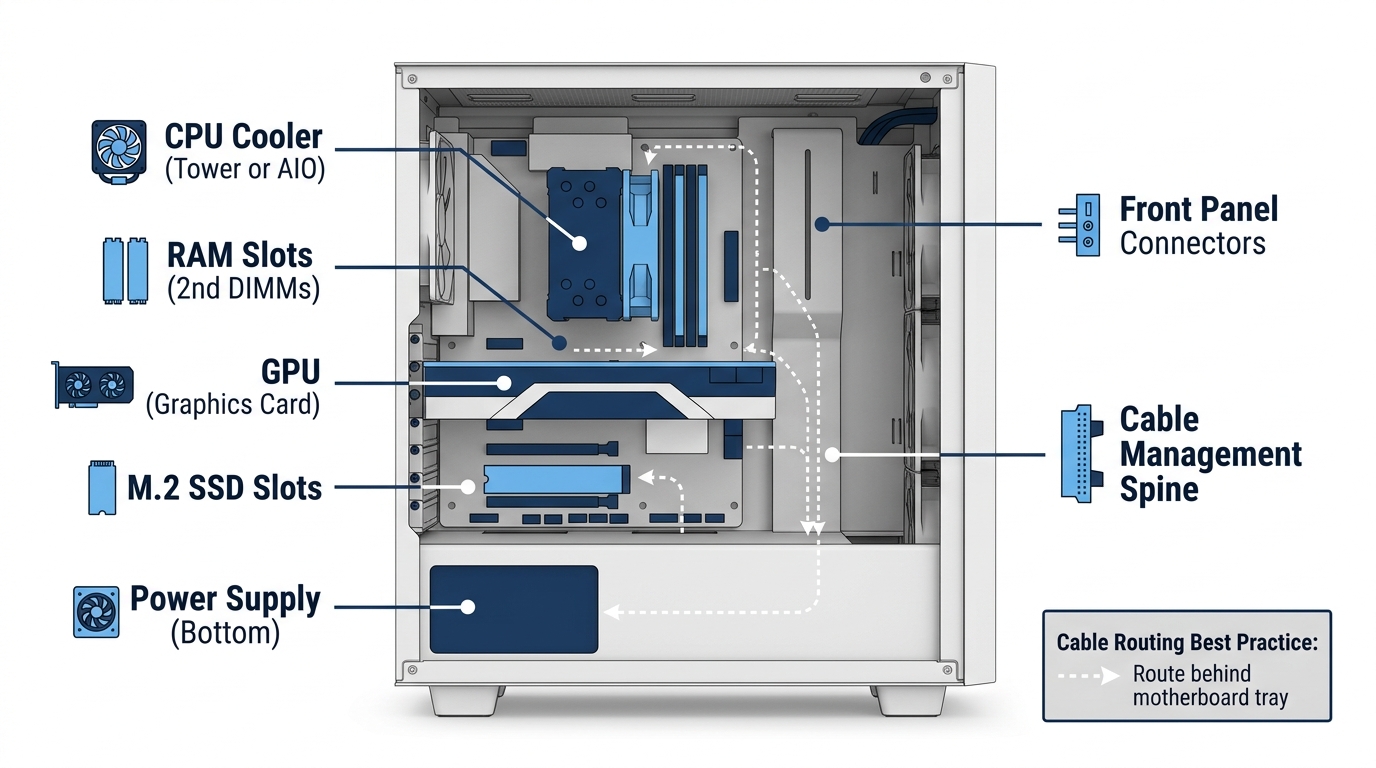
Going all-white inside the case is where the details matter most. The component selection is genuinely more constrained than a black build, but the hardware availability situation has improved significantly since 2022. According to reporting from multiple hardware reviewers at TechPowerUp, white gaming setups have matured to include both aesthetic-focused designs with translucent cases and refined internal components and practical solutions for console gamers, with major manufacturers now offering clean white editions of peripherals designed to complement modern gaming platforms while maintaining visual appeal for those preferring minimalist aesthetics over maximum RGB.
That trend is real and confirmed by shelf availability: Corsair, Lian Li, NZXT, be quiet!, and ASUS all produce white variants of their core product lines now.
White PC Case Options (By Budget)
| Budget Tier | Case Model | Form Factor | White Variant | Approx. Price |
|---|---|---|---|---|
| Budget | Corsair 4000D Airflow | ATX | Yes | ~$90 |
| Mid-Range | Lian Li LANCOOL 216 | ATX | Yes | ~$110 |
| Premium | Lian Li O11 Air Mini | ATX | Yes | ~$140 |
| High-End | Phanteks Enthoo 719 | Full Tower | Yes | ~$200 |
| Compact/ITX | NZXT H1 V2 | ITX | Yes | ~$350 |
The Corsair 4000D Airflow in white is the recommendation at the budget tier, it has excellent airflow, wide cooler compatibility, and the white finish is consistent and well-executed. At the mid-range, the LANCOOL 216 white is hard to beat for airflow-to-dollar ratio. The O11 Air Mini is the enthusiast pick for builders who want the dual-chamber layout with a showcase window.
White Peripherals That Don’t Compromise Performance
White peripherals represent roughly 15-25% of most product categories, with a 5-10% average price premium over equivalent black versions. Not great for budget builds, but worth knowing upfront.
- Keyboards: Keychron Q1/Q2 (white), Logitech G715 (white), Ducky One 3 (pure white), all use quality switches and don’t sacrifice feel for looks
- Mouse: Logitech G Pro X Superlight 2 (white) is the competitive pick, Razer DeathAdder V3 (white) for a slightly larger grip
- Headset: SteelSeries Arctis Nova Pro (white) for premium, HyperX Cloud Alpha (white) for mid-range
- Mousepad: Corsair MM350 (white) for hard surface, Glorious XL (white) for cloth
- Monitor: White-bezeled monitors are genuinely rare. The LG UltraGear white variant is one of the few options. The stronger move is a standard monitor with a white monitor arm, the Ergotron LX White (~$180) or Amazon Basics white option (~$35) does the visual work without limiting your monitor selection
White CPU Coolers and Fans, The Details That Make a Build
The fans and cooler are the most visible internal components in a windowed case, and white options exist across all price points now. Worth the investment.
- Air coolers: be quiet! Pure Rock 2 White, Arctic Freezer 36 White, Noctua NH-D15 chromax.white (the chromax.white remains the thermal benchmark for air cooling)
- Case fans: Lian Li Uni Fan SL120 in white for maximum visual impact, Corsair LL120 in white for addressable RGB
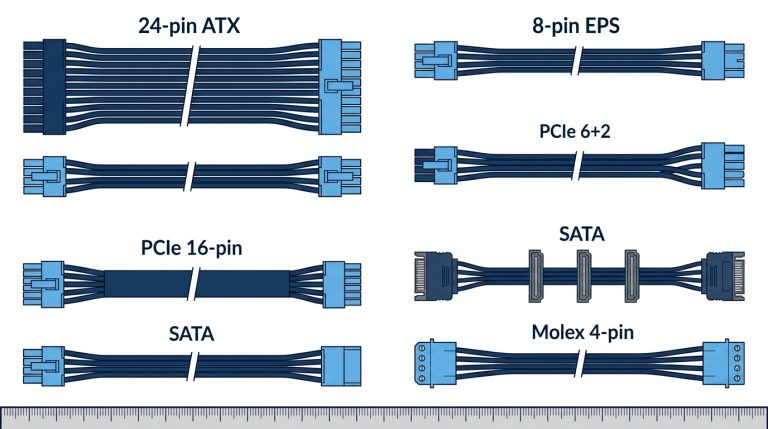
- Cable extensions: CableMod white modular cables are consistently the highest single-impact visual upgrade in a white build at roughly $40-60. Swapping black PSU cables for clean white sleeved extensions transforms the interior more than any other change at that price point
Understanding how your RGB headers work is key before you start planning your lighting. If you’re mixing different LED types in the build, check the difference between ARGB and standard RGB headers before buying fans or strips, since the connectors are not interchangeable and the wrong purchase means returning hardware.
Choosing the Right White Gaming Desk Setup
The desk is the anchor of any gaming setup. Get the size wrong and nothing else matters.
Desk Size and Shape Recommendations
For a single monitor setup, 47″ is the minimum you should consider. Dual monitor setups need 55″ at minimum, and 63″ gives you proper breathing room for a monitor arm, keyboard, and peripheral spread without crowding. L-shaped desks solve the dual-purpose gaming and work problem efficiently, the DUMOS and Eureka Ergonomic L-shaped options in white are worth considering if space allows.
Standing desks in white start around $400 for quality options. The FlexiSpot E7 in white and Uplift V2 in white are the most recommended in the community. Both offer strong weight capacity for multi-monitor setups and reliable motor performance over time. Budget sitting desks can go much lower.
Top White Gaming Desks by Use Case
| Use Case | Desk Pick | Size Options | Approx. Price |
|---|---|---|---|
| Budget Single Monitor | IKEA LAGKAPTEN + ALEX | 47″-63″ | ~$150-$200 |
| Mid-Range / L-Shape | Eureka Ergonomic L60 (White) | L-Shaped | ~$250 |
| Premium Sit/Stand | FlexiSpot E7 (White) | 48″-72″ | ~$400-$500 |
| Cable Management Priority | Secretlab Magnus (White) | 59″ | ~$500 |
| Compact / Small Space | Prepac Floating Wall Desk | 48″ | ~$120 |
The IKEA LAGKAPTEN + ALEX combination is the undisputed starting point for budget white desk setups. It’s not fancy, but it’s sturdy, wide, and the white finish photographs well. The Secretlab Magnus in white is the premium cable management choice, the built-in magnetic cable management channels are genuinely excellent.
Desk Accessories That Complete the Look
Accessories make or break a white desk setup more than any other setup style because every mismatched item is visible. Stick to the theme throughout.
- Cable management: White cable spine along the desk back edge, white velcro ties for bundle management, white cable raceways for vertical runs
- Desk mat: White or light gray extended mousepad (90cm x 40cm minimum), this anchors the keyboard and mouse zone visually
- Monitor arm: White Ergotron LX (~$180) is the quality pick, Amazon Basics white arm (~$35) gets the job done at entry level
- Plants: White ceramic pot with a snake plant, pothos, or ZZ plant, all are low-light tolerant and require minimal maintenance, which matters when you’re already managing a weekly desk wipe-down
Room-Level Design, Going Beyond the Desk
The desk is the core, but the room around it determines whether the setup looks complete or just like a random collection of white hardware.
White 3D Wall Panels, The Fastest Room Upgrade
This is the highest-impact room-level upgrade relative to cost, and it’s consistently underrepresented in competitor guides. 3D white wall panels transform a flat white wall into a textured, dimensional backdrop that makes any setup look deliberate and professional.
Brands like Walldecor3d and HushPanel produce quality PVC panels. Generic Amazon options are cheaper and work fine for most rooms. The installation doesn’t require any drywall damage, 3M Command strips handle panels up to 12 square feet without issue. Cover 6-12 square feet directly behind the monitor area for maximum visual effect.
The lighting interaction is where the real value shows up. An LED strip mounted behind a 3D panel doesn’t just backlight the wall, it creates shadows and highlights across every surface ridge, producing a depth effect that flat paint can’t match. Cost runs roughly $25-60 per box, with each box covering 10-15 square feet. For a standard monitor backdrop, one to two boxes is sufficient.
Lighting Strategy for White Setups
White rooms need a different lighting approach than dark setups. Less is more, and placement matters more than brightness.
- Bias lighting: Govee Dreamview or Philips Hue gradient strips behind the monitor. White surfaces amplify the color bleed, so dial saturation down 20-30% from what looks right in a dark room
- Overhead: Smart bulbs set to 4000K-5000K during the day for accurate color rendering. Drop to warm white or match your RGB accent color for night gaming sessions
- Under-desk strips: White desk surfaces reflect floor-level LED strips dramatically. This is often more impactful than overhead lighting for overall room ambiance
- Key rule: White rooms require roughly 30% less LED brightness to achieve the same glow intensity as a dark room. Don’t start at full brightness
Before buying LED strips, understand what header type you’re connecting to if you’re routing lighting through the motherboard. The RGB header guide covers pinouts and connector types for both standard and addressable strips.
White Gaming Setup Accessories and Finishing Touches
The small things matter in white setups because every element is visible. Cheap black accessories destroy the cohesion. Cheap white accessories that match the theme work fine.
- Controller stands: White acrylic or 3D-printed PLA options on Etsy, custom shapes available for PlayStation and Xbox controllers
- Headset stand: White aluminum options from Corsair and third-party brands; avoid cheap plastic that yellows
- Cable management boxes: White cable management boxes hide power strips entirely, one of the easiest visual wins in any setup
- Wall art: White-framed prints or metal posters with white frame borders maintain the color palette without introducing competing elements
White Gaming Setup for PS5 and Console Gamers
Competitors almost exclusively focus on PC builds when covering white gaming setups. That’s a miss. The PlayStation 5 is arguably the single best console for a white gaming setup because Sony designed it that way from launch. The PS5 disc and digital editions both use a predominantly white aesthetic that was clearly built for this look.
Pairing a PS5 with a white floating shelf or TV stand, a white-framed monitor, and a white controller charging dock creates a genuinely clean setup with zero color-matching effort. The Sony Inzone M9 monitor in white is worth considering if you’re building a premium PS5 and occasional PC gaming station, it supports 4K 144Hz with HDMI 2.1 for full PS5 bandwidth and has a white chassis that fits the aesthetic without compromise.
The white and light blue color combination works particularly well for PS5-centric setups. The controller’s blue accent lines on the DualSense already introduce light blue into the setup, making it the most natural accent color direction for a console-focused white gaming space. Blue LED strips and a light blue desk mat complete the look without any additional hardware purchases.
Maintaining a White Gaming Setup, The Honest Truth

Every guide glosses over this section. Here’s the reality without the spin.
What Actually Gets Dirty and How Fast
- White plastic peripherals: ABS plastic yellows from UV exposure over 2-3 years, particularly keyboards and mouse shells. This is a material property issue, not a cleaning failure. PBT keycaps resist yellowing significantly better than ABS
- White desk surface: Coffee rings and fingerprints show on gloss finish immediately. Matte white is significantly more forgiving and hides surface marks between cleanings
- White PC cases: Dust accumulation on intake filters becomes visible within 2-4 weeks without cleaning. Not a deal-breaker, but it requires commitment
- White fabric mousepads: The highest-maintenance component in the entire setup. White cloth mousepads stain and gray over time regardless of care. Budget for replacement every 12-18 months or shift to a hard surface white pad
Cleaning and Maintenance Schedule
Sustainable maintenance, not maximum effort.
- Weekly: Microfiber cloth wipe on desk surface, damp cloth on keycaps and mouse top shell, quick dust wipe on monitor bezels
- Monthly: Compressed air through PC case filters, fan blade wipe, keyboard deep clean with keycap removal if needed
- Every 3-6 months: 70% isopropyl alcohol on plastic peripheral surfaces (safe for most painted and raw plastics at this concentration), filter removal and rinse if filters are removable
- Yellowing prevention: UV-blocking window film on windows nearest the setup is the single most effective preventive measure. Keep ABS plastic peripherals out of direct sunlight entirely
- Product recommendations: Screen Mom screen cleaner for monitor and display surfaces, Whoosh! for coated surfaces, standard microfiber cloths for desk wipes
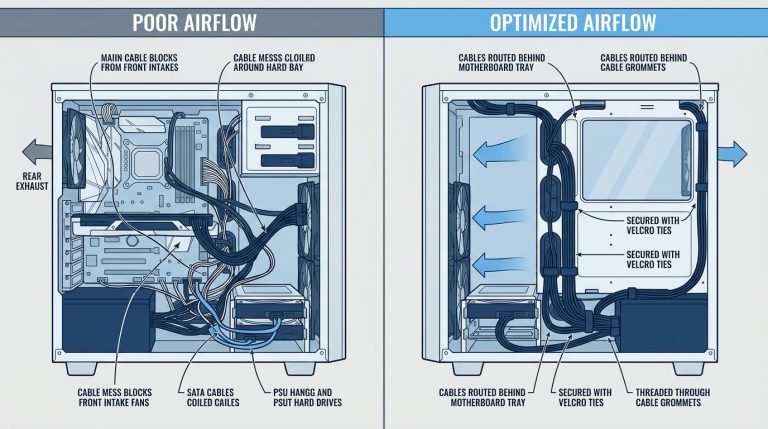
On the PC dust question specifically: using a positive pressure airflow configuration (more intake fan CFM than exhaust) reduces internal dust accumulation by approximately 60% compared to negative pressure setups. This is the most practical airflow advice for white builds where visible internal dust is a real concern.
FAQ, White Gaming Setup Questions Answered
What is the best color for a gaming setup?
There’s no universal best. White setups perform strongest in smaller or darker rooms where the reflective surfaces amplify available light. Black setups handle bright ambient light better without washing out. Among color combinations, white with a single accent color (blue, black, or purple) consistently ranks as the most popular choice in Reddit battlestations polls through 2024. Pick based on your room’s existing conditions, not just what looks good in someone else’s photo.
Are white PC builds good for gaming?
Yes. Completely. Color has zero effect on gaming performance. What matters is GPU, CPU, RAM speed, and storage, none of which are influenced by case or peripheral color. White components have reached near-parity in availability with black options as of 2023-2024, with Corsair, Lian Li, NZXT, be quiet!, and ASUS all maintaining consistent white product lines. The only real compromise is slightly fewer SKU options and a 5-10% average price premium per category.
Do white PC builds get dirty faster?
White builds don’t accumulate more dust than black ones, they just show it more clearly. The practical difference is that you’ll notice dust on a white case in 2-3 weeks where a black case might not show the same accumulation visually for 6-8 weeks. Using a positive pressure airflow configuration reduces internal dust intake by roughly 60% compared to negative pressure setups. Clean the intake filters every 3-4 weeks for a white build and the interior stays presentable.
What’s the most popular white gaming setup color combination?
Black and white is #1 by a significant margin, based on Pinterest search data and Reddit battlestations post frequency. Blue and white holds #2, pink and white is #3, and purple and white has been the fastest-rising combination through 2023-2024. Green and white (in the organic/plant direction rather than neon) is emerging as a distinct aesthetic, particularly among setups that double as work-from-home spaces.
How much does a full white gaming setup cost?
It depends heavily on your PC build tier, but here’s a realistic breakdown:
| Component Category | Budget | Mid-Range | High-End |
|---|---|---|---|
| PC Build | $400-600 | $900-1,500 | $2,000-4,000 |
| White Gaming Desk | $150-200 | $250-400 | $500-700 |
| Peripherals (full set) | $150-200 | $300-500 | $600-1,200 |
| Room/Wall Decor | $50-100 | $150-300 | $400-800 |
| Total (approx.) | $750-1,100 | $1,600-2,700 | $3,500-6,700 |
The white premium (roughly 5-10% over equivalent black components) adds $50-300 to total build cost depending on tier. Worth it if the aesthetic matters to you. Not worth it if you’re on a strict budget and need every dollar in the GPU.
Quick-Start White Gaming Setup Checklist
Use this as your planning reference before buying anything:
- Choose your accent color: black, blue, purple, pink, wood, red, or green, pick one
- Select a white desk, 55″ minimum for single monitor with peripheral space, 63″+ for dual monitor
- Choose your white PC case by budget tier (see table above) or select your console, PS5 fits naturally
- Match peripherals in white: keyboard, mouse, headset, and mousepad, prioritize keyboard first since it’s most visible
- Plan cable management before building, buy white cable spine, white velcro ties, and cable raceways before the desk arrives
- Install 3D white wall panels or bias lighting behind monitors for the room-level upgrade
- Add one organic element, a plant in a white ceramic pot is the cheapest high-impact finishing touch
- Set RGB lighting color to match your chosen accent color, at 30% lower brightness than you’d use in a dark room
- Establish a weekly cleaning habit from day one, it’s easier to maintain than to recover
Wrapping Up
White isn’t a constraint. It’s a canvas. The seven color combinations covered here (black and white, blue and white, purple and white, pink and white, red and white, green and white, and white with wood) all produce genuinely strong results when executed with intention. The real work is in the planning: one accent color, consistent cable management, appropriate lighting, and a maintenance routine that keeps it looking clean six months from now. Get those foundations right and the hardware choices mostly follow. For component-level recommendations as you start building, the X870 vs X870E chipset comparison is worth reading if you’re planning a new AMD platform build as the foundation of your white setup.
For additional reference on white gaming hardware availability and specifications, the Lian Li cases page and NZXT case catalog are the most current sources for white case specs and variants.

Alex has been building and tweaking custom PCs for over 12 years. From budget builds to full custom water loops, he’s assembled more than 50 systems and helped hundreds of builders troubleshoot their rigs. When he’s not benchmarking the latest hardware, you’ll find him optimizing airflow setups or stress-testing overclocks.