XMP vs EXPO: Intel and AMD Memory Profiles
XMP is Intel’s licensed DDR4/DDR5 overclocking profile standard, while EXPO is AMD’s open, royalty-free equivalent built specifically for DDR5 and AM5 Ryzen platforms.
Last updated: June 2026
Table of Contents
- Quick Answer: What Is the Difference Between XMP vs EXPO?
- What Is XMP? (Intel eXtreme Memory Profile)
- XMP Origins and How It Works
- XMP Versions by DDR Generation
- What Is EXPO? (AMD Extended Profiles for Overclocking)
- EXPO Origins and AMD’s Open Standard Approach
- EXPO 1 vs EXPO 2, What’s the Difference?
- XMP vs EXPO, Head-to-Head Comparison
- Core Differences at a Glance
- Performance Difference, Is There Any?
- DOCP and A-XMP, The Compatibility Bridge Standards
- What Is DOCP?
- What Is A-XMP?
- DOCP vs EXPO, Which to Use on AMD?
- Which Should YOU Use? Platform-Specific Recommendations
- On Intel (LGA1700, LGA1851, Core i9/i7/i5, Core Ultra)
- On AMD AM5 (Ryzen 7000, 8000G, 9000 Series, Including 9800X3D)
- On AMD AM4 (Ryzen 5000 and Older, DDR4)
- Can You Use XMP RAM on AMD, or EXPO RAM on Intel?
- XMP RAM on AMD AM5
- EXPO RAM on Intel
- XMP vs EXPO on DDR4 vs DDR5, Does It Matter?
- Why JEDEC Defaults Are So Conservative
- How to Enable XMP or EXPO in BIOS
- Step-by-Step (General Process)
- What If Your System Won’t POST After Enabling?
- FAQ, XMP vs EXPO Common Questions
- Is EXPO better than XMP?
- Can I use XMP on an AMD CPU?
- Should I use XMP or EXPO on the Ryzen 9 9800X3D?
- What is EXPO 1 vs EXPO 2?
- Does enabling XMP or EXPO void my warranty?
- The Short Version
Quick Answer: What Is the Difference Between XMP vs EXPO?
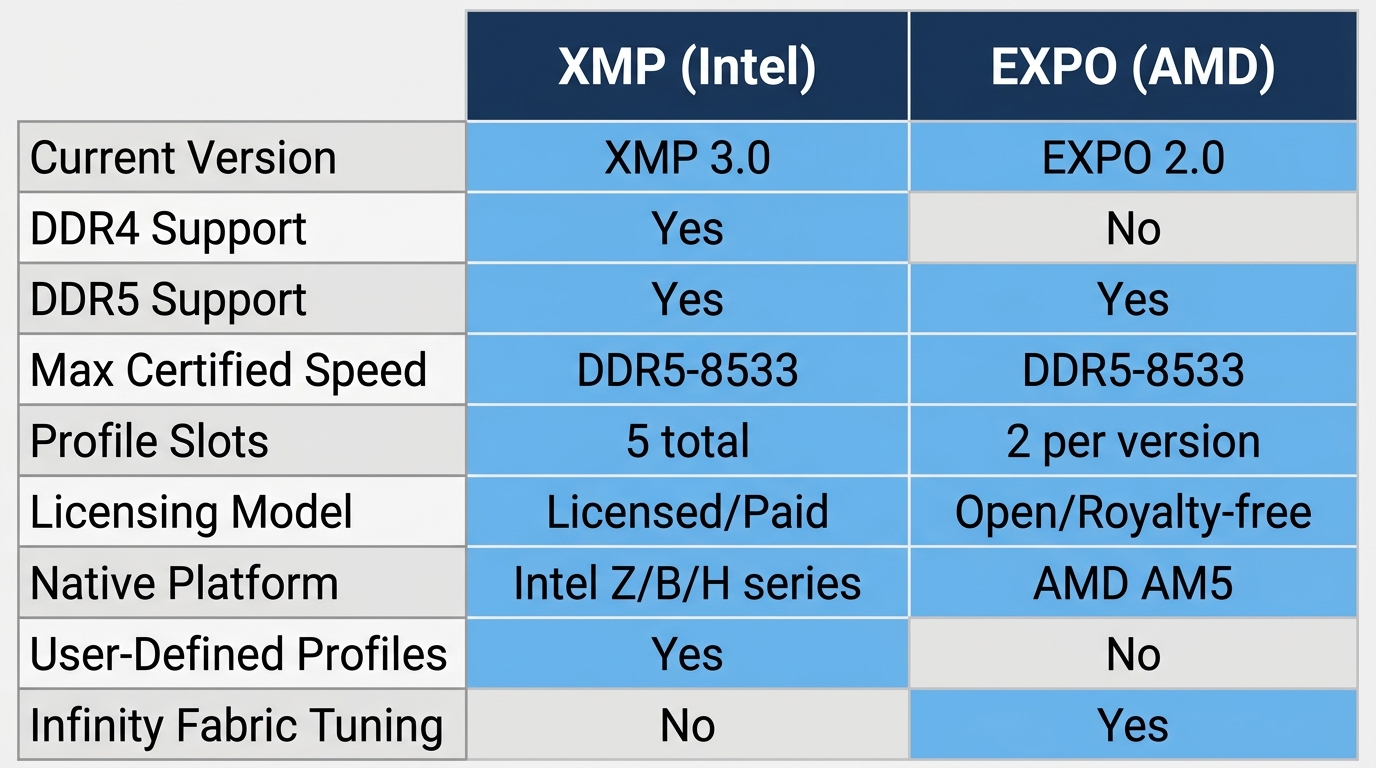
XMP and EXPO do the same job: they store pre-tested frequency, voltage, and timing data on your RAM so you can hit advertised speeds with a single BIOS toggle instead of manual tuning. The difference is platform. XMP is Intel’s standard and works natively on Intel Z, B, and H-series motherboards. EXPO is AMD’s standard, optimized for AM5 and Ryzen’s Infinity Fabric. If your DDR5-6000 kit is sitting at 4800 MT/s right now, you haven’t enabled either one.
Most people assume RAM automatically runs at the speed printed on the label. It doesn’t. Fresh out of the box, every kit boots at conservative JEDEC defaults. That DDR5-6000 CL30 kit you paid a premium for? It’s running at DDR5-4800 CL40 until you flip a switch. XMP and EXPO are that switch. This article breaks down the differences, which standard to use on your platform, what EXPO 1 vs EXPO 2 actually means, and how to handle cross-platform compatibility when your kit only supports one standard.
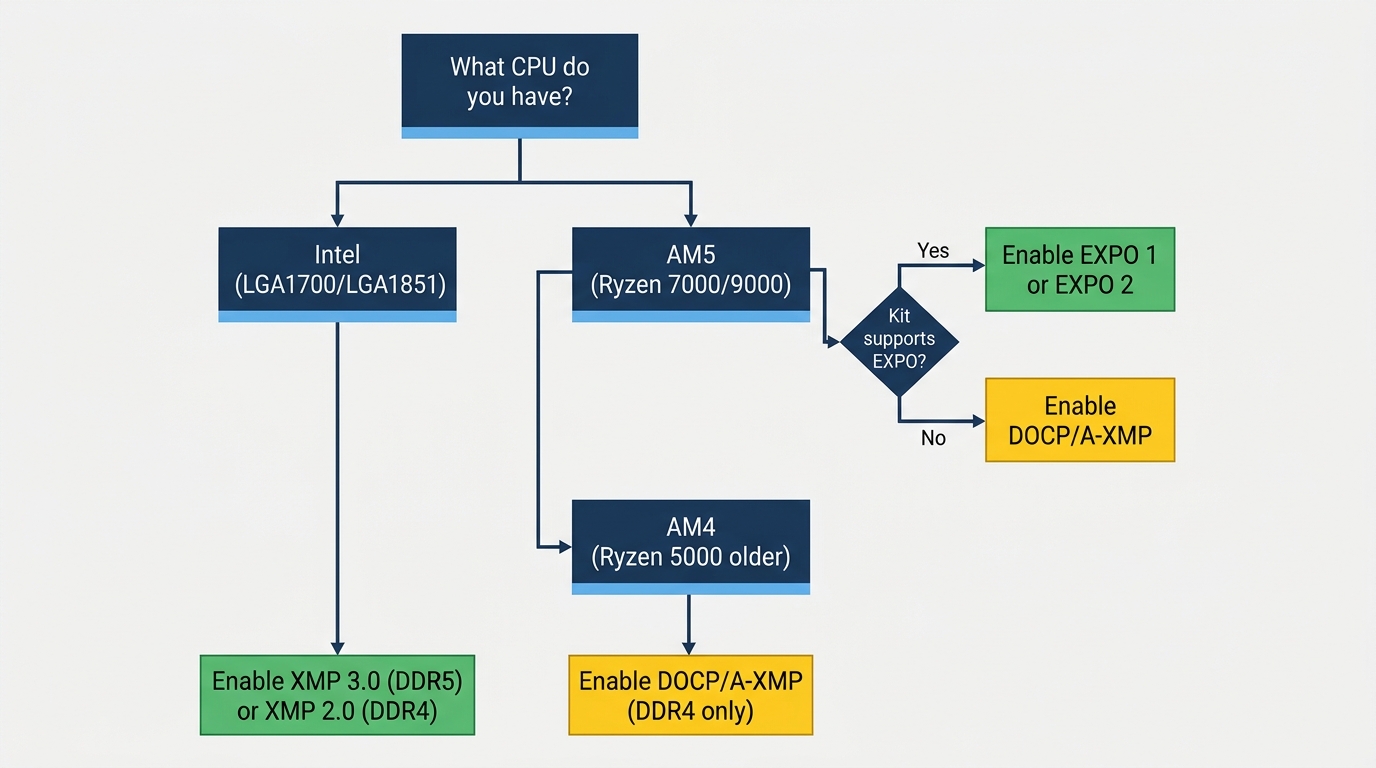
- 🟢 Intel (LGA1700/LGA1851): Enable XMP (XMP 3.0 for DDR5, XMP 2.0 for DDR4)
- 🟢 AMD AM5 (Ryzen 7000/9000 series): Enable EXPO if kit supports it
- 🟡 AMD AM5 with XMP-only kit: Enable DOCP or A-XMP, then verify FCLK manually
- 🟡 AMD AM4 (Ryzen 5000 and older): Enable DOCP or A-XMP (no EXPO on DDR4)
- 🔴 No profile enabled at all: You’re running at JEDEC defaults and leaving significant performance on the table
What Is XMP? (Intel eXtreme Memory Profile)
XMP Origins and How It Works
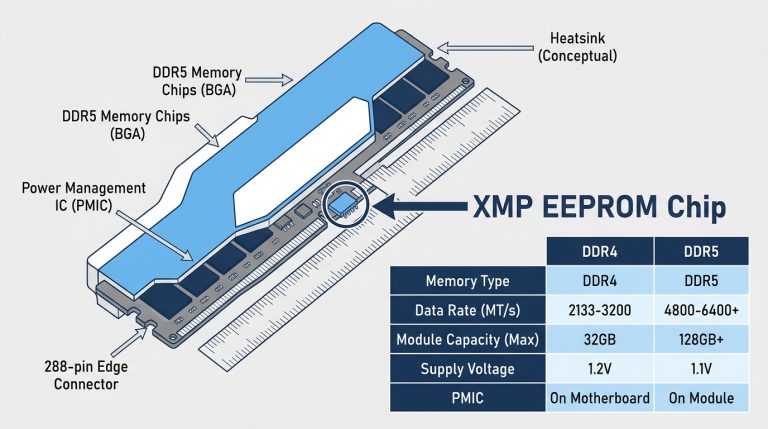
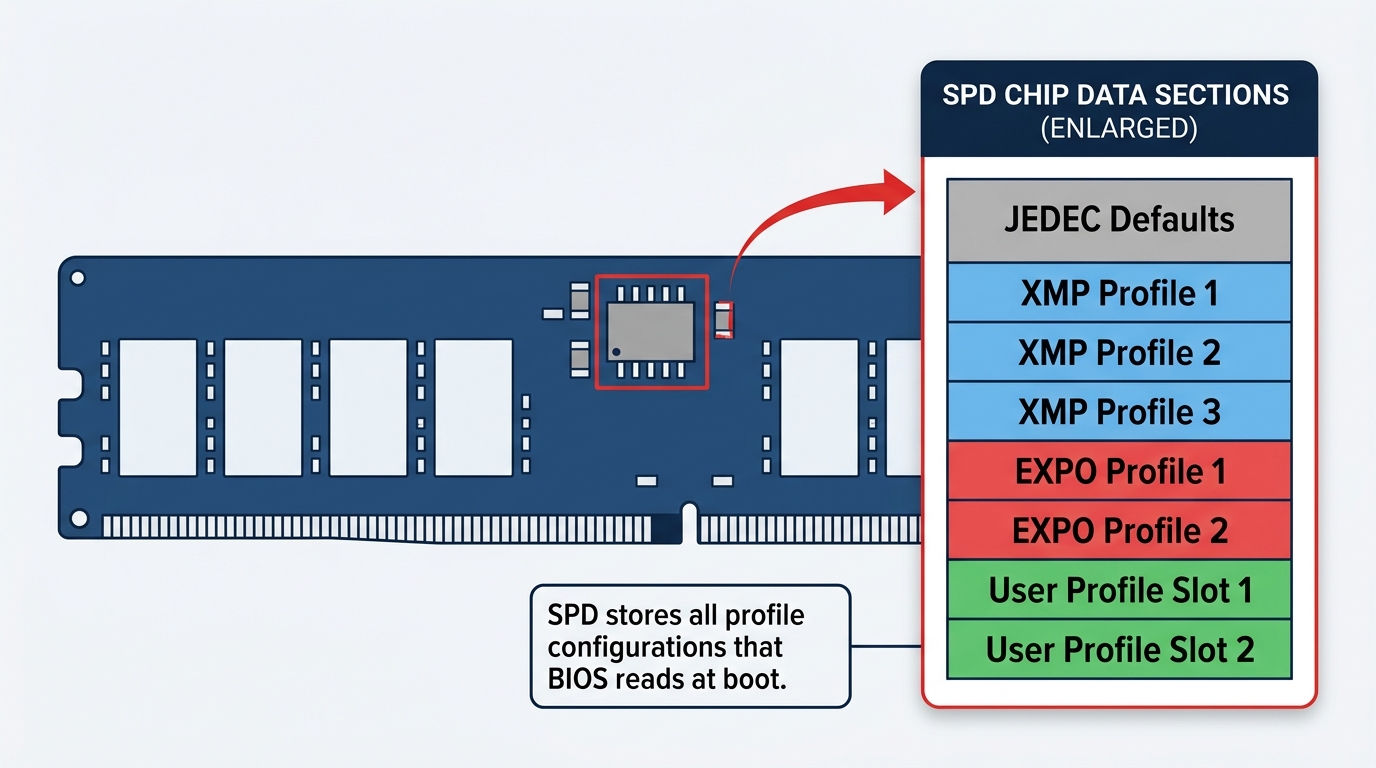
Intel developed XMP back in 2007 during the DDR3 era, and it’s now on version 3.0 for DDR5. The concept is simple: every RAM stick has a small chip called an SPD (Serial Presence Detect). XMP stores pre-tested frequency, voltage, and timing configurations on that chip. When you enable XMP in BIOS, your motherboard reads those stored values and applies them automatically at boot. No manual tuning. No guesswork.
XMP is a licensed technology. Memory manufacturers pay Intel to certify their kits, which means every XMP profile has been validated to run stable at those settings. That’s not marketing fluff. It’s why XMP profiles are reliable rather than theoretical numbers pulled from a spec sheet.
XMP is natively supported on Intel Z-series, B-series, and H-series motherboards. According to Intel’s XMP documentation, XMP 3.0 kits can store up to five profiles total: three from the manufacturer and two user-defined slots. That last part is something almost no competitor mentions. You can save your own custom timing profile directly to the RAM’s SPD. Useful if you fine-tune settings manually and want them to persist across BIOS resets.
XMP Versions by DDR Generation
| Standard | DDR Gen | Max Certified Speed | Profile Slots | Platform |
|---|---|---|---|---|
| XMP 1.0 | DDR3 | Up to 3200 MT/s | 2 | Intel Core 2 / X38 chipset onward (2007); common through Sandy Bridge/Ivy Bridge-era DDR3 boards |
| XMP 2.0 | DDR4 | Up to 5333 MT/s | 2 | Intel 6th–14th Gen (introduced 2014 with Haswell-E/X99) |
| XMP 3.0 | DDR5 | 8000+ MT/s certified | 5 (3 factory + 2 user) | Intel 12th Gen+, Core Ultra 200 |
If you’re on a current-gen Intel platform like a Core Ultra 9 285K or Core Ultra 7 265K (Arrow Lake, LGA1851, Z890), XMP 3.0 is what you want. Older platforms like 12th or 13th gen on Z690/Z790 also support XMP 3.0 with DDR5. For any DDR4 build, XMP 2.0 is your ceiling. You can read more about enabling this in our guide on XMP and getting RAM to its advertised speed in one BIOS setting.
What Is EXPO? (AMD Extended Profiles for Overclocking)
EXPO Origins and AMD’s Open Standard Approach
AMD launched EXPO in 2022 alongside the Ryzen 7000 series and the AM5 platform. The key distinction from XMP: EXPO is an open, royalty-free standard. Memory manufacturers don’t pay AMD to certify kits. AMD framed this as a consumer-friendly alternative to Intel’s licensed approach, and it has practical downstream effects. More kits across more price points carry EXPO certification compared to high-end-only XMP certifications in the early DDR5 era.
Functionally, EXPO works identically to XMP. It stores tested configurations in the same SPD chip. Your motherboard reads the profile at POST and applies the settings. The difference is under the hood: EXPO profiles are optimized for Ryzen’s dual-channel memory controller and Infinity Fabric clock (FCLK). That optimization matters more than it might seem, especially at the 6000 MT/s threshold (covered below). According to AMD’s EXPO documentation, the standard is designed specifically around AM5 memory controller behavior.
EXPO 1 vs EXPO 2, What’s the Difference?
This is where most articles drop the ball. Most EXPO-certified DDR5 kits ship with two distinct profiles, not one.
- EXPO 1: The high-performance profile. This is the advertised speed with aggressive timings (for example, 6000 MT/s at CL30). Maximum performance, minimum margin.
- EXPO 2: The stability-first profile. Same or slightly lower frequency with relaxed timings (for example, 6000 MT/s at CL36, or 5600 MT/s at CL30). Designed for system-to-system variability.
AMD built this dual-profile system because Ryzen’s Infinity Fabric is particularly sensitive to memory speeds. The UCLK-to-MCLK ratio at 6000 MT/s sits at a perfect 1:1 (both at 3000 MHz), while the separate FCLK (Infinity Fabric Clock) stays decoupled around 2000 MHz. Push UCLK:MCLK above that and you enter 2:1 territory, which can hurt latency-sensitive workloads despite the raw bandwidth increase. Some kits, some motherboards, and some ambient temperature conditions make EXPO 1 unstable. That’s why EXPO 2 exists as a fallback.
When to start with EXPO 2: new platform build, your system won’t POST with EXPO 1, crashes under memory-intensive load, or you’re running in a hot environment. Start with EXPO 1. If you get instability, drop to EXPO 2. Simple.
According to community discussion at TechPowerUp Forums, EXPO can be more aggressive than XMP on AMD systems, which sometimes results in longer boot times as memory undergoes training during startup. That’s normal behavior, not a warning sign.
XMP vs EXPO, Head-to-Head Comparison
Core Differences at a Glance
| Feature | Intel XMP | AMD EXPO |
|---|---|---|
| Developer | Intel | AMD |
| Standard Type | Licensed (proprietary) | Open / royalty-free |
| DDR Generation | DDR4 + DDR5 | DDR5 only (AM5 platform) |
| Profile Slots | Up to 5 (XMP 3.0) | 2 (EXPO 1 + EXPO 2) |
| Platform Support | Intel Z / B / H series | AMD AM5 |
| Max Certified Speed | 8000+ MT/s | 8000+ MT/s |
| Lowest Certified Latency | CL28 | CL28 |
| Infinity Fabric Optimization | No | Yes |
| User-Defined Profile Slots | 2 (XMP 3.0) | No |
| Cross-Platform Use | Works on some AMD boards via DOCP/A-XMP | Works on some Intel boards (not guaranteed) |
Performance Difference, Is There Any?
In practice: no meaningful performance difference between XMP and EXPO at identical speeds and timings. Both standards aim for the same end state, which is RAM running at its rated frequency with validated timing settings. The real performance gap isn’t XMP vs EXPO. It’s JEDEC defaults vs. any profile enabled at all.
That gap is significant. DDR5-4800 CL40 (JEDEC) vs DDR5-6000 XMP/EXPO (CL30) shows 8 to 12% improvement in CPU-bound gaming titles. Not huge in isolation. But it’s free performance from a one-click BIOS change.
On Ryzen specifically, the 6000 MT/s target matters more than the raw MHz number. At 6000 MT/s, the memory controller clock (UCLK) and memory clock (MCLK) both run at 3000 MHz in a 1:1 ratio, while the separate Infinity Fabric clock (FCLK) stays decoupled around 2000 MHz. That 1:1 UCLK:MCLK relationship minimizes latency between cores and the memory controller. Going above 6000 MT/s forces UCLK:MCLK into a 2:1 ratio (UCLK plateaus near 3000 MHz while MCLK keeps climbing with the memory’s rated speed), and despite higher bandwidth, the latency increase can actually hurt gaming performance in CPU-bound scenarios. This applies to every AM5 CPU including the Ryzen 9 9950X3D and Ryzen 9 9800X3D.
DOCP and A-XMP, The Compatibility Bridge Standards
What Is DOCP?
DOCP (Direct OverClock Profile) was created by ASUS for AMD platforms before EXPO existed. It’s not a new profile format. It’s a firmware-level translation layer that reads an XMP profile stored on the RAM and re-applies those settings through AMD’s memory controller. You’ll find it on ASUS AMD motherboards, both AM4 and some AM5 boards.
Think of DOCP as a workaround that became standard practice. When AMD platforms only had DDR4 and no native equivalent to XMP, board vendors needed a way to let users hit advertised RAM speeds. DOCP solved that. It still works perfectly on AM4 platforms today.
What Is A-XMP?
A-XMP is the same concept as DOCP but from other motherboard vendors. MSI uses “A-XMP” or “DCOP.” Gigabyte uses “EOCP.” The labels differ. The function is identical: read the XMP data stored on the RAM and apply it through the AMD memory controller.
Not a different standard. Just vendor-specific branding for the same translation process.
DOCP vs EXPO, Which to Use on AMD?
If your kit supports EXPO and you’re on AM5: always use EXPO. It was tested specifically against Ryzen’s memory controller and will generally offer better validated stability than a translated XMP profile. Our guide covering DOCP and EXPO on AMD platforms goes deeper on the differences between these compatibility modes and when to reach for each one.
If your kit only has XMP profiles (no EXPO certification): enable DOCP or A-XMP. It works. Most major kit makers including Corsair, G.Skill, and Kingston now certify flagship kits for both XMP and EXPO simultaneously, so dual-certified kits are easier to find than they were at AM5 launch in 2022.
Modern AM5 motherboards (X670E, X870, X870E) typically support both profile types. AM5 BIOS updates since the platform’s 2022 launch have dramatically improved memory compatibility. If you had issues enabling profiles on an early AM5 build, update your BIOS first before troubleshooting anything else.
Which Should YOU Use? Platform-Specific Recommendations
On Intel (LGA1700, LGA1851, Core i9/i7/i5, Core Ultra)
Use XMP. Full stop. It’s native to the platform, there’s no translation layer, and stability is guaranteed for any XMP-certified kit.
- Core Ultra 200 series (Arrow Lake, LGA1851, Z890): XMP 3.0 on DDR5. This platform is memory-latency sensitive, so tight timings matter more than raw frequency above 6400 MT/s.
- 13th and 14th Gen (Raptor Lake, LGA1700, Z790): XMP 3.0 on DDR5, XMP 2.0 on DDR4 builds.
- 12th Gen (Alder Lake, LGA1700, Z690): XMP 2.0 for DDR4, XMP 3.0 if you went DDR5 on this platform.
Sweet spot for current Intel DDR5 platforms: 6400 to 6800 MT/s with CL32 to CL34 timings. Intel’s memory controller handles higher speeds more gracefully than AM5 without the FCLK ratio concern.
On AMD AM5 (Ryzen 7000, 8000G, 9000 Series, Including 9800X3D)
Use EXPO if your kit supports it. The EXPO profile was tuned for Ryzen’s memory controller, and the factory-validated settings will be more stable out of the box than a translated XMP profile at the same speeds.
The 6000 MT/s sweet spot applies to every AM5 CPU. At 6000 MT/s, UCLK and MCLK both run at 3000 MHz in a 1:1 ratio, while FCLK sits in its own decoupled sweet spot around 2000 MHz. Clean, low-latency, optimal. For the Ryzen 9 9800X3D specifically, this matters even more. The 3D V-Cache architecture is highly latency-sensitive. A DDR5-6000 CL30 EXPO kit will outperform a DDR5-7200 CL36 kit in most gaming scenarios on that CPU because the tighter latency at the 1:1 UCLK:MCLK point beats raw bandwidth at a 2:1 ratio.
If your kit is XMP-only, enable DOCP or A-XMP on AM5. Then manually verify in BIOS that UCLK and MCLK are both set to 3000 MHz (1:1 ratio) and that FCLK is left around 2000 MHz. Some boards won’t auto-set this correctly when translating XMP profiles.
On AMD AM4 (Ryzen 5000 and Older, DDR4)
EXPO doesn’t exist here. AM4 is a DDR4 platform. Your options are XMP, DOCP, or A-XMP depending on your board vendor.
Sweet spot for AM4: 3600 MT/s CL16 to CL18. At 3600 MT/s, FCLK genuinely locks at 1800 MHz in a true 1:1:1 ratio with UCLK and MCLK, unlike AM5 where FCLK stays decoupled from the UCLK:MCLK ratio. Going higher on AM4 generally requires loosening timings or accepting FCLK desynchronization, which hurts more than the extra bandwidth helps.
Can You Use XMP RAM on AMD, or EXPO RAM on Intel?
XMP RAM on AMD AM5
Yes, it works. All major AM5 motherboard vendors (ASUS, MSI, Gigabyte, ASRock) support reading XMP profiles via their respective DOCP/A-XMP compatibility modes. The kit will run at advertised speeds in most cases.
The caveat: the XMP profile wasn’t validated against Ryzen’s specific memory controller. Stability may be slightly lower than an EXPO-certified kit at the same speeds. After enabling, run stability testing with MemTest86 or HCI MemTest for at least a few passes before trusting the system with production workloads. Silent data corruption is possible if your memory isn’t fully stable, even if the system boots and runs Windows without obvious errors.
Most flagship DDR5 kits from Corsair, G.Skill, and Kingston now carry dual certification (XMP 3.0 + EXPO). If you’re buying new RAM, look for that dual-cert label. Flexibility across platforms is worth it.
EXPO RAM on Intel
Trickier. Intel motherboards don’t natively read EXPO profiles. An EXPO-only DDR5 kit on an Intel Z890 or Z790 board will fall back to JEDEC defaults (4800 MT/s CL40) unless you manually set the frequency, voltage, and primary timings yourself.
Some newer Intel boards (Z790, Z890) have added EXPO reading capability in BIOS updates, but this isn’t guaranteed across the board. Best practice: if you might ever move RAM between Intel and AMD systems, buy a dual-certified XMP + EXPO kit from the start. Don’t leave this to chance.
XMP vs EXPO on DDR4 vs DDR5, Does It Matter?
EXPO is a DDR5-only standard. It was created specifically for AM5’s DDR5 platform and has no DDR4 equivalent. If you’re running DDR4 on any platform, EXPO isn’t an option.
DDR4 on AMD: XMP profiles read via DOCP or A-XMP. That’s your entire toolkit. DDR4 XMP 2.0 is technically certified up to around 5333 MT/s, though real-world kits top out practically around 3600 to 4000 MT/s for daily stable use.
DDR5 changes things substantially. Both XMP 3.0 and EXPO now support kits up to 8000+ MT/s, with the most popular performance sweet spots sitting at 6000 to 6800 MT/s depending on platform.
| Platform | DDR4 Profile Option | DDR5 Profile Option |
|---|---|---|
| Intel (12th Gen+, Z690/Z790/Z890) | XMP 2.0 | XMP 3.0 |
| AMD AM4 (Ryzen 5000 and older) | DOCP / A-XMP | N/A (DDR4 platform only) |
| AMD AM5 (Ryzen 7000/9000 series) | N/A (DDR5 platform only) | EXPO or DOCP/A-XMP |
Why JEDEC Defaults Are So Conservative
JEDEC (Joint Electron Device Engineering Council) sets universal baseline specifications that every DDR5 module must meet, regardless of vendor, platform, or use case. The default DDR5 JEDEC speed is 4800 MT/s at CL40. Safe for literally any motherboard and CPU combination. No failures, no stability questions, no compatibility issues.
The problem: virtually no enthusiast DDR5 kit is optimized for 4800 MT/s. That’s the floor, not the performance target. A DDR5-7200 CL34 kit boots at DDR5-4800 CL40 by default. That’s a massive gap you’re paying for but not using.
XMP and EXPO profiles aren’t theoretical overclocking numbers. They’re manufacturer-validated settings. The kit was tested at those specific speeds, voltages, and timings in a controlled environment before it shipped. Enabling the profile isn’t “overclocking” in the risky sense. It’s running the hardware at the spec it was designed for.
Voltage note: JEDEC DDR5 runs at 1.1V. XMP and EXPO DDR5 profiles typically push VDIMM to 1.35V to 1.45V. That’s normal. Expected. Every performance DDR5 kit runs at elevated voltage under its certified profile. Nothing to worry about.
How to Enable XMP or EXPO in BIOS
Step-by-Step (General Process)
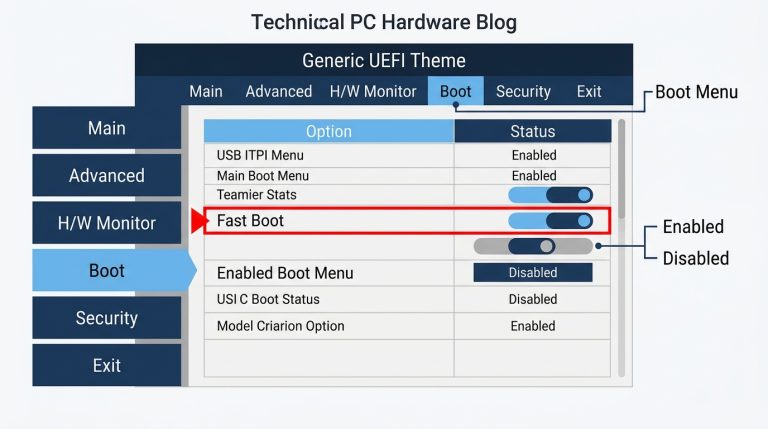
- Restart your PC and press DEL or F2 repeatedly at POST to enter BIOS/UEFI.
- Find the overclocking or tweaker section: AI Tweaker on ASUS boards, OC on MSI, Tweaker on Gigabyte and ASRock.
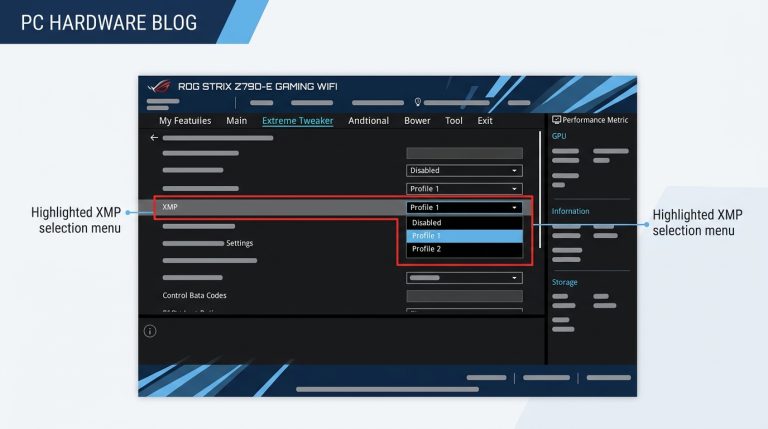
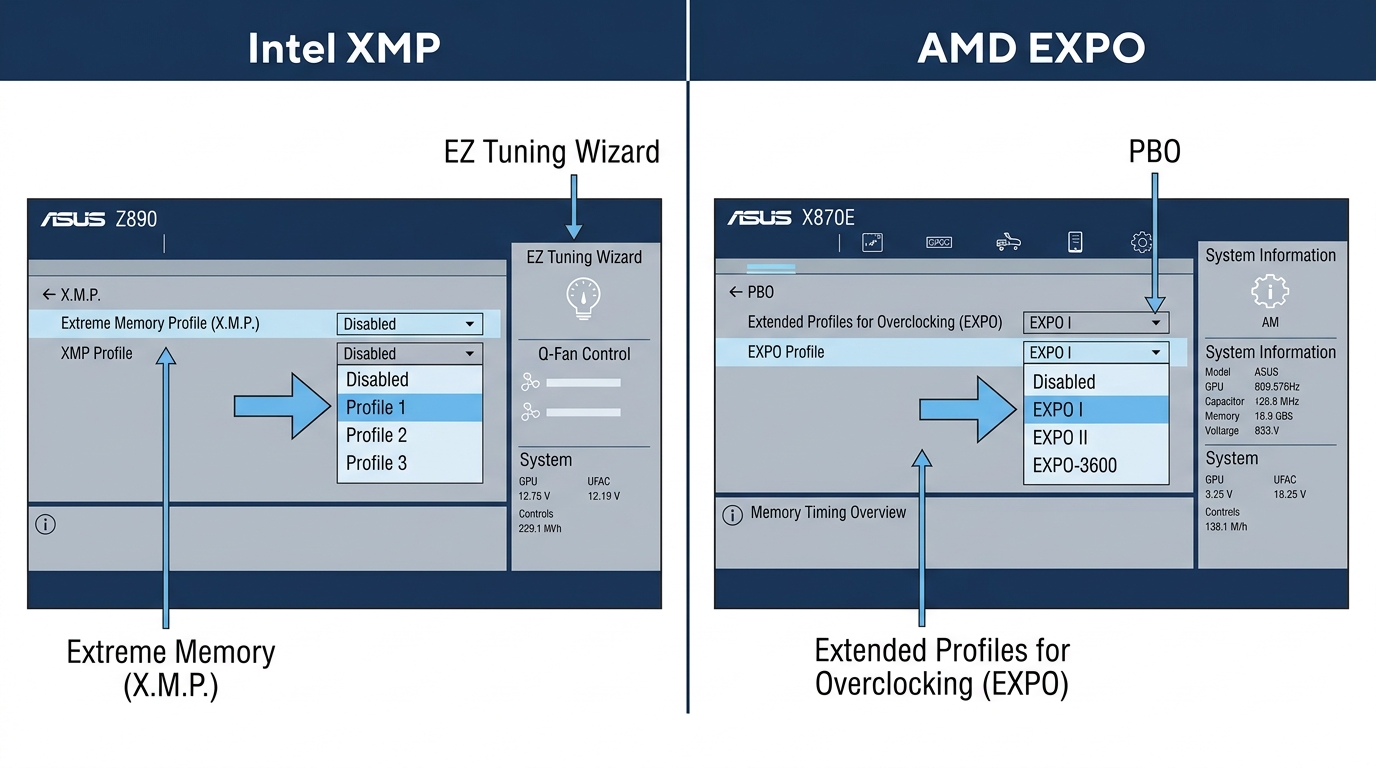
- Look for the setting labeled XMP, EXPO, DOCP, or A-XMP depending on your board and kit.
- Select your preferred profile (XMP Profile 1, EXPO 1, etc.).
- Save and exit with F10.
- Confirm in Windows: open Task Manager, go to Performance, then Memory. The speed shown should match your kit’s rated frequency. If it still shows 4800 MT/s, the profile didn’t apply.
G.Skill’s setup documentation confirms this basic three-step process: enter BIOS, locate the profile selector, save and exit. The specific menu location varies by vendor, but the principle is universal across Intel and AMD platforms.
What If Your System Won’t POST After Enabling?
Don’t panic. Clear CMOS (check your motherboard manual for the jumper location or use the CMOS button on the rear I/O if your board has one), then try EXPO 2 instead of EXPO 1, or XMP Profile 2 if available.
Other things to check:
- QVL (Qualified Vendor List): Your motherboard manufacturer’s website lists tested RAM kits. If your kit isn’t on it, stability at rated speeds isn’t guaranteed.
- BIOS version: AM5 especially has seen major memory compatibility improvements since its 2022 launch. An outdated BIOS is the most common cause of EXPO instability on AM5 boards.
- Slot population: On most boards, two sticks of RAM should go in slots A2 and B2 (second and fourth slots). Wrong slots will hurt stability at high speeds.
- RAM seating: Press firmly until both clips click. Partially seated sticks cause all kinds of strange instability that looks like a profile issue but isn’t.
FAQ, XMP vs EXPO Common Questions
Is EXPO better than XMP?
Neither is inherently better. They achieve the same result, which is RAM running at its advertised rated speed, but they’re platform-specific. On AMD AM5, EXPO is the better choice because it was optimized for Ryzen’s memory controller and Infinity Fabric. On Intel, XMP is the correct choice because it’s the native standard. Using the wrong profile for your platform doesn’t break anything, but you may see slightly lower stability or need to use a compatibility translation layer to make it work.
Can I use XMP on an AMD CPU?
Yes. Modern AMD AM5 motherboards support XMP profiles via DOCP (on ASUS boards) or A-XMP (on MSI, Gigabyte, and ASRock boards). These are firmware-level compatibility modes that read the XMP data from the RAM’s SPD chip and apply it through AMD’s memory controller. It works reliably in most cases. EXPO-certified kits will generally offer better out-of-the-box stability on AM5 since the profiles were tuned for Ryzen specifically.
Should I use XMP or EXPO on the Ryzen 9 9800X3D?
Use EXPO if your kit supports it. Target DDR5-6000 CL30 for the optimal 1:1 UCLK:MCLK ratio, where both run at 3000 MHz while FCLK stays decoupled around 2000 MHz. The 9800X3D’s 3D V-Cache is highly latency-sensitive. Tight timings at 6000 MT/s will beat higher raw frequencies with looser timings in almost every gaming benchmark. Don’t chase 7200 MT/s kits for this CPU. Stay at 6000 MT/s with the tightest timings you can get stable.
What is EXPO 1 vs EXPO 2?
EXPO 1 is the high-performance profile: advertised speed with aggressive (tight) primary timings. EXPO 2 is the stability-tuned alternative with slightly relaxed settings, either looser timings at the same frequency or the same timings at a slightly lower frequency. Start with EXPO 1. If your system crashes under load, fails POST, or shows instability in memory testing, switch to EXPO 2. Most users will run EXPO 1 without issues on a current AM5 board with an updated BIOS.
Does enabling XMP or EXPO void my warranty?
In most cases, no. Enabling a manufacturer-certified XMP or EXPO profile is considered normal use, not overclocking in the warranty-voiding sense. The kit was tested and certified to run at those settings. Running your RAM beyond those certified profiles through manual overclocking is a different situation and may void RAM warranty depending on the brand. Check your specific kit’s warranty terms if you plan to push beyond rated specs.
The Short Version
Pick the right profile for your platform and enable it. On Intel, that’s XMP. On AMD AM5, that’s EXPO. On AMD AM4, that’s DOCP or A-XMP. If you’re buying new RAM and want flexibility, get a dual-certified XMP 3.0 and EXPO kit. For Ryzen 9000 series builds including the 9800X3D, DDR5-6000 CL30 is the target. For current Intel platforms like the Core Ultra 200 series, 6400 to 6800 MT/s CL32 is the sweet spot. Whatever platform you’re on, running JEDEC defaults means you’re paying for performance you’re not using. One toggle in BIOS fixes that completely.

Alex has been building and tweaking custom PCs for over 12 years. From budget builds to full custom water loops, he’s assembled more than 50 systems and helped hundreds of builders troubleshoot their rigs. When he’s not benchmarking the latest hardware, you’ll find him optimizing airflow setups or stress-testing overclocks.