M.2 Screw Guide: Sizes Types and What Comes With Your Motherboard
A small fastener that secures M.2 solid-state drives to motherboard slots, available in standard and countersunk variants.
An M.2 screw is a small M2 x 3mm machine screw used to secure an M.2 SSD into its slot on a motherboard or expansion card. Without it, an installed M.2 drive sits at an upward angle and stays unseated, risking poor electrical contact, vibration damage, and inconsistent read/write performance.
Table of Contents
- What Is an M.2 Screw?
- Official Size and Thread Specification
- What Does the Screw Actually Do?
- M.2 Screw Sizes and Types: Full Spec Comparison
- Standard M.2 Screw Dimensions by Use Case
- How M.2 Screws Differ from Other PC Screws
- Do Motherboards Come With M.2 Screws?
- What’s Typically Included in the Box
- What If Your Motherboard Didn’t Come With the Screw?
- Screwless M.2 Retention Systems
- Where to Buy M.2 Replacement Screws
- Online Sources
- Local and Brick-and-Mortar Options
- Radiator Screws: What You Need to Know
- What Are Radiator Screws in a PC Build?
- Radiator Screw Sizes by Configuration
- How to Install an M.2 Drive (and Not Lose the Screw)
- Step-by-Step M.2 Installation
- Tips to Avoid Losing the M.2 Screw
- Frequently Asked Questions
- What is an M2 size screw?
- What screws do M.2 drives use?
- Do motherboards come with M.2 screws?
- Can I use a regular screw instead of an M.2 screw?
- Are radiator screws the same as M.2 screws?
- The Short Version
Lost yours during a build? You’re not alone. It’s one of the most commonly misplaced components in PC assembly, partly because it’s tiny and partly because most builders don’t realize how specific the spec is until they go hunting for a replacement at the hardware store and come back empty-handed. This guide covers the exact screw specs you need, what your motherboard should have included in the box, where to buy replacements, and how M.2 screws differ from other fasteners you’ll encounter in a build, including radiator screws.

- 🟢 Standard spec: M2 x 3mm Phillips pan head (M2-0.4 thread pitch)
- 🟢 Included with most retail motherboards: Yes, one per M.2 slot
- 🟡 Torque warning: Finger tight plus a quarter turn only. Do not overtighten.
- 🟡 Screwless boards: High-end 2022+ motherboards may use clip retention. No screw needed.
- 🔴 Wrong screw risk: Using M3 or #6-32 will strip the standoff permanently
- 🔴 Radiator screws are NOT the same: M3 x 25-40mm. Not interchangeable.
What Is an M.2 Screw?
Official Size and Thread Specification
The “M” in M2 screw stands for metric. It’s part of the ISO metric fastener system, and the number tells you the thread diameter in millimeters. So an M2 screw has a 2mm thread diameter with a 0.4mm thread pitch. The version used for M.2 SSD mounting is almost always 3mm in length, giving you the full designation: M2-0.4 x 3mm.
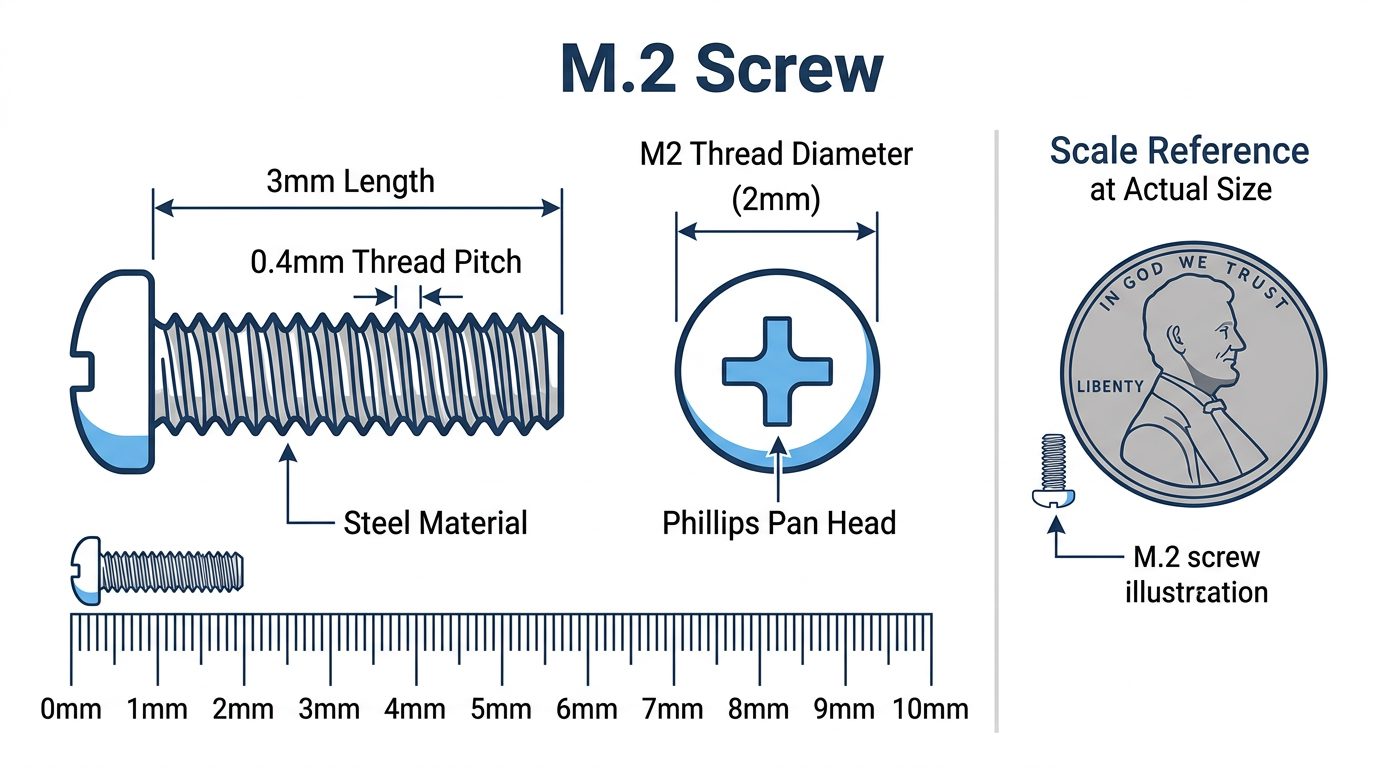
Head type is typically a pan head or flat head with a Phillips drive, size #0 or #1. Material is usually steel, though some boards ship with brass standoffs and stainless screws in premium accessory kits.
Some builders encounter M2 x 4mm or M2 x 5mm screws on certain ITX boards and server riser cards. Those are real variants, but 3mm is the one you need for the vast majority of desktop motherboard builds.
What Does the Screw Actually Do?
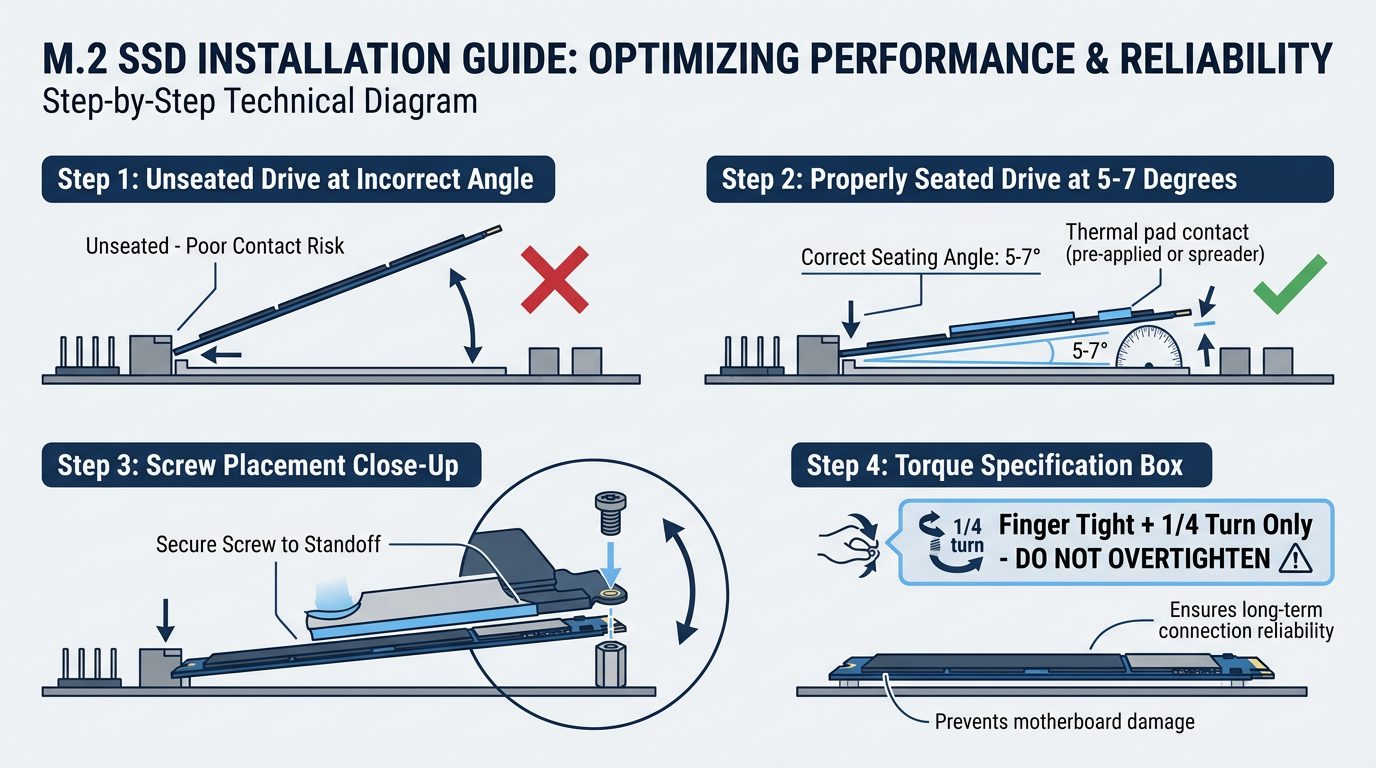
Mechanically, the M.2 screw locks the drive down at the correct seated angle, which is typically 5 to 7 degrees from horizontal. That pressure keeps the M-key or B+M-key connector making consistent electrical contact inside the slot. Let the drive float unseated and you introduce resistance variance, which can cause intermittent disconnects under vibration, especially in a system with multiple fans or a loud case environment.
There’s a secondary thermal function too. Many modern boards ship with rubber-backed thermal pads over the M.2 slot. The screw presses the drive flush against that pad, completing the heat-transfer path. Without it, the pad just sits there doing nothing.
Do you technically need the screw? For a quick benchtop test or a temporary desk build, no. The drive will usually post and run. But for any long-term installation inside a case, yes. That single screw matters more than most builders think.
M.2 Screw Sizes and Types: Full Spec Comparison
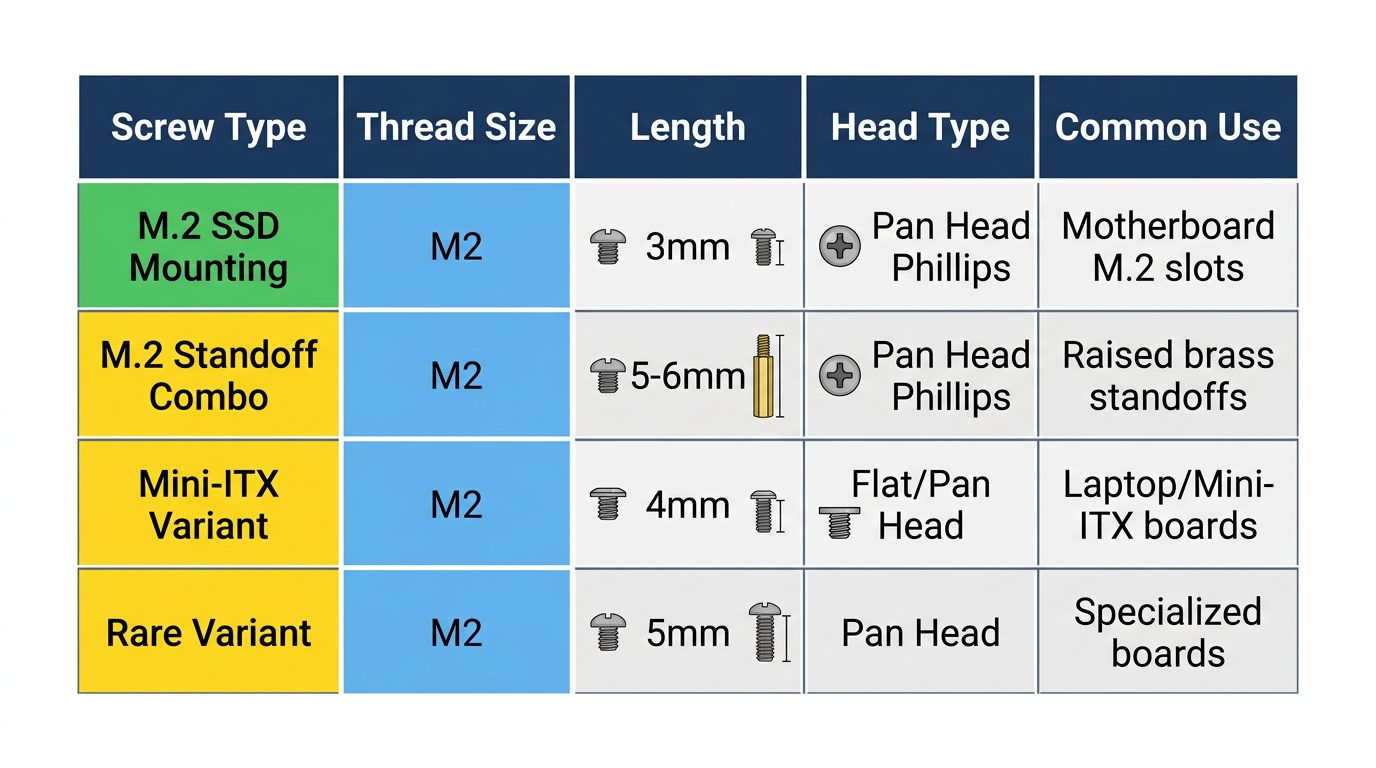
Standard M.2 Screw Dimensions by Use Case
| Screw Type | Thread Size | Length | Head Type | Common Use |
|---|---|---|---|---|
| M.2 SSD Mounting Screw | M2 | 3mm | Pan Head Phillips | Securing M.2 SSD to motherboard standoff |
| M.2 Standoff-Screw Combo | M2 | 5–6mm total | Pan Head Phillips | Boards with raised brass standoffs (one-piece unit) |
| M2 x 4mm | M2 | 4mm | Flat or Pan Head | Laptops, some Mini-ITX boards |
| M2 x 5mm | M2 | 5mm | Pan Head | Rare, server boards, some riser cards |
One thing that confuses builders on modern boards: many motherboards released by ASUS and MSI since 2022 ship with a combo standoff-screw unit. It looks like a stubby bolt with a threaded top. The bottom threads into the board, the top accepts the M.2 screw. One piece replaces what used to be a two-step process. If your board has a pre-installed brass standoff sticking up from the PCB, you just need the small M2 x 3mm screw to finish the job. If the board has a flat retention hole with no raised standoff, the screw goes directly into the PCB-mounted threaded insert.
How M.2 Screws Differ from Other PC Screws
A typical PC build involves at least four different screw types. Mixing them up strips threads fast.
- #6-32 UNC, the standard American coarse-thread screw used for case standoffs, PSU mounting, and drive cages. Most common screw in your build.
- M3 x 5mm, fan mount screws. Slightly larger than M2. Won’t fit M.2 standoffs.
- M3 x 4mm, common on SFX PSU bracket hardware and some case accessory brackets.
- Thumb screws, side panel retention, tool-free. Not interchangeable with anything else.
Do Motherboards Come With M.2 Screws?
What’s Typically Included in the Box
Yes. Nearly all retail motherboards include at least one M.2 screw, and most include one per available M.2 slot. They’re usually tucked inside a small labeled accessory pouch alongside SATA cables, the rear I/O shield, and sometimes a Wi-Fi antenna cable. Don’t throw that bag away before checking it thoroughly.
Here’s a general breakdown of what to expect by board tier:
| Motherboard Tier | Brand Examples | M.2 Screws Included | Standoffs Included | Notes |
|---|---|---|---|---|
| Budget (B650, B760) | ASRock, Gigabyte entry | 1–2 screws | Sometimes pre-installed | May only cover one slot |
| Mid-Range (B650E, Z790) | MSI MAG, ASUS Prime | 2–4 screws | Often pre-installed brass | Covers all M.2 slots |
| High-End (X670E, Z790 Apex) | ASUS ROG, Gigabyte Aorus | 4–6 screws plus spares | Pre-installed plus extras | Some use screwless retention clips |
| Workstation/HEDT | ASUS WS, MSI Creator | 4–8 screws | Multiple standoff heights | May include a full hardware kit |
What If Your Motherboard Didn’t Come With the Screw?
This happens more often than you’d expect. Open-box returns, OEM board pulls, and second-hand builds are the most common culprits. Before you order a replacement, check these spots first:
- The small accessory pouch or bag inside the motherboard box
- Small foam-tray compartments (some boards have labeled recesses pressed into the foam)
- The I/O shield packet (sometimes loose screws get taped here)
- The board itself, many manufacturers pre-thread the screw into the standoff hole on the PCB during packaging. Look before assuming it’s missing.
Not there? Then you need a replacement. They’re cheap and widely available. See the buying section below.
Screwless M.2 Retention Systems
This is where a lot of builders with newer flagship boards get confused. They open the box, find no M.2 screw for certain slots, and assume something is wrong. Nothing is wrong. They just have a screwless retention system.
The main systems in use right now:
- ASUS EZ M.2 Clip, a spring-loaded lever clip on the end of the M.2 slot. Insert the drive, press down, the clip snaps over the drive corner. No screwdriver needed. Found on boards like the ROG Strix Z790-E and ROG Maximus Z790 Hero.
- MSI M.2 Shield Frozr Clip System, MSI’s heatsink cover for M.2 slots integrates a push-pin retention mechanism. The heatsink holds down the drive when locked. Used on the MEG Z790 ACE and MAG Z790 Tomahawk.
- Gigabyte M.2 EZ-Latch, similar concept to ASUS; a rotating clip at the end of the slot secures the drive without tools. Present on the Z790 Aorus Master and Aorus Elite AX.
These systems are a genuine quality-of-life improvement, especially when you’re swapping drives in a cramped case. ASUS has published documentation on the EZ M.2 Clip mechanism on their product support pages. Note that even boards with screwless primary slots sometimes include a legacy screw for a secondary slot that uses traditional retention. Check your manual.
Where to Buy M.2 Replacement Screws
Online Sources
Online is your best bet for getting the exact spec. When searching, use the term “M2-0.4 x 3mm Phillips pan head machine screw” rather than just “M.2 screw”, that gets you the right results faster.
- Amazon, search for M2 x 3mm Phillips pan head machine screws. Brands like Hilitchi, Uxcell, and TPOHH sell kits of 50 to 100 for $5 to $10. Useful to have a kit sitting in your parts drawer permanently.
- eBay, good for small quantities. You can find listings for 5 to 10 screws if you don’t want a full kit.
- iFixit, sells M2 screw sets aimed at repair techs, but the screws are exactly the same spec. Slightly pricier per unit but reliable quality and known dimensions.
- McMaster-Carr, if you want to get technical about material and tolerance, McMaster-Carr carries M2 screws in stainless steel and alloy steel in multiple lengths. Overkill for most builders, but good to know.
Local and Brick-and-Mortar Options
Harder. Not impossible.
- Home Depot / Lowe’s, carry M2 metric screws in the specialty fastener aisle, but typically stock 4mm or 6mm lengths, not 3mm. An M2 x 4mm might work with a taller standoff but it’s not ideal. Test-fit before trusting it.
- Micro Center, your best brick-and-mortar option if one is nearby. The cable and accessories section near checkout often carries PC screw kits that include M2 variants.
- Best Buy, hit or miss. Don’t count on it.
- Walmart, limited in-store selection. The Bolt Dropper brand M2 stainless sets are available online through Walmart’s site for around $7.99 to $9.99, which is a reasonable option if you have store pickup available.
- Fastenal / Ace Hardware (metric section), the most reliable local source for the exact M2 x 3mm spec. Fastenal especially caters to industrial fastener needs and will have metric sizes that Home Depot doesn’t stock.
Radiator Screws: What You Need to Know
What Are Radiator Screws in a PC Build?
This is a surprisingly common point of confusion. New builders searching for “M2 screws” sometimes actually need radiator screws, and the two are not remotely interchangeable.
Radiator screws are the fasteners used to mount an AIO cooler or custom loop radiator to a PC case. The most common spec for fan-to-radiator mounting is M3 x 25mm or M3 x 30mm, using a standard M3 x 0.5 thread pitch. Radiator-to-case bracket mounting often uses #6-32 UNC screws, which is the same American coarse thread used for case standoffs.
Key difference: M3 has a 3mm thread diameter. M2 has a 2mm thread diameter. They won’t thread into each other’s holes. Using the wrong one damages threads permanently.
Radiator Screw Sizes by Configuration
| Configuration | Screw Length Needed | Thread Type | Notes |
|---|---|---|---|
| Fan only, no radiator | 25mm | M3 x 0.5 | Standard 120/140mm fan mount |
| Fan + slim radiator (27mm core) | 35mm | M3 x 0.5 | Most AIO kits include these |
| Fan + standard radiator (30mm core) | 38–40mm | M3 x 0.5 | Thicker cores need longer screws |
| Fan + fan sandwich, push-pull | 55–65mm | M3 x 0.5 | Dual fan thickness plus radiator core |
Most AIO kits include the correct screws in the box for a single-fan configuration. If you’re running push-pull, plan to buy M3 x 55mm or M3 x 65mm screws separately. They’re available in the same places as M2 screws online, and Home Depot actually stocks M3 lengths better than M2 lengths.
How to Install an M.2 Drive (and Not Lose the Screw)
Step-by-Step M.2 Installation
- Identify your M.2 slot and standoff position. Check your motherboard manual for supported form factors. The 2280 (80mm length) position is the most common. The standoff hole will be clearly labeled.
- Confirm the standoff is in place. If it’s a separate brass standoff, thread it into the correct hole by hand before touching the drive. Some boards ship with it pre-installed at the 2280 position.
- Insert the M.2 drive at a 30-degree angle. Align the notch in the connector with the key in the slot, then slide the gold contacts fully into the slot. Don’t force it.
- Press the drive down gently until it’s level. It should sit parallel to the board surface and align over the standoff hole.
- Insert the M2 x 3mm screw using a #0 Phillips screwdriver. Finger tight first, then a quarter turn. That’s it. Stop there.
- Do not overtighten. Intel’s technical documentation specifies a maximum torque of 0.67 Newton-meters for M.2 enclosure screws, with an applied force of 0.45 Nm recommended for flat head variants. In practical terms, that’s barely snug. Overtightening cracks PCBs and strips standoff threads. See Intel’s official M.2 torque specification documentation for reference.
Tips to Avoid Losing the M.2 Screw
These are small enough to disappear into carpet forever. Literally.
- Work over a magnetic parts tray. They’re $5 at any auto parts store and will save you at some point during every build.
- Use a magnetized #0 Phillips screwdriver. It holds the screw on the tip so you can guide it into the standoff without using a second hand.
- Pre-thread the screw into the standoff before inserting the drive. Then unthread it just enough to accept the drive, press down, and tighten. Easier to control than trying to start the screw one-handed while holding the drive down.
- Store your spare M.2 screws in a labeled zip-lock bag taped to the inside of your case. Future-you will be grateful.
- Buy a kit of 50. They’re $6 on Amazon. One kit lasts years of building.
Frequently Asked Questions
What is an M2 size screw?
An M2 screw has a 2mm thread diameter with a 0.4mm thread pitch, making it the smallest screw you’ll typically encounter in a desktop PC build. The “M” designation comes from the ISO metric fastener system, where the number directly indicates the thread diameter in millimeters. In PC building, the M2 x 3mm variant is the standard used to mount M.2 SSDs to motherboard standoffs. Don’t confuse it with the M.2 form factor name, they’re named differently for different reasons.
What screws do M.2 drives use?
M.2 drives use M2 x 3mm Phillips pan head machine screws, with a thread pitch of M2-0.4. That’s the full spec you need when ordering replacements. Some boards with taller-than-standard standoffs may use M2 x 4mm or M2 x 5mm variants, but 3mm is correct for the overwhelming majority of desktop motherboards. When in doubt, check your motherboard manual’s accessories section, it will list the exact screw spec.
Do motherboards come with M.2 screws?
Yes, most retail motherboards include one M.2 screw per available M.2 slot. They’re typically in the accessory pouch alongside SATA cables and the I/O shield. High-end boards from 2022 onward increasingly use screwless clip retention systems like ASUS EZ M.2 Clip, MSI Shield Frozr, or Gigabyte EZ-Latch, so some slots on premium boards won’t need a screw at all. If you bought a used or open-box board and the screw is missing, replacements are cheap and easy to find online.
Can I use a regular screw instead of an M.2 screw?
No. Standard hardware store screws like #6-32 UNC or even M3 metric screws will not fit an M.2 standoff. The standoff requires an M2-threaded fastener specifically. Attempting to force a larger screw will strip the standoff threads permanently, and a stripped standoff on a motherboard is a serious and expensive problem. Stick with M2 x 3mm. They cost less than a dollar each in bulk.
Are radiator screws the same as M.2 screws?
No. Not even close. Radiator screws are typically M3 x 25mm to M3 x 40mm depending on your fan and radiator configuration, using an M3 x 0.5 thread pitch. That’s a 3mm thread diameter versus the 2mm diameter of an M2 screw. They are not interchangeable in any direction. Searching for “M2 screws” when you actually need radiator screws is a common beginner mistake that sends people down the wrong aisle at the hardware store.
The Short Version
The M.2 screw spec is M2 x 3mm, Phillips pan head, M2-0.4 thread pitch. Your retail motherboard almost certainly included one per M.2 slot in the accessory bag. If it’s missing, buy a kit of 50 from Amazon for around $6 and never worry about it again. Install with a #0 Phillips, finger tight plus a quarter turn, and stop before you think you should stop. Radiator screws are M3 x 25-40mm and have nothing to do with M.2 screws. If your newer high-end board has no screw at all for certain slots, look for a clip or lever mechanism, screwless retention systems are now standard on flagship boards and they work well.

Alex has been building and tweaking custom PCs for over 12 years. From budget builds to full custom water loops, he’s assembled more than 50 systems and helped hundreds of builders troubleshoot their rigs. When he’s not benchmarking the latest hardware, you’ll find him optimizing airflow setups or stress-testing overclocks.