DDR4 vs DDR3: Differences Explained and Is It Worth Upgrading?
DDR4 SDRAM is the fourth generation of DDR memory, operating at 1.2V with speeds starting at 2133 MHz, while DDR3 runs at 1.5V with speeds from 800 MHz to 2133 MHz, making DDR4 faster, more efficient, and higher-capacity by design.
Last updated: March 2026
Table of Contents
- What Is DDR Memory? A 30-Second Primer
- The DDR Lineage, DDR1 Through DDR5
- What Does SDRAM Mean?
- DDR4 vs DDR3, Physical Differences You Can See
- Pin Count and Notch Position
- PCB Height and Form Factor
- DDR4 vs DDR3, Full Specs Comparison
- Speed, Specific Numbers That Matter
- Latency, The Counterintuitive Truth
- Real-World Performance, Gaming, Productivity, and Workloads
- DDR4 vs DDR3 Gaming Benchmarks
- Content Creation and Productivity Workloads
- The Bandwidth Sweet Spot, When More Speed Stops Mattering
- Power Consumption and Thermals
- Voltage Comparison and What It Means
- Thermals and Overclocking Headroom
- Compatibility, Can You Mix, Match, or Upgrade?
- Can You Use DDR4 in a DDR3 Slot?
- Motherboard and CPU Platform Compatibility
- DDR3 vs DDR4 Laptop RAM
- Is Upgrading From DDR3 to DDR4 Worth It? (2025 Reality Check)
- The True Cost of “Just Upgrading” to DDR4
- When Staying on DDR3 Makes Sense
- When Upgrading to a DDR4 Platform Is Worth It
- The DDR4 Value Window in 2025
- DDR3 vs DDR4 vs DDR5, Where Does Each Fit Today?
- Frequently Asked Questions, DDR4 vs DDR3
- Can you use DDR4 RAM in a DDR3 motherboard?
- Is DDR4 noticeably faster than DDR3 for gaming?
- What is the difference between DDR3 and DDR4 voltage?
- Is it worth upgrading from DDR3 to DDR4 in 2025?
- Can DDR3 and DDR4 be used together in the same system?
- Final Thoughts
Here’s the question I get constantly: “My PC runs DDR3. Should I just grab some cheap DDR4 sticks, or is a full rebuild the smarter move?” It’s a fair question, and the answer matters more than most guides let on. This article breaks down every real difference between DDR3 and DDR4 SDRAM, from pin count to gaming benchmarks to the actual cost of switching platforms in 2025. By the end, you’ll know exactly where you stand.
- 🟢 DDR4 voltage: 1.2V standard, cooler, more efficient
- 🟢 DDR4 max speed: 3200 MHz+ (no hard ceiling)
- 🟢 DDR4 capacity: Up to 128 GB per stick
- 🟡 DDR4 CAS latency: Higher CL numbers, but real-world ns latency is better at speed
- 🟡 Gaming gains: 5–17% in CPU-bound titles, near zero at 4K
- 🔴 Compatibility: DDR4 requires a new motherboard. No exceptions.
- 🔴 Upgrade cost: A full DDR3-to-DDR4 platform swap runs $215–$555+
What Is DDR Memory? A 30-Second Primer
DDR stands for Double Data Rate. It transfers data on both the rising and falling edge of the clock cycle, effectively doubling throughput without doubling the clock frequency. SDRAM means Synchronous DRAM, meaning it’s synchronized to the system clock. Put them together and “DDR4 SDRAM” is the full technical name for the RAM sitting in most modern systems right now.
The DDR Lineage, DDR1 Through DDR5
Each generation of DDR memory pushed bandwidth higher while dropping operating voltage. Here’s the fast version:
- DDR1 (2000): 2.5V, 200–400 MHz, 2n prefetch buffer. The starting point.
- DDR2 (2003): 1.8V, 400–1066 MHz, 4n prefetch. Doubled the prefetch over DDR1.
- DDR3 (2007): 1.5V, 800–2133 MHz, 8n prefetch. Became the dominant standard for nearly a decade.
- DDR4 (2014): 1.2V, 2133 MHz and beyond, 8n prefetch with Bank Groups added. Bank Groups are the key architectural upgrade competitors skip over.
- DDR5 (2020): 1.1V, 4800 MHz base, on-die ECC, higher per-stick capacity. The current bleeding edge.
DDR3 and DDR4 share the same 8n prefetch buffer size on paper. The real DDR4 advantage comes from Bank Group architecture, which allows the memory controller to access multiple banks simultaneously, reducing access conflicts and boosting effective bandwidth without changing the prefetch depth.
What Does SDRAM Mean?
“Synchronous” means the memory controller and the RAM module coordinate on the same clock signal. Before SDRAM, DRAM ran asynchronously. Synchronization lets the CPU predict exactly when data will be ready, removing wait states and improving efficiency. That’s why “DDR4 SDRAM” is the proper term, it’s both synchronous and double data rate. Most people just say “DDR4 RAM,” and that’s fine, but if you’re reading a spec sheet or a JEDEC DDR4 standard document, you’ll see the full designation.
DDR4 vs DDR3, Physical Differences You Can See
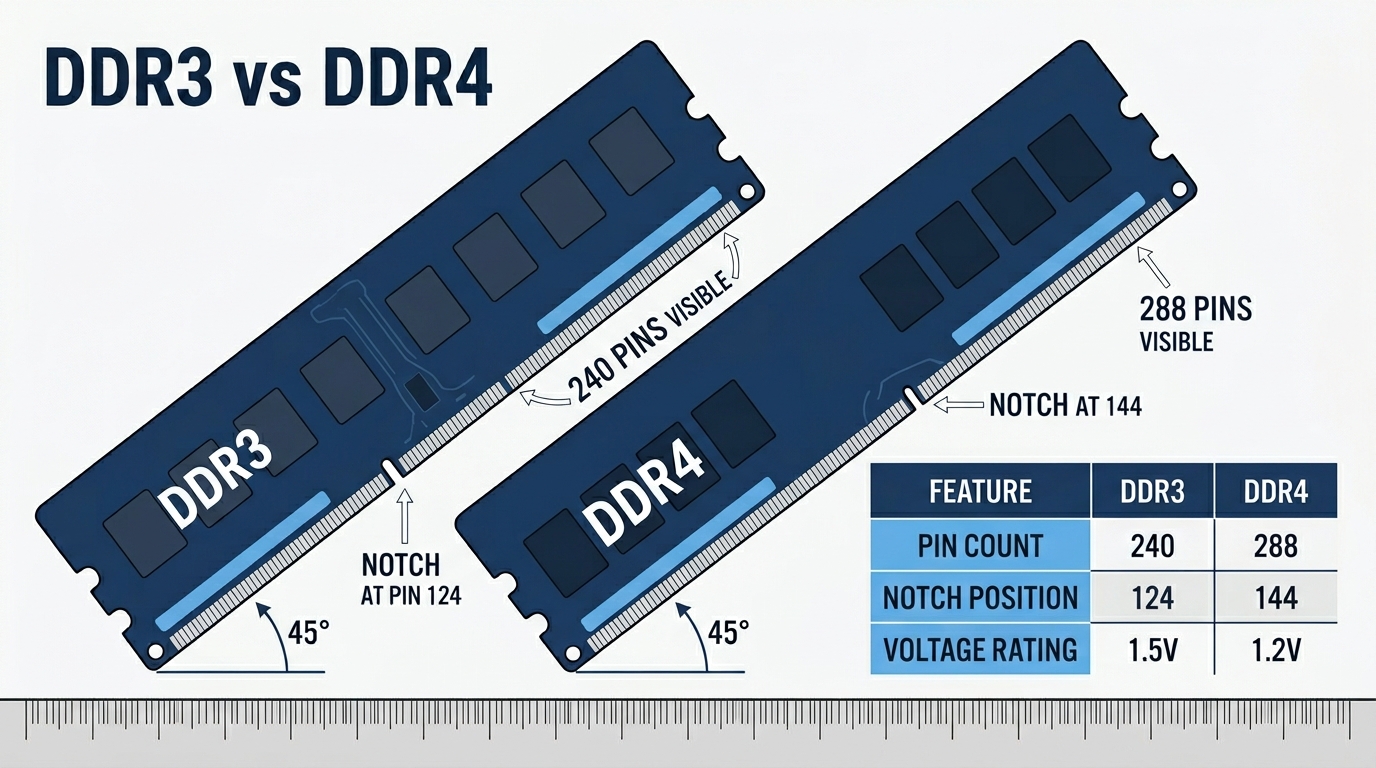
These two sticks look almost identical, and that’s exactly why people accidentally buy the wrong one. The modules are the same general shape and sit in the same style of slot. Until you try to install one. Then the notch stops you cold.
Pin Count and Notch Position
The notch is a small gap cut into the bottom edge of the module. It lines up with a key inside the slot, and it only fits one way. DDR3 and DDR4 have different notch positions, so you physically cannot insert the wrong generation. Not just “it won’t work”, it won’t go in at all.
| Form Factor | DDR3 Pins | DDR4 Pins |
|---|---|---|
| Desktop DIMM | 240 pins | 288 pins |
| Laptop SO-DIMM | 204 pins | 260 pins |
DDR4 DIMMs also feature a slightly curved “V-edge” along the bottom connector. This curves the PCB edge so pins engage progressively during insertion rather than all at once. It reduces insertion force and the risk of bending pins in the slot. Subtle design. Practical difference.
PCB Height and Form Factor
DDR4 desktop DIMMs are marginally taller than DDR3: 31.25mm vs 30.35mm. That ~1mm difference rarely matters, but if you run a very low-profile CPU cooler that sits close to the RAM slots, it’s worth double-checking clearance. Both generations come in standard DIMM (desktop) and SO-DIMM (laptop) configurations. The physical incompatibility between desktop and laptop versions within each generation also applies, a SO-DIMM won’t fit a full DIMM slot regardless of DDR generation.
DDR4 vs DDR3, Full Specs Comparison
Here’s where the real differences live. Voltage, bandwidth, capacity, and latency all tell a different part of the story.
| Specification | DDR3 | DDR4 |
|---|---|---|
| Operating Voltage | 1.5V standard / 1.35V (DDR3L) | 1.2V standard / 1.05V (DDR4L) |
| Clock Speed Range | 800 MHz – 2133 MHz | 1600 MHz – 3200 MHz+ (no hard ceiling) |
| Peak Transfer Rate | 6,400 – 17,066 MB/s | 12,800 – 25,600 MB/s+ |
| Prefetch Buffer | 8n | 8n + Bank Group architecture |
| Max Capacity Per Stick | 16 GB (common) / 32 GB (high-end) | Up to 128 GB |
| Typical CAS Latency | CL9 – CL13 | CL14 – CL18 |
| ECC Support | Yes (select platforms) | Yes (select platforms) |
| Pins (DIMM / SO-DIMM) | 240 / 204 | 288 / 260 |
| Architecture | Standard bank access | Bank Group parallelism |
Speed, Specific Numbers That Matter
Peak theoretical bandwidth is where DDR4 pulls away hard. Here are the real numbers:
- DDR3-1600: 12,800 MB/s peak bandwidth
- DDR3-1866: 14,928 MB/s peak bandwidth
- DDR4-2666: 21,333 MB/s peak bandwidth
- DDR4-3200: 25,600 MB/s peak bandwidth
DDR4-3200 is roughly 70% faster than DDR3-1866 in peak theoretical throughput. That’s a significant number. But here’s the part most articles skip: at identical clock speeds, like both running at 2133 MHz, raw throughput is nearly the same between DDR3 and DDR4. Community testing on Reddit’s r/buildapc consistently shows this. The real DDR4 advantage isn’t that it’s inherently faster at the same frequency, it’s that it can reach far higher frequencies reliably without the voltage and stability tradeoffs DDR3 hits at its ceiling.
Latency, The Counterintuitive Truth
CAS latency numbers look worse on DDR4. CL16–18 vs DDR3’s CL9–11. That’s a real difference in clock cycles. But clock cycles aren’t nanoseconds, and that’s where people get confused.
Real latency in nanoseconds: Latency (ns) = (CL ÷ Clock Speed MHz) × 2000
- DDR3-1600 CL11: (11 ÷ 800) × 2000 = 13.75 ns
- DDR4-2400 CL16: (16 ÷ 1200) × 2000 = 13.33 ns
- DDR4-3200 CL16: (16 ÷ 1600) × 2000 = 10.0 ns
DDR4-3200 CL16 is actually faster in real terms than DDR3-1600 CL11. Don’t be fooled by the raw CL number. Higher clock speed more than compensates. According to contributors at the Tom’s Hardware Forum, DDR4 has higher bandwidth than DDR3 and wins in bandwidth performance even with looser CAS latency timings, making it more future-proof on newer platforms where DDR3 support has been dropped entirely, like Intel’s Skylake and beyond.
Real-World Performance, Gaming, Productivity, and Workloads
Specs are one thing. What does this mean when you’re actually running games or rendering video?
DDR4 vs DDR3 Gaming Benchmarks
Important framing first: gaming performance is mostly CPU and GPU bound. RAM generation differences are smaller than marketing suggests, especially once you move away from CPU-bottlenecked scenarios. That said, the differences are real and measurable in the right conditions.
| Game / Scenario | DDR3-1600 (Avg FPS) | DDR4-3200 (Avg FPS) | Gain |
|---|---|---|---|
| CS2 (1080p, CPU-bound) | ~290 fps | ~340 fps | ~17% |
| Cyberpunk 2077 (1080p, GPU-bound) | ~95 fps | ~98 fps | ~3% |
| Civilization VI (turn time) | Baseline | ~8% faster turns | ~8% |
| Blender Render (BMW scene) | Baseline | ~12% faster | ~12% |
At 1440p and 4K, where your GPU is doing the heavy lifting, the RAM type barely moves the needle. We’re talking 1–5% in most GPU-bound scenarios, which you won’t notice without a frame counter running. Esports titles at high framerates are where DDR4 earns its keep. If you’re playing CS2, Valorant, or Rainbow Six Siege and pushing 300+ fps, the CPU-bound headroom that DDR4 provides is genuinely useful.
Content Creation and Productivity Workloads
This is where bandwidth actually matters. Video editing with 4K timelines, large Photoshop files, batch photo exports, all of these benefit from higher memory throughput. DDR4’s bandwidth advantage translates to faster scrubbing, smoother previews, and shorter render queues. Compilation workloads in software development also show moderate DDR4 gains, particularly with large codebases that don’t fit neatly in CPU cache. Not dramatic. But consistent.
The Bandwidth Sweet Spot, When More Speed Stops Mattering
Diminishing returns are real. The jump from DDR3-1866 to DDR4-3200 is significant. The jump from DDR4-3200 to DDR4-3600? Much smaller. For most users running a gaming rig with a dedicated GPU, the platform and CPU generation matter more than whether you’re on DDR3 or DDR4. A modern Ryzen 5 on DDR4 will outperform an old Intel Core i5 on DDR4 every time. The RAM is a supporting player.
Power Consumption and Thermals
72°C under load. That’s a rough average for what DDR3 running at 1.5V produces in a sustained workload. DDR4 at 1.2V runs cooler and draws less current, and that matters more in some scenarios than others.
Voltage Comparison and What It Means
- DDR3 standard: 1.5V
- DDR3L (low voltage): 1.35V
- DDR4 standard: 1.2V
- DDR4L (low voltage): 1.05V
A typical 2×8GB DDR3 kit at 1.5V draws roughly 4–6W under load. The DDR4 equivalent sits around 2.5–4W. On a desktop plugged into the wall, the power bill difference is negligible, maybe $1–3 per year depending on usage. For laptops, though, the math changes. DDR4’s lower voltage can contribute to an extra 20–45 minutes of battery life depending on the workload. Not nothing, especially on a thin-and-light that already has a small battery.
Thermals and Overclocking Headroom
Lower voltage means lower heat. Lower heat means more stable operation at higher speeds. DDR4 modules with XMP (Intel) or EXPO (AMD) profiles routinely hit 4000–5000+ MHz with standard voltages. DDR3’s practical overclocking ceiling lands around 2400–2666 MHz, and pushing past that requires significant voltage increases that generate real heat. DDR4 simply has more headroom to work with before you’re fighting stability issues.
Compatibility, Can You Mix, Match, or Upgrade?
Short answer: no, you can’t mix them. Longer answer below.
Can You Use DDR4 in a DDR3 Slot?
This isn’t like CPU sockets where sometimes a newer chip fits an older board with a firmware update. The RAM slot itself is different. You cannot bridge this gap with any software or hardware solution currently available.
Motherboard and CPU Platform Compatibility
Every DDR generation maps to specific CPU platforms. Here’s how it breaks down:
| Platform Generation | DDR Type Supported | Example CPUs |
|---|---|---|
| Intel LGA 1150 (Haswell) | DDR3 / DDR3L only | i5-4690K, i7-4790K |
| Intel LGA 1151 (Skylake / Z170) | DDR4 (some boards DDR3) | i7-6700K, i5-6600K |
| Intel LGA 1200 / LGA 1700 | DDR4 only | i9-10900K, i7-12700K, i7-13700K |
| AMD AM3+ | DDR3 only | FX-8350, FX-6300 |
| AMD AM4 | DDR4 only | Ryzen 5000, 3000, 2000 series |
| AMD AM5 / Intel LGA 1851 | DDR5 only | Ryzen 7000/9000, Core Ultra 200 |
One nuance worth knowing: the original LGA 1151 (Z170 chipset, Skylake) had some motherboard variants built for DDR3 and others built for DDR4. Same socket, different memory support depending on the board. Always check the specific motherboard spec sheet, not just the socket name. The Intel ARK product page for each CPU lists supported memory types if you’re unsure.
DDR3 vs DDR4 Laptop RAM
The same physical incompatibility applies to laptops. SO-DIMMs are smaller than desktop DIMMs, but DDR3 SO-DIMMs (204 pins) and DDR4 SO-DIMMs (260 pins) won’t fit in each other’s slots. Your laptop’s motherboard determines which type you can use, and that’s fixed at the factory. Always pull your exact model number and check the manufacturer’s support page or important’s compatibility tool before buying laptop RAM. And if your laptop has soldered RAM, none of this matters, there’s no upgrade path at all.
Is Upgrading From DDR3 to DDR4 Worth It? (2025 Reality Check)
This is the question that actually matters, and it’s the one most guides dodge. Here’s the honest answer.
The True Cost of “Just Upgrading” to DDR4
You can’t just swap the sticks. That’s the critical point. To run DDR4, you need a motherboard that supports DDR4. And if you’re on a DDR3 platform like LGA 1150 or AM3+, that means a new CPU too. You’re not upgrading RAM, you’re upgrading the entire platform.
| Component | Stick With DDR3 | Upgrade to DDR4 Platform |
|---|---|---|
| RAM (2×8GB) | ~$20–30 (DDR3 used) | ~$35–55 (DDR4 new) |
| Motherboard | Already owned | $80–200 (B550 / B660+) |
| CPU (if needed) | Already owned | $100–300+ |
| Total Additional Cost | ~$20–30 | $215–555+ |
That’s the actual number. Not the cost of the RAM. The cost of the RAM plus the platform it requires.
When Staying on DDR3 Makes Sense
- Your DDR3 system is a temporary stopgap before a full new build
- You game primarily at 1440p or 4K where GPU bottleneck dominates and RAM type barely registers
- Your total upgrade budget is under $100
- You’re planning a complete platform rebuild within the next 12 months
- You just need more capacity, adding cheap used DDR3 sticks is a legitimate short-term move
When Upgrading to a DDR4 Platform Is Worth It
- Your DDR3 CPU is also showing its age (pre-2015 hardware especially)
- You do video editing, 3D rendering, or heavy multitasking that genuinely stresses RAM bandwidth
- You want a system that holds up for the next 4–5 years without another upgrade cycle
- You’re a competitive gamer where every frame at high refresh rates matters
The DDR4 Value Window in 2025
DDR4 is at peak affordability right now. As DDR5 takes over the high-end market on AM5 and Intel’s latest platforms, DDR4 pricing has dropped hard. If you’re building new on a budget, a DDR4 platform, AM4 (Ryzen 5000 series) or LGA 1700 with DDR4 support, gives you excellent performance per dollar. You don’t need DDR5 to build a great gaming PC in 2025. But if you’re already on DDR3 and considering the jump, the smarter play for many people is to skip DDR4 entirely and save for a DDR5 build that will carry you further.
Not great advice if your budget demands action now. Very good advice if you can wait six months.
DDR3 vs DDR4 vs DDR5, Where Does Each Fit Today?
With three generations on the market simultaneously, here’s how they stack up and who each one is actually for in 2025.
| Spec | DDR3 | DDR4 | DDR5 |
|---|---|---|---|
| Standard Voltage | 1.5V / 1.35V | 1.2V / 1.05V | 1.1V |
| Base Speed | 800 MHz | 2133 MHz | 4800 MHz |
| Common OC Ceiling | ~2400–2666 MHz | 4000–5200 MHz | 7200+ MHz |
| Typical Per-Stick Capacity | Up to 16 GB | Up to 64 GB | Up to 128 GB |
| Platform Examples | Haswell, AM3+ | Ryzen 5000, 12th/13th Gen Intel | Ryzen 7000/9000, Core Ultra |
| Relative Cost (2025) | Very cheap (used market) | Budget sweet spot | Premium, prices dropping |
| Best For | Legacy systems, stopgap | New budget/mid builds | High-end and future builds |
DDR3 is legacy. It still works, but don’t build new with it. DDR4 is the budget builder’s best friend right now, the platform is mature, the RAM is cheap, and the performance is more than adequate for gaming and productivity. DDR5 is the future. It’s required for AM5 (Ryzen 7000/9000) and Intel’s latest LGA 1851 socket. Prices are dropping, but the platform premium is still real.
Frequently Asked Questions, DDR4 vs DDR3
Can you use DDR4 RAM in a DDR3 motherboard?
No. DDR4 and DDR3 are physically incompatible. DDR4 desktop DIMMs have 288 pins and a different notch position compared to DDR3’s 240 pins. You cannot insert a DDR4 stick into a DDR3 slot, the notch physically blocks it. No adapter, BIOS update, or workaround bridges this gap. Upgrading to DDR4 means getting a DDR4-compatible motherboard.
Is DDR4 noticeably faster than DDR3 for gaming?
In most gaming scenarios, the difference is modest. Expect 5–17% gains in CPU-bound games at 1080p, like esports titles running at high framerates. At 1440p and 4K where the GPU is the bottleneck, you’ll see little to no difference. The gap also shrinks significantly when comparing both types at identical clock speeds, at 2133 MHz, DDR3 and DDR4 perform nearly the same. DDR4’s gaming advantage comes primarily from its ability to run at much higher speeds reliably.
What is the difference between DDR3 and DDR4 voltage?
DDR3 standard runs at 1.5V, with DDR3L low-voltage variants at 1.35V. DDR4 standard runs at 1.2V, with DDR4L variants at 1.05V. That 20% voltage reduction means lower power consumption, less heat, and better overclocking headroom. For desktops, the power savings are minimal on your electricity bill. For laptops, the lower voltage can add 20–45 minutes of battery life depending on workload intensity.
Is it worth upgrading from DDR3 to DDR4 in 2025?
Not as a RAM-only swap, because DDR4 requires a compatible motherboard, and DDR3-era platforms don’t have one. If your DDR3 system is otherwise running adequately, it’s usually smarter to save toward a complete new build. If you’re gaming at 1440p or 4K, you likely won’t feel the difference anyway. However, if you’re already planning to replace your CPU and motherboard, building on a DDR4 platform offers excellent value in 2025. Just don’t rule out going straight to DDR5 if you can stretch the budget.
Can DDR3 and DDR4 be used together in the same system?
No. A motherboard supports exactly one DDR generation. You can’t mix DDR3 and DDR4 sticks in the same board, and slots don’t accept both types. some early LGA 1151 motherboards (Z170 chipset) came in DDR3 variants or DDR4 variants, not both on the same board. Within any single motherboard, only one DDR generation is supported, and that’s determined by the hardware design, not firmware.
Final Thoughts
DDR4 wins on every measurable spec: speed ceiling, capacity, efficiency, and overclocking headroom. But the upgrade question isn’t really about RAM, it’s about your whole platform. If you’re on DDR3 in 2025, the honest advice is this: don’t spend $30 on more DDR3 sticks if a full rebuild is coming soon, and don’t spend $300+ jumping to DDR4 if you’re just going to want DDR5 in two years. For anyone building new today on a budget, DDR4 is exactly where you want to be. The platform is proven, the prices are low, and the performance gap with DDR5 is real but not dramatic for most use cases. Know your situation, do the math, and make the move that makes sense for your actual build, not just the spec sheet.

Alex has been building and tweaking custom PCs for over 12 years. From budget builds to full custom water loops, he’s assembled more than 50 systems and helped hundreds of builders troubleshoot their rigs. When he’s not benchmarking the latest hardware, you’ll find him optimizing airflow setups or stress-testing overclocks.